
Color Studio for Omarchy
A small color studio in your bar: pick colors from the screen, explore harmonies on an Adobe-style wheel, pull palettes out of images, and copy everything in the format you actually use.
Install
Requires Omarchy 4.x (Quattro). Uses hyprpicker and ImageMagick's
magick (both ship with Omarchy) plus wl-clipboard. No other dependencies.
omarchy plugin add https://github.com/alexdont/color-studio.git --enable
Optional keybinding (add to ~/.config/hypr/bindings.lua):
o.bind("SUPER + ALT + C", "Color studio", "omarchy-shell colorstudio toggle")
Use
Bar icon — left-click picks a color from anywhere on screen (copied in
your chosen format, saved to history, shown as the dot on the icon).
Right-click opens the studio. IPC for scripting/keybindings:
omarchy-shell colorstudio pick and omarchy-shell colorstudio toggle.
The studio — three picker modes, remembered between sessions:
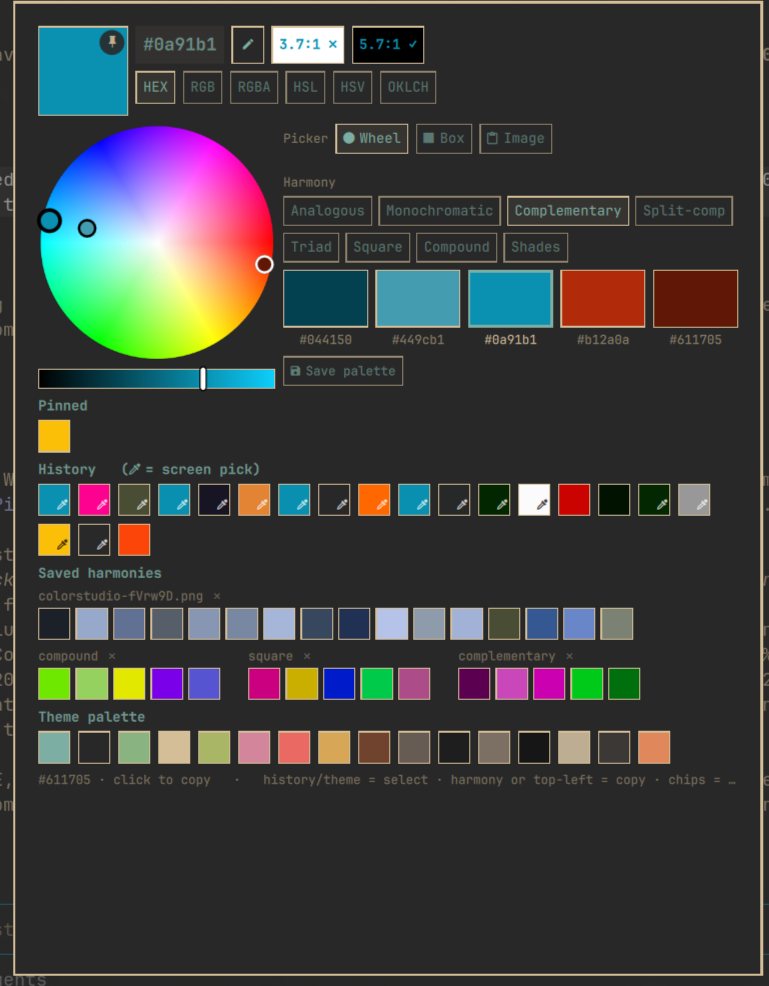
- Wheel — an Adobe-style hue/saturation wheel with five markers. Pick a harmony rule (analogous, monochromatic, complementary, split-complementary, triad, square, compound, shades) and drag ANY marker — the others realign to keep the rule's geometry. Save palettes you like with Save palette.
- Box — a classic saturation/value square with hue bar, plus a compact at-a-glance list of harmony families.
- Image — paste (or drop, from any mode) an image and its 16 dominant colors take the chooser's place. Clicking Image re-parses whatever image is on the clipboard; leaving the mode clears it.
One interaction language everywhere: history / pinned / theme swatches select (become the working color, remembered across opens); harmony, saved-set, and image swatches copy on left-click and become the base on right-click; the top-left code or big swatch copies the working color. Format chips (HEX · RGB · RGBA · HSL · HSV · OKLCH) switch the notation used everywhere — including what screen picks copy. WCAG contrast vs white and black is shown beside the code. The pencil edits/pastes a hex.
Sections: Pinned · History (eyedropper icon marks screen picks) · Saved harmonies (with per-set delete) · your active Omarchy theme palette.
Remove
omarchy plugin remove io.github.alexdont.color-studio
State (history, pins, saved palettes) stays at
~/.local/state/omarchy/io.github.alexdont.color-studio/; delete that
folder too for a clean slate. The plugin never modifies other configuration
— the keybinding above is added by you.
License
MIT