
Croc Transfer for Omarchy
Send a file to anyone, anywhere, without touching a terminal: drop it on
the bar, paste the short code to your recipient, done. Powered by
croc — end-to-end encrypted (PAKE), no
accounts, no shared network, resumable, and the recipient can be on
Linux, macOS, or Windows. Receiving works the same way in reverse: paste
a code, the file lands in ~/Downloads.
This is the third leg Omarchy was missing: omarchy share covers the
same LAN (LocalSend) and Taildrop covers your own tailnet — this covers
another person, anywhere on the internet.
Install
⚠️ croc is required and must be installed first. This plugin is a front-end for the
croccommand-line tool — nothing can be sent or received without it. It's in the official Arch repos and is the only dependency you need to install (wl-clipboardandqrencodealready ship with Omarchy).
Requires Omarchy 4.x (Quattro):
sudo pacman -S croc
omarchy plugin add https://github.com/alexdont/croc-transfer.git --enable
If croc is missing, the plugin doesn't break — the card and every send or receive attempt tell you exactly what to install, and it starts working the moment croc is present (no restart needed).
Optional keybindings (add to ~/.config/hypr/bindings.lua):
o.bind("SUPER + ALT + S", "Croc: pick & send", "omarchy-shell croctransfer pick")
o.bind("SUPER + ALT + R", "Croc transfer", "omarchy-shell croctransfer toggle")
Use
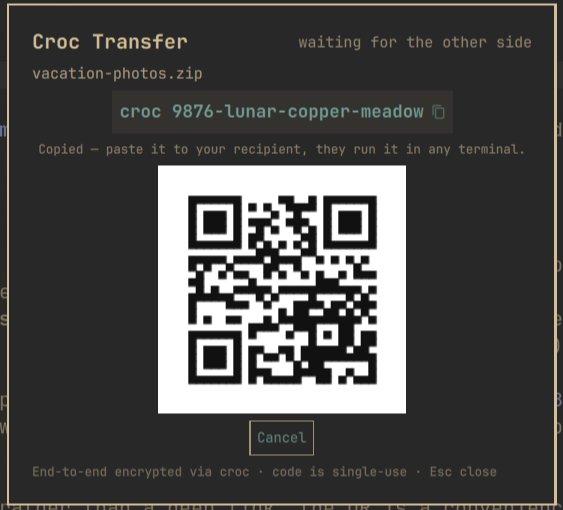
Send — drop files or a folder onto the bar icon (or onto the open
card, or click Pick files…). The moment croc is ready, the
paste-ready command — croc lion-brave-sunset — is on your clipboard and
a toast shows it; paste it to your recipient over any channel and they
run it in any terminal. Clicking the toast reopens the card, which shows
the code, a scannable QR of the command, live progress, and Cancel.
The bar icon tracks state: ··· while waiting, a percentage while bytes
move.
Receive — click the bar icon, paste the code someone sent you into
the receive field (a full croc xyz paste works too), hit Enter. Files
land in ~/Downloads. A receive that finds no sender gives up after five
minutes.
One transfer runs at a time; starting another tells you so instead of
silently doing nothing. IPC for scripting:
omarchy-shell croctransfer pick | toggle | send <path> | receive <code> | cancel | status
(status returns state as JSON).
Custom relay
By default croc meets through its public relay, which only ever carries end-to-end encrypted traffic and never sees filenames or contents. If you run your own relay:
omarchy bar set io.github.alexdont.croc-transfer relay "myrelay.example.com:9009"
(The setting is declared in the widget's manifest schema, so it will also appear in the shell's widget-settings UI as that lands.)
Security notes
- End-to-end encrypted by croc (PAKE): the relay — public or yours — relays ciphertext only.
- The code phrase is single-use: whoever redeems it first gets the file, so share it over a channel you trust, and Cancel revokes a pending send at any time.
- The receive code is handed to croc via the
CROC_SECRETenvironment variable (croc's own recommended form), not argv. - The plugin keeps no state and no transfer history — a transfer's only record is its notification. Codes live in memory (and your clipboard) for the transfer's lifetime, and the plugin never writes a state or log file of its own.
- Received files land in
~/Downloads, nothing else. The plugin runs croc with~/Downloadsas the working directory and never executes what arrives. croc itself refuses malicious sender filenames — path traversal and symlinks that point outside the transfer are rejected (verified against croc 11.x: an escaping symlink aborts the receive with "refusing files"). Only accept codes from people you trust, since a very large transfer will fill your disk like any download. - The plugin passes every external value — file paths, the receive code, a custom relay — to croc as separate arguments, never spliced into a shell string; the code is additionally restricted to letters, digits, and dashes.
- This plugin does not ship its own browser/web receive bridge: that would mean a server holding decrypted files, breaking the end-to-end claim. (croc upstream offers its own web helper; that's croc's, not this plugin's, and this plugin never routes your files through it.)
Remove
omarchy plugin remove io.github.alexdont.croc-transfer
Nothing else to clean up — the plugin writes no state.
License
MIT