
Tmux Helper for Omarchy
A curated tmux cheat-sheet that shrinks as you learn.
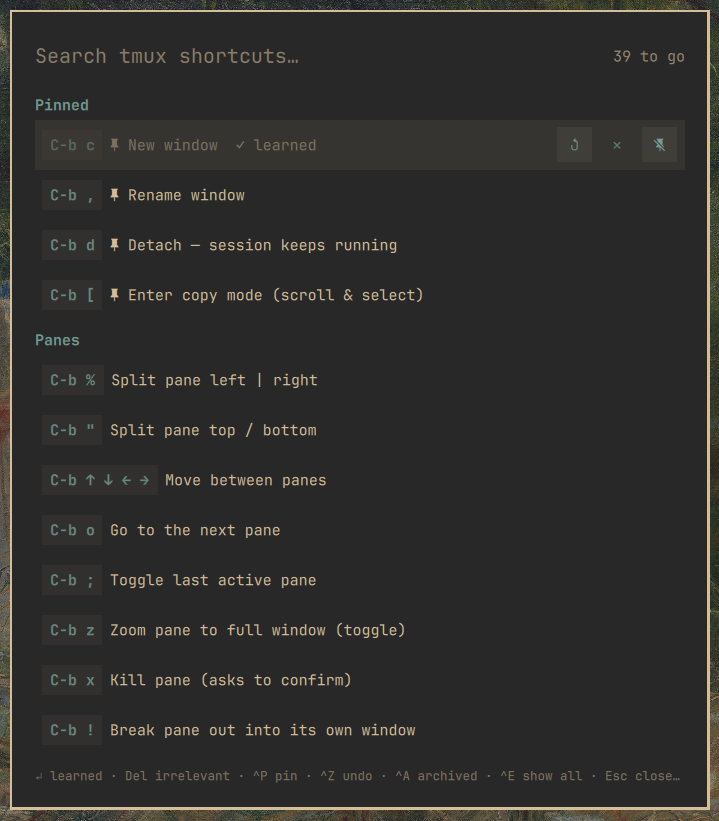
Instead of dumping all 200+ tmux bindings on you, Tmux Helper shows the ~40 default bindings that actually matter — hand-picked, grouped, and described in plain language. As you get better, you curate: mark shortcuts learned or irrelevant and they get out of your way. What's left is your personal "still learning" list.
Install
Requires Omarchy 4.x (Quattro). No hard dependencies beyond the Omarchy
shell itself: tmux is optional — with it, the sheet shows your real prefix
and the Ctrl+E "More" sections parse your live config; without it, the
curated list still works with stock defaults.
omarchy plugin add https://github.com/alexdont/tmux-helper.git --enable
Optional keybinding (add to ~/.config/hypr/bindings.lua):
o.bind("SUPER + SHIFT + T", "Tmux cheat sheet", "omarchy-shell shell toggle io.github.alexdont.tmux-helper '{}'")
Use
Open it from the bar icon or your keybinding. Type to search.
- Enter — mark selected shortcut learned (hides it, counts as progress)
- Delete — mark it irrelevant (hides it, shrinks the total)
- Ctrl+P — pin to the top. Pinned entries never hide — a learned pin stays visible wearing its ✓, so the Pinned section is your reference card
- Ctrl+Z — undo · Ctrl+A — show archived (learned/irrelevant) to review or un-mark · Esc — clear search, then close
- Ctrl+E — reveal the "More" sections: every other binding from your live tmux config (prefix, no-prefix, and vi copy-mode tables), deduped against the curated list. Fully curatable too.
The sheet shows your real prefix (read live from tmux — C-a users see
C-a), while teaching default keys that transfer to any machine. Copy-mode
selection keys are labeled "(vi keys)".
State lives in ~/.local/state/omarchy/io.github.alexdont.tmux-helper/state.json —
plain JSON, dotfiles-friendly.
License
MIT
Remove
omarchy plugin remove io.github.alexdont.tmux-helper
Curation state is left behind at ~/.local/state/omarchy/io.github.alexdont.tmux-helper/;
delete that folder too if you want a clean slate. The plugin never modifies
any other configuration — the optional keybinding above is added by you.