
Homearchy
Presence-first Home Assistant rooms, built for the Omarchy bar.
Why I built this
I wanted my Omarchy bar to answer one useful question at a glance: where is everyone right now?
My Home Assistant setup already knew about floors, rooms, presence sensors, lights, temperature, and humidity—but reaching that information meant opening a dashboard and finding the right card. Homearchy brings the most relevant rooms directly into Omarchy, ordered by live presence instead of a fixed floor plan. When someone moves through the house, the interface moves with them.
I also work from different rooms throughout the day. I might start at a desk, move to the kitchen, or settle somewhere else with a laptop, and I wanted the controls for the room I was actually using to follow that change. Homearchy makes the occupied room the quickest one to reach, so its lights, fans, media, and live conditions are available from the bar without hunting through a full dashboard.
The idea came from Lawris's Advanced Room Card. ARC showed how good a home overview feels when occupied rooms rise to the top, recent presence matters, and room cards combine climate and lighting context. Homearchy is an independent implementation for the Omarchy shell, but the product idea and interaction model started there. Please check out Lawris's repository and video showcase and installation guide.
What it does
- Discovers Home Assistant floors, areas, devices, and entities automatically.
- Inherits room assignments from devices when an entity has no direct area.
- Ranks rooms by current occupancy, most recent presence, then room name.
- Shows the five highest-priority rooms when the panel opens.
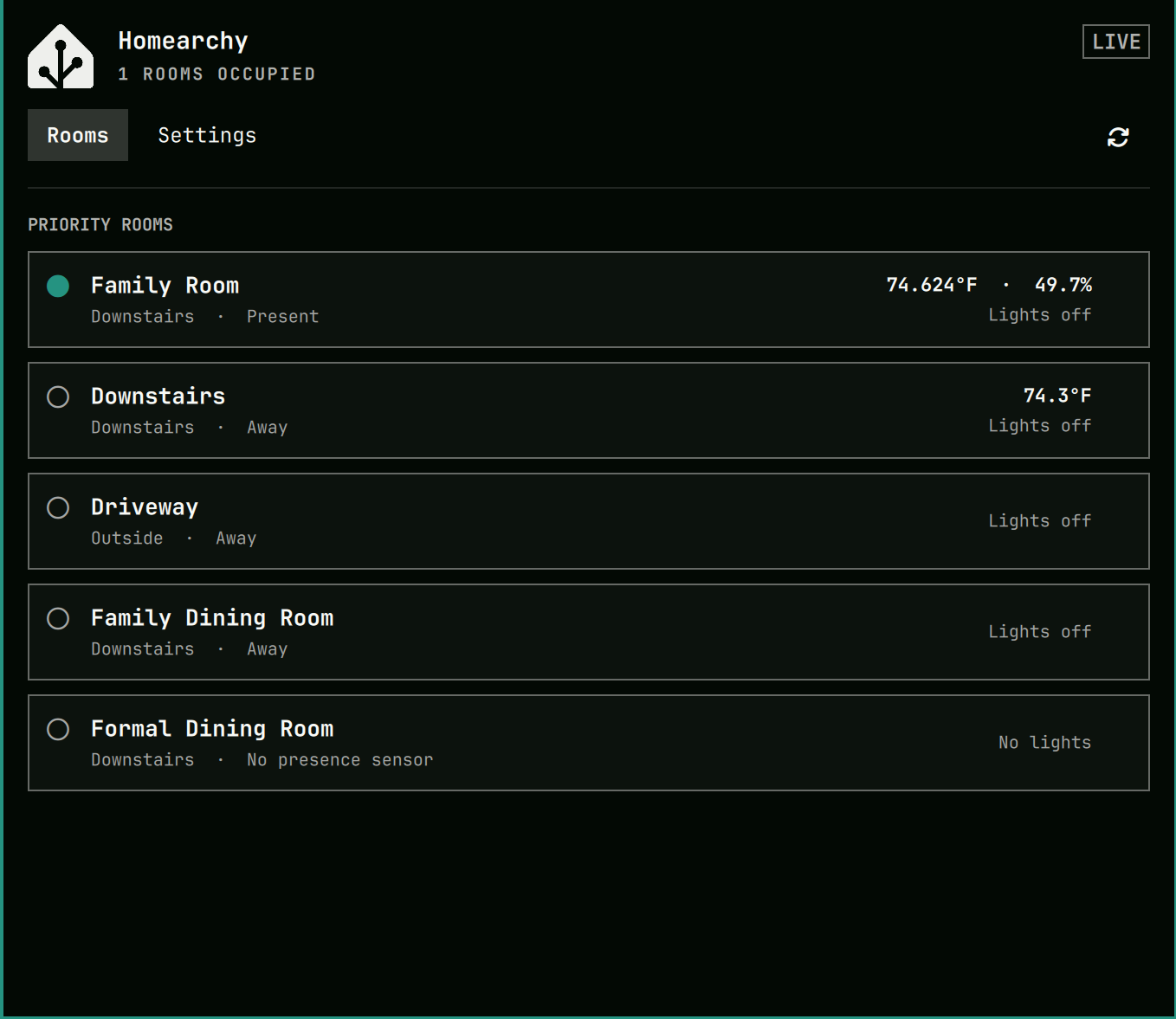
- Displays presence, temperature, humidity, and active-light status.
- Uses your Omarchy theme, including an accent-colored bar icon when a room is occupied.
- Provides safe one-click light, fan, scene, and media controls. Climate, covers, locks, and alarm panels remain status-only in this release.
- Lets you hide rooms and choose the presence, climate, lights, and other controls used by each room.
- Keeps the Home Assistant token in the system keyring—not in plugin configuration.
- Suppresses stale states and controls when Home Assistant is offline.
Screenshots
Presence-ranked rooms
Presence in the bar

The screenshots use a live Home Assistant installation and an Omarchy theme; colors automatically follow the active theme.
Install
Install and enable Homearchy with:
omarchy plugin add https://github.com/amitcpatel/omarchy-homearchy.git --enable
Homearchy has no third-party Python dependencies. It uses Python 3 and Secret Service through secret-tool, both available on Omarchy.
Remove
Remove Homearchy through Omarchy:
omarchy plugin remove io.github.amitcpatel.homearchy --yes
Removing the plugin does not delete its keyring entry or local preferences. If you want to remove the token first, open Homearchy → Settings → Remove token, then remove the plugin. Local non-secret metadata can be deleted separately from ~/.config/homearchy and ~/.local/state/homearchy.
Connect Home Assistant
- Create a long-lived access token from your Home Assistant profile.
- Open Homearchy → Settings.
- Enter your Home Assistant URL.
- Paste the token into the masked field and select Save connection.
The token is passed over stdin, stored in the system keyring, and immediately cleared from the field. Never paste a token into a configuration file, command argument, issue, log, or screenshot.
HTTPS is required by default. Plain HTTP requires explicit consent and is limited to http://homeassistant.local:8123 resolving exclusively to private-LAN addresses.
Configure rooms
Homearchy works automatically after discovery, but Settings → Room Configuration lets you refine each room:
- Show or hide the room in ranked views.
- Choose the primary occupancy, presence, or motion sensor.
- Select temperature and humidity sensors.
- Search and include all, some, or none of the room's lights.
- Search and include all, some, or none of its fans, climate devices, media players, covers, scenes, locks, and alarm panels.
- Rediscover after changing floors, areas, devices, or entities in Home Assistant.
Presence ranking
Homearchy selects one primary presence entity per room using this order:
- Occupancy
- Presence
- Motion
- Stable entity ID as the tie-breaker
You can override that choice in Settings. Occupied rooms appear first, followed by the most recently occupied rooms and then rooms without presence sensors.
Security and privacy
Homearchy talks directly to your Home Assistant instance. It has no cloud service, analytics, telemetry, or advertising.
- Tokens live only in the system keyring.
- Configuration and cached layout metadata contain no secrets.
- Redirects and public plain-HTTP destinations are rejected.
- Home Assistant service calls are constrained by an explicit allowlist.
- Locks and alarm panels are status-only.
- Offline state never presents cached readings as live.
See Security and Privacy for the full boundaries.
Development
python3 -m unittest discover -s tests -v
python3 -m compileall -q homearchy bin/homearchy
bash -n scripts/check-secrets
./scripts/check-secrets
omarchy plugin validate .
Additional documentation:
- Architecture
- Provenance and upstream inspiration
- Release status
- Contributing
- Changelog
- Third-party notices
Credits
Homearchy was inspired by Advanced Room Card by Lawris. ARC and Homearchy are separate projects with independent codebases; no ARC source code is included here.
The Home Assistant logo is used to identify compatibility with Home Assistant. Homearchy is unofficial and is not affiliated with or endorsed by Home Assistant, Lawris, Advanced Room Card, or Omarchy.
License
MIT © Amit Patel