
Omaprox — Proxmox VE in the Omarchy bar
Live demo → — every theme, no Proxmox required.
A read-only Proxmox VE dashboard for the Omarchy 4 (Quattro) bar: every
container and VM on your cluster with a status light, per-guest stats, and
one key to a console — pct enter for containers, SSH for Linux VMs,
xfreerdp3 for Windows.
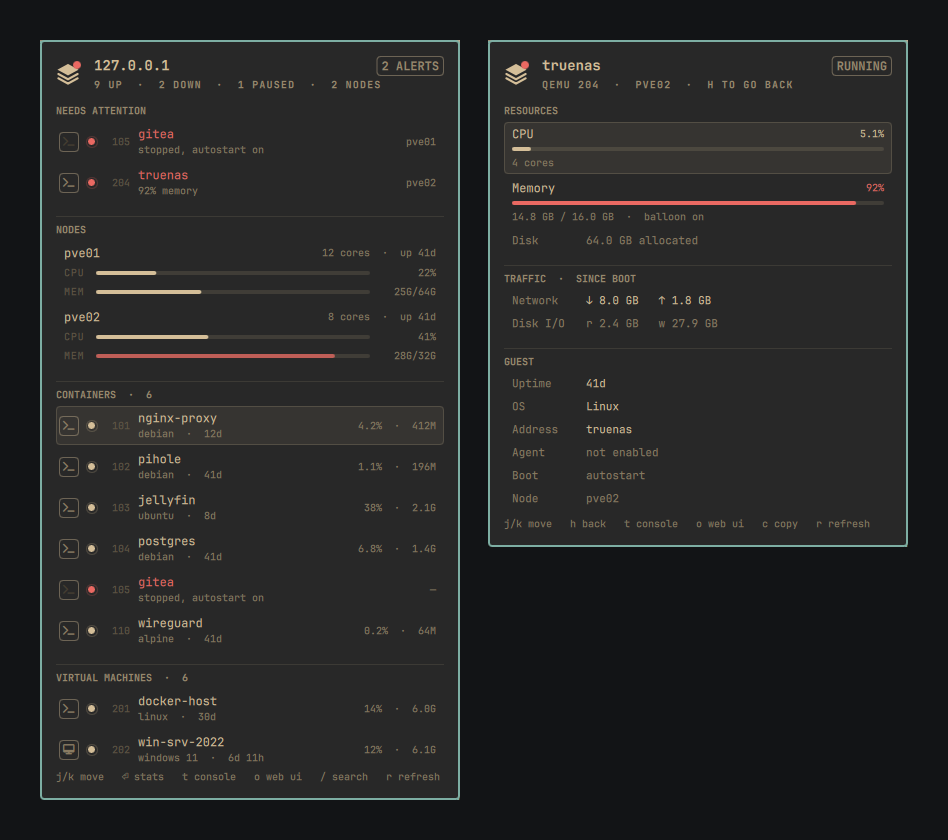
Omaprox is a dashboard, not a control panel. Nothing in it starts, stops, migrates, snapshots or reconfigures a guest, so it only ever needs a read-only API token.
Install
omarchy plugin add https://github.com/AndresSM415/omaprox.git --enable
The command clones the repo into ~/.config/omarchy/plugins/, validates it,
and asks where in the bar you want it. Plugins land disabled by default so
you can read the code first — --enable turns it on in the same step, or do
it separately:
omarchy plugin enable io.github.andressm415.omaprox
Plugins run unsandboxed inside the Omarchy shell process with your permissions, so only add repos you trust. Omaprox installs nothing outside its own folder: no hooks, no sudo, no files elsewhere on the system.
Connect your cluster
Two steps: create a token in Proxmox, then write it to a file. Until both are done the panel shows exactly which one is missing.
1. Create a read-only API token. In the Proxmox web UI, two screens:
-
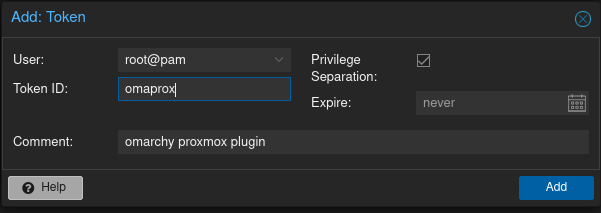
Datacenter → Permissions → API Tokens → Add creates the token: user, token ID, and Privilege Separation ticked. There is no role picker on this screen — a fresh token can do nothing yet.
-
Datacenter → Permissions → Permissions → Add → API Token Permission: Path
/, the token you just created, rolePVEAuditor, Propagate ticked.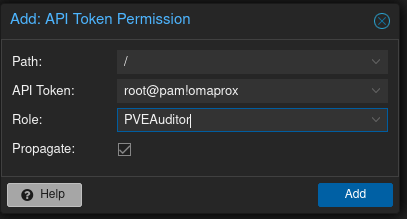
PVEAuditor is read-only and covers exactly what Omaprox needs. A token
that cannot stop a VM cannot stop a VM by accident — that is the point.
2. Write it to a file:
mkdir -p ~/.config/omaprox
printf 'host = pve01.lan\nroot@pam!omaprox=00000000-0000-0000-0000-000000000000\n' \
  > ~/.config/omaprox/token
chmod 600 ~/.config/omaprox/token
The first line is any node in the cluster — pve01.lan, 10.0.20.2 and
https://pve01.lan:8006 all work; the scheme defaults to https and the
port to 8006. The second line is your token. The file is watched, so
editing it takes effect without a restart.
The token lives in a file rather than in shell.json on purpose:
shell.json is a config file people paste into issues and copy between
machines, and an API token should not travel with it. host can still go in
shell.json if you prefer; the file wins when both are set.
TLS. Proxmox ships a self-signed certificate, so verification starts
off. Point caCert at your CA, or set verifyTls to On once the node has
a real certificate.
Use the panel
Click the bar widget to open the overview: anything needing attention first,
then nodes, then containers, then VMs. Press Enter on a row for that guest's
stats. o opens the Proxmox web UI at the selected guest.
| Key | Action |
|---|---|
j / k, arrows |
move the cursor |
l / Enter |
open a guest's stats; on a node, the web UI |
h / Escape |
back out one level, then close the panel |
t |
console — terminal for a node or Linux guest, remote desktop for Windows |
o |
open this guest in a browser — its own page if it has one, else the Proxmox web UI |
c |
copy the address |
/ |
search by name, vmid, node or OS |
F |
forget a QEMU guest's saved address and password (asks again next time) |
r |
refresh now |
Tab |
move to the next bar panel |
The panel keeps polling on its own schedule while it is open. Rows update in
place rather than rebuilding, so live figures never flicker or move the list —
and r still refreshes on demand when a poll is too far away.
Mouse: left click toggles the panel, right click refreshes, middle click opens the web UI.
Pin: press p or the pin button at the top of the panel and it stays put —
outside clicks and a final esc are ignored until you unpin, close it from the
bar icon, or send the IPC hide.
While pinned, everything outside the card goes back to being other windows':
click one and it focuses and takes the keyboard as usual, with the dashboard
still on screen beside it. Click the card again to drive it with j/k.
The pin is only offered on a single-monitor session, and the button and its key
disappear when a second output is connected. The panel can hand back its own
screen but not the others: the shell's panel component covers every other
output with a full-screen surface whose only job is to catch a click and
dismiss, and a pinned panel would swallow every click there. Lifting this needs
a change in Omarchy's own KeyboardPanel — see docs/PIN_FEATURE_HANDOFF.md.
Status lights use form and brightness rather than colour, so they read well in monochrome themes: filled = running, hollow ring = stopped, dimmed = paused, red = something needs attention — a running guest over its memory threshold, a node offline, or a stopped guest with autostart on.
Consoles
Press t, or click the left edge of a row. Nodes open a shell on
themselves; containers open pct enter on their node; Linux VMs open SSH;
Windows VMs open a remote desktop. A stopped guest's button stays in place,
dimmed and inert.
First time on a Linux VM or Windows VM, if the guest agent has not
reported an address and none is set in shell.json, the console opens in a
terminal and asks for one — a hostname or IP, whatever actually resolves to
that guest. It is remembered in ~/.config/omaprox/addresses, keyed by
vmid, so you are only asked once per guest. Containers never ask: pct enter always targets the node they live on, not the container itself.
First time on a Linux guest, the SSH helper also offers to install your public key, and every connection after that is silent. Say no and it just asks each time. No SSH password is ever stored — an authorized key is the better version of "remember me".
First time on a Windows guest, the helper asks where to connect, for a username, password and domain (blank for a local account), verifies them, and saves the password to your login keyring. Later connections go straight to the desktop. A saved password the server rejects is deleted and asked for again.
Every question is prefilled with the current answer and takes Enter for "keep it", the address included — an address the panel resolved is still a guess, and a VM with a docker bridge routinely reports the wrong one. If the address turns out to be unreachable you are asked again rather than dropped, so a typo costs one line instead of a second trip through the panel.
Got the wrong address, or need to redo credentials? Open the guest and
press F, or click Reset under SESSION. That drops everything the console
prompt remembered about the guest and asks again on the next console. For a VM
that is the address, the saved password and the web page; for a container it is
the web page alone, since its console is pct enter on its node and it has
neither an address nor a password of its own here.
It is all or nothing on purpose: the prompt asks those questions together, so
a reset that cleared only some of them would leave you answering a form already
half filled in with the answers you just asked it to forget. To change one
without touching the rest, open a console and edit that answer at the prompt —
every question is prefilled, and - on the web page clears it.
Linux guests have nothing to forget this way: an installed SSH key is
authorization granted on the guest itself, not a secret held here, so it is
removed from that account's ~/.ssh/authorized_keys on the guest, not
through Omaprox. You can also inspect or clear stored state directly:
cat ~/.config/omaprox/addresses                     # vmid = address, one per line
cat ~/.config/omaprox/webpages                      # vmid = url, one per line
secret-tool search service omaprox                  # attributes print on stderr
secret-tool clear service omaprox host 192.168.1.50
Web pages
Every guest row has a second button beside its console one, and o does the
same thing: it opens that guest in a browser. By default that is the guest's
page in the Proxmox web UI.
Plenty of guests are a thing you visit as much as a thing you log into — a NAS, a router, Home Assistant — and for those the Proxmox page is one click short of where you were going. The last question the console prompt asks is whether this guest has a page of its own; answer it and the button goes there instead. The row's button brightens to say so, and the guest view names the destination under SESSION.
Every guest is asked once, at its first console, and never again — including
containers, which are the ones most likely to be running something with a web
UI. Answer - (or leave it blank) to say there is no page; that is remembered
too, so the question does not come back. A bare nas.lan:5000 is fine, the
scheme is filled in.
Console dependencies: openssh for nodes, containers and Linux VMs,
xfreerdp3 and secret-tool for Windows VMs.
Configure
Placement:
omarchy bar move io.github.andressm415.omaprox --section right
Everything else lives in the widget's entry in
~/.config/omarchy/shell.json, which hot-reloads on save:
{ "id": "io.github.andressm415.omaprox", "host": "pve01.lan", "refreshIntervalSec": 10 }
| Key | Default | Meaning |
|---|---|---|
host |
— | any node in the cluster; scheme and port are filled in |
credentialsPath |
~/.config/omaprox/token |
where the token file lives |
refreshIntervalSec |
10 | how often the overview refreshes |
verifyTls |
Off |
Proxmox self-signs, so verification starts off |
caCert |
— | PEM for your CA; setting it verifies regardless of verifyTls |
nodeSshUser |
root |
user for the container console, which lands on the node |
guestSshUser |
root |
user for the Linux VM console, which lands on the guest |
rdpUser |
— | Windows username, so FreeRDP asks only for the password. No password setting exists by design |
lxcConsoleCommand |
ssh -t {nodeUser}@{node} pct enter {vmid} |
container console, runs in a floating terminal |
vmConsoleCommand |
ssh -t {guestUser}@{address} |
Linux VM console, runs in a floating terminal |
rdpCommand |
xfreerdp3 /v:{address} /dynamic-resolution +clipboard |
Windows console, launched directly |
memWarnPercent |
90 | memory share that turns a light red |
smoothMeters |
On |
glide the CPU/memory bars between values instead of snapping |
showRunningCount |
On |
show the number of running guests beside the bar icon |
showTemplates |
Off |
templates never run, so they would be permanently dark rows |
agentAddresses |
Off |
read VM addresses from the guest agent; needs VM.Monitor |
addresses |
— | per-vmid address overrides, keyed by vmid as a string — usually unnecessary, since the console prompts for and remembers an address itself the first time it needs one |
Placeholders for the three command templates: {vmid} {name} {node}
{host} {address} {nodeUser} {guestUser} {rdpUser}.
Node names that do not resolve — common when you reach Proxmox by IP and
have no local DNS — break the default container console, because {node} is
a Proxmox node name, not necessarily a hostname. On a single node use
{host} instead:
{ "id": "io.github.andressm415.omaprox",
  "lxcConsoleCommand": "ssh -t {nodeUser}@{host} pct enter {vmid}" }
On a cluster, pct enter has to run on the node the container lives on, so
keep {node} and give the node names to /etc/hosts or your resolver.
A guest whose name will not resolve is normally handled by the console's own
first-connection prompt (see Consoles), which remembers the
address you give it. Set addresses in shell.json instead only if you
want it fixed in version-controlled config rather than in
~/.config/omaprox/addresses — it takes precedence over both the prompt and
whatever was previously remembered:
{ "id": "io.github.andressm415.omaprox", "addresses": { "202": "10.0.20.42" } }
Troubleshooting
- The panel says the token is missing.
credentialsPathmust point at a file withhost = …anduser@realm!tokenid=…lines. - Every row shows an error. Check the token's role and Propagate on
Permissions → Permissions, the
hostaddress, and the TLS setting. - The widget does not appear in the bar. Confirm it is enabled with
omarchy plugin list, and inspect the shell log for QML errors. - The debug hatch is
omarchy-shell io.github.andressm415.omaprox diagnose, which dumps credential state, host resolution and the last error as JSON.
Remove
omarchy plugin remove io.github.andressm415.omaprox
The plugin is a plain git checkout and installs nothing outside its own
directory. ~/.config/omaprox/ is left in place — delete it yourself if you
also want the token gone.
License
MIT. Not affiliated with or endorsed by Proxmox Server Solutions GmbH.
Development notes for contributors: docs/DEVELOPMENT.md.