
Omamode
An Omarchy shell (Quickshell) plugin that keeps GNOME's light/dark preference and your Omarchy theme in sync. Set a default theme for light mode and one for dark mode; flip between them with two buttons, let GNOME's own setting drive it, or put it on a daily schedule — either way, your Omarchy theme follows automatically.
- Manual switch — Light/Dark buttons in the bar dropdown.
- Follows GNOME — if
org.gnome.desktop.interface color-schemechanges from anywhere else (GNOME Settings, another script), the Omarchy theme switches to match. - Scheduled — optional daily light/dark times; a manual switch while the schedule is on overrides it only until the next scheduled boundary, then the schedule resumes.
Installation
omarchy plugin add https://github.com/andrewmsboyd/omamode.git --enable
This adds the widget to your bar's right section. Move it with:
omarchy bar move io.github.andrewmsboyd.omamode --section right
Usage
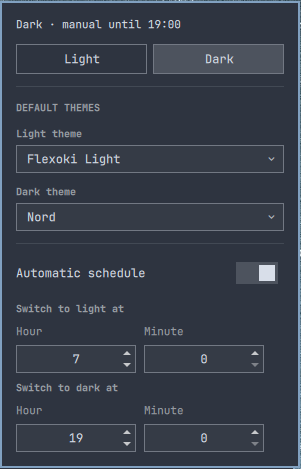
Click the dimmer-switch icon in the bar to open the dropdown:
- Light / Dark buttons — switch immediately.
- Light theme / Dark theme — pick the Omarchy theme each mode should
apply (any theme
omarchy theme listshows). - Automatic schedule — toggle on, then set the hour/minute each mode should start.
The status line at the top of the dropdown shows the current mode and either "following schedule" or how long a manual override has left before the schedule resumes.
CLI / keybinding access
omarchy-shell omamode status   # {"mode":"light","scheduleEnabled":true,"overrideActive":false}
omarchy-shell omamode light    # switch to light
omarchy-shell omamode dark     # switch to dark
omarchy-shell omamode toggle   # flip mode
Useful for wiring a Hyprland keybinding if you don't want to open the dropdown.
Configuration
All configuration is stored inline in the widget's own entry in
~/.config/omarchy/shell.json (the same mechanism Omarchy's built-in widgets
use for their settings) — there's no separate config file. Everything is
editable from the dropdown; the underlying keys are lightTheme, darkTheme,
scheduleEnabled, scheduleLightTime, scheduleDarkTime.
How it works / dependencies
- Runs entirely inside the existing
omarchy-shellprocess — like every Omarchy shell plugin, it is not sandboxed and runs with your user permissions. It does not start a second Quickshell process, install a systemd service, or require any daemon of its own. - Requires the
gsettingsbinary (part ofglib2) and theomarchyCLI, both already present on a standard Omarchy install. No packages are installed by this plugin. - Two background processes are owned by the plugin's own service for as long
as
omarchy-shellruns: agsettings monitorsubprocess (detects external color-scheme changes) and a 60-second internal timer (evaluates the schedule). Both stop when the shell does; nothing persists outside it. - The only commands it ever runs are
gsettings get/set/monitor org.gnome.desktop.interface color-schemeandomarchy theme list/current/set— nosudo, no privilege escalation, no network access.
Removal
omarchy plugin remove io.github.andrewmsboyd.omamode
Attribution
The bulk of this plugin's design and implementation — architecture, Service/ BarWidget code, the icon-contrast fix, marketplace packaging — was written by Claude (Anthropic), working interactively with @andrewmsboyd, who directed the design, tested it on real hardware, and reviewed/approved every change. Noted here for transparency since GitHub's Contributors graph only credits identities tied to a real linked account, which doesn't exist for an AI assistant working locally.
License
MIT — see LICENSE.