
OmaMoodist
A layered ambient-sound mixer for the Omarchy bar.
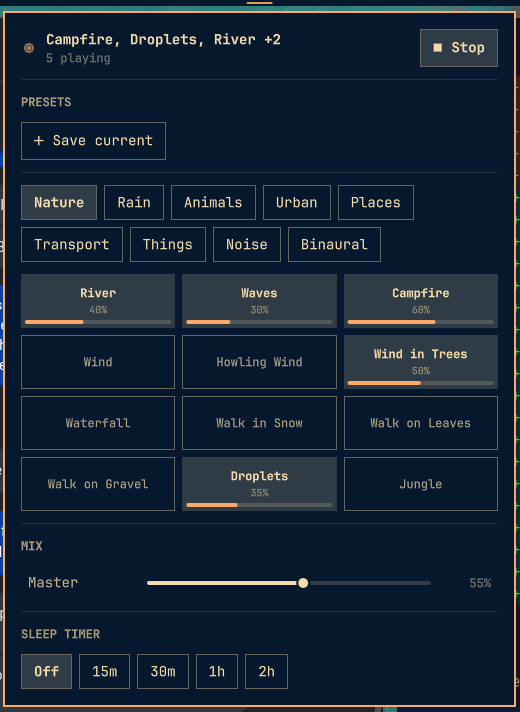
84 recorded loops from the Moodist library — rain, nature, animals, places, machines, urban, transport, coloured noise — any number layered together, each with its own volume. Save mixes as presets. A binaural / isochronic beat generator and a sleep timer come along for the ride.
It is the sample-playing counterpart to Lull, which synthesises its sounds from nothing. Lull's rain never repeats; Moodist has a coffee shop, a train and a cat. Run both.
Each sound is decoded to full-quality stereo float32 — stereo recordings keep their stereo image, mono recordings stay mono, and nothing is resampled down from what the file holds.
Not affiliated with, sponsored by, or endorsed by Moodist. See THIRD_PARTY_NOTICES.md.
Install
Review the source, then:
omarchy plugin add https://github.com/aphelion-studios/omamoodist.git
Accept the prompt to enable the plugin. Install ffmpeg and python-numpy
first (see Requirements) — the mixer will tell you in the panel if either is
missing.
Remove
omarchy plugin remove io.github.aphelion-studios.omamoodist
That stops the widget and deletes the plugin. Your saved presets and any downloaded sound files are left behind deliberately; remove them yourself with:
rm -rf ~/.config/moodist ~/.local/share/omarchy-moodist
Any keybindings you added to ~/.config/hypr/bindings.lua are yours to delete —
the plugin never edits that file.
Requirements
ffmpeg— decodes the audio. The mixer will say so in the panel if it is missing. Install it before enabling the plugin.python-numpy— the mixer will not start without it.- PipeWire (
pw-cat), which Omarchy already ships.paplayis a fallback. - Network, once per sound. See below.
Sound files and the network
The plugin ships a catalogue (data/sounds.json) but no audio. The first
time you turn a sound on, its file is downloaded from
raw.githubusercontent.com/remvze/moodist into
~/.local/share/omarchy-moodist/sounds/ and verified against a recorded SHA-256.
After that it is on disk and nothing touches the network. The whole library is
about 117 MB.
Pre-fetch from a terminal if you would rather not wait:
moodist fetch --all          # everything (~117 MB)
moodist fetch nature rain     # just those categories
moodist fetch cafe train      # individual sounds
Using it
The widget lands in the bar.
| Action | What it does |
|---|---|
| Left click | Open the mixer |
| Right click | Start / stop the whole mix |
| Middle click | Next saved preset |
| Scroll | Master volume |
In the mixer, tap a tile to add that sound; tap again to drop it. An active tile shows its own volume as a fill bar — drag on it, scroll on it, or use the keyboard.
Keyboard
The panel is fully keyboard-driven (a superset of Lull's model).
| Key | Effect |
|---|---|
j k / ↓ ↑ |
Move the cursor between rows and sections: transport → presets → tabs → grid → mix → sleep |
h l / ← → |
Sideways on chip rows and tabs. On the grid: between tiles, or — when the tile is already active — nudge that sound's volume. On a slider: nudge it |
Enter / Space |
Activate: play/stop, apply a preset, open the save field, switch tab, toggle a sound, pick a sleep length, toggle binaural |
x |
Remove: delete the preset / drop the sound layer under the cursor |
Esc |
Close |
Tab / Shift+Tab |
Next / previous bar panel |
Optional keybindings
Keybindings stay user-owned. Add these to ~/.config/hypr/bindings.lua:
o.bind("SUPER + N",       "Moodist: toggle", "omarchy-shell -q io.github.aphelion-studios.omamoodist toggle")
o.bind("SUPER + ALT + N", "Moodist mixer",   "omarchy shell -q shell toggle io.github.aphelion-studios.omamoodist")
IPC endpoints on io.github.aphelion-studios.omamoodist: mixer, toggle, clear, nextPreset,
prevPreset, louder, quieter.
From a terminal
The engine is also a CLI, sharing state with the bar live in both directions:
moodist ls [category]              # list the catalogue
moodist add cafe 0.4               # add / re-level a sound
moodist rm cafe                    # remove one
moodist clear                      # drop every layer
moodist on | off | toggle
moodist master 0.6
moodist sleep 30                   # stop after 30 min (fades the last 90 s)
moodist binaural alpha | off       # named band, or a mode: binaural mode isochronic
moodist preset save focus | load focus | rm focus | preset ls
moodist status
It lives at ~/.config/omarchy/plugins/io.github.aphelion-studios.omamoodist/bin/moodist. Symlink it
onto your PATH if you want the short command:
ln -s ~/.config/omarchy/plugins/io.github.aphelion-studios.omamoodist/bin/moodist ~/.local/bin/moodist
What it does on your system
- Runs a background process (
moodist daemon), started on demand, exiting with your session. It holds the audio stream so sound survives a shell reload. Roughly 1% of a core. Each active sound is decoded to full-quality stereo float32 and held in RAM — about 66 MB per three-minute loop — so a mix of a few layers is a few hundred MB while playing. Inactive sounds are cached up toMOODIST_CACHE_MB(default 512) and evicted oldest-first beyond that. - Executes
ffmpegto decode audio andpw-cat(orpaplay) to play it. - Downloads sound files on first use from
raw.githubusercontent.com, into~/.local/share/omarchy-moodist/sounds/, verified by SHA-256. No other network access, no telemetry. - Writes
~/.config/moodist/config.json— your mix and saved presets. - Listens on a unix socket at
$XDG_RUNTIME_DIR/moodist.sock(not a network socket), used by the bar widget and the CLI. - Never starts playing on its own. Playback state is deliberately not restored, so a reboot is silent.
Regenerating the catalogue
data/sounds.json is generated from the Moodist source by tools/build-catalog.py
(needs network — it downloads every file once to hash it). Run it when Moodist
adds or changes sounds upstream.
Security
This plugin runs unsandboxed inside omarchy-shell when enabled, starts a
background Python process, and reaches the network to fetch sound files. Review
its source and the behaviour described above before installing it.
License and credits
The plugin is MIT — see LICENSE.
- Architecture derived from Lull by Wyatt Billingsley (MIT).
- Sound catalogue and the flower mark derived from Moodist by MAZE / remvze (MIT).
- The sound recordings are third-party assets under the Pixabay Content License or CC0. This repository ships none of them — the plugin fetches each file at runtime, directly from Moodist's repository, onto your machine.
Full copyright notices and license texts are in THIRD_PARTY_NOTICES.md.