
Waynergy for Omarchy
A one-click waynergy start/stop bar widget for Omarchy.



Part of the AROICE family of tools.
Features • Install • Usage • Contributing • Case Study
</div>
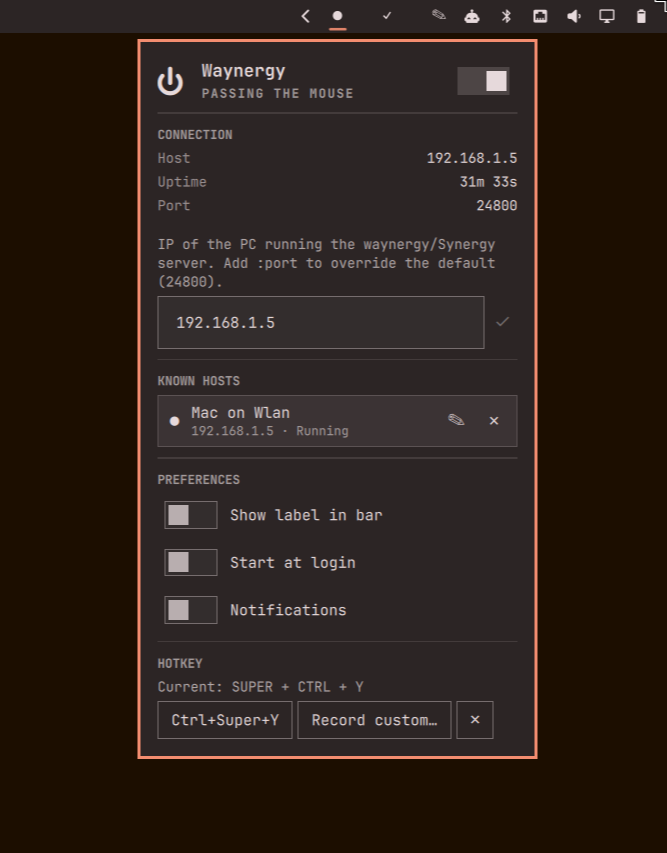
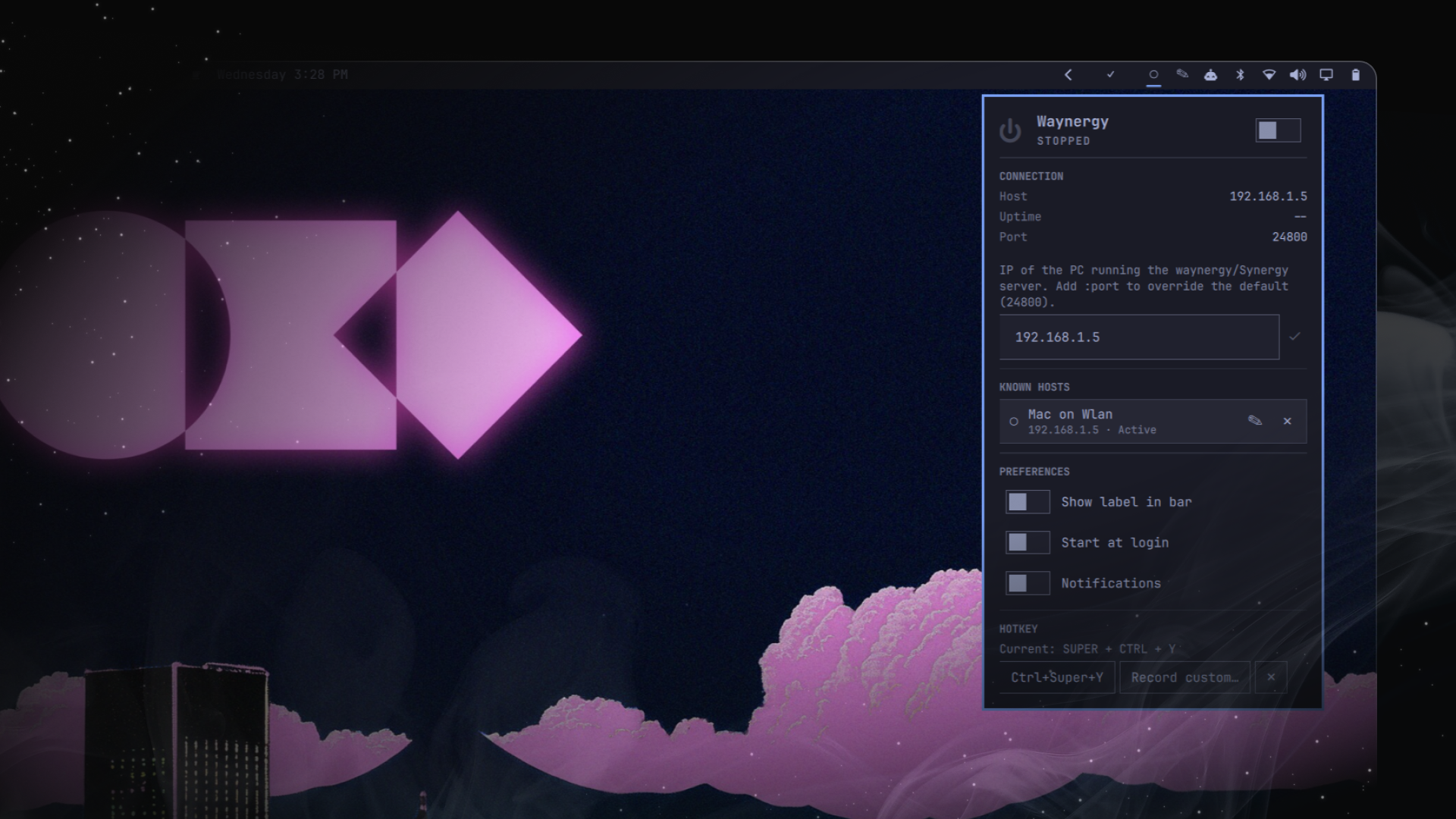
Right-click the bar pill to start waynergy; right-click again to kill it. Left-click opens a small panel with the status, a power toggle, connection details, a field to change the host (and port, if it's non-default), and a switch to hide the "Waynergy" text next to the dot — handy when the other PC's IP changes and you don't want to touch a terminal. It also actually checks the connection is alive, not just that the process is running, and tells you when either one drops.
Contents
- Who this is for
- Features
- Requirements
- Install
- Usage
- How it works
- State files
- Uninstalling
- Contributing
- Getting help
- Changelog
- License
- Author
Who this is for
You use waynergy (a Wayland-native Synergy-compatible client) to share one keyboard and mouse across two PCs, and you're tired of opening a terminal every time you want to connect, disconnect, or the other machine's IP changes (DHCP renewal, switching networks, a fresh install). This plugin puts start, stop, and the IP field one click away in your Omarchy bar instead.
If you don't already run a waynergy/Synergy server on another machine, this plugin has nothing to connect to — it's the client-side control only.
Features
- Bar pill shows a filled dot (
●) when running, a hollow one (○) when stopped, next to an optional "Waynergy" label — polled every 5s so it stays accurate even if waynergy exits on its own. - Right click — toggle: starts
waynergy -c <host> -p <port> -Eif it's not running, kills it (pkill -x waynergy) if it is. No panel opens. - Left click — opens a panel with:
- A power toggle in the header, next to a status line that rotates through a few silly phrases while actually connected ("Sharing keystrokes", "Herding cursors", ...) — same idiom as the built-in Wi-Fi and Bluetooth panels — and drops to a plain word (Stopped, Not responding, Starting…) whenever something needs your attention instead.
- A status pill that actually tells you what's wrong instead of staying silent: not installed, a start attempt that died immediately, the process running but the host not answering, or it stopping on its own after running fine for a while.
- A connection-details grid (Host, Port, live Uptime) — click the host to copy it.
- A real reachability check, not just "is the process alive" — a TCP
probe to host:port every poll while running, so a dropped connection
shows up even though
waynergyitself is still sitting there running. - A text field to change the host, saved with the checkmark button next
to it. Accepts a bare IP (port stays the default
24800) orip:portto target something else. - Known Hosts — your last 5 saved host:port targets as one-click rows, so switching between two PCs doesn't mean retyping anything. Tap one to make it active (an already-running session keeps running against the old target until you restart it). Give one a name (pencil icon, or press N with it highlighted) so it reads "Home Mac" instead of a raw address; forget one with the small ✕.
- Preferences: show/hide the "Waynergy" label in the bar, start waynergy automatically when the bar starts, and mute the desktop notifications below if you'd rather not get them.
- A keyboard shortcut recorder — set once, works from anywhere.
- Middle click — force a status refresh.
- Desktop notifications (can be muted from Preferences) when waynergy stops on its own after running fine, or when it's running but the host stops answering — you don't have to be looking at the bar to find out.
- Auto-start on login (off by default) — waynergy comes back on its own after a reboot, without needing to know whether a previous session already survived the reload first (it checks before starting a second one).
- Optional global keyboard shortcut (
Ctrl+Super+Yby default, or record your own) to open the panel without touching the mouse. - Fully keyboard-navigable panel — Up/Down between every control, Space or Enter to activate whatever's highlighted, Escape to back out, R to refresh and S to toggle from anywhere.
- No config file editing required — settings live in a small local JSON file, edited entirely from the panel.
Requirements
- Omarchy, obviously — this is a Quickshell bar plugin, not a standalone app.
- The
waynergybinary, installed and reachable onPATHfor your graphical session — not just your interactive shell. Quickshell launches it directly (no login shell sourced), so if it's installed somewhere only your~/.bashrc/~/.zshrcadds toPATH(e.g.~/.local/bin), also export that same directory in your Hyprland/systemd user session (e.g.~/.config/hypr/*.confor~/.config/environment.d/), or install it to/usr/local/bin//usr/bininstead. The panel's status pill will tell you plainly if waynergy can't be found at all. - A waynergy/Synergy server already running on the other PC, reachable
on TCP port
24800by default (configurable per host — see Usage). This plugin only drives the client side. - Network reachability between this machine and that host:port — same LAN, VPN, Tailscale, whatever gets you there. If the process dies right after starting, or the panel says it's running but the host isn't responding, that's usually this.
Install
omarchy plugin add https://github.com/Aryan-Techie/omarchy-waynergy-plugin.git --enable
Or, to develop/inspect it locally first:
omarchy plugin clone io.github.aryan-techie.waynergy --edit
(swap in this repo's contents, or just copy this folder to
~/.config/omarchy/plugins/io.github.aryan-techie.waynergy/ directly and
run omarchy-shell shell rescanPlugins if it doesn't pick up right away).
Usage
| Action | Effect |
|---|---|
| Right click | Start waynergy if stopped, kill it if running |
| Left click | Open the panel (status + power toggle + connection details + host field + Known Hosts + label switch + keyboard shortcut) |
| Middle click | Refresh the running-state check immediately |
Setting a custom port
The host field takes a bare IP (192.168.1.5) or ip:port
(192.168.1.5:9999). Leave the port off and it defaults to 24800. Known
Hosts remembers whichever form you saved, so a non-default port round-trips
correctly when you switch back to that entry later.
Keyboard shortcut
No shortcut is set by default — open the panel once (left-click the bar pill) and use the Keyboard shortcut section at the bottom:
- Ctrl+Super+Y — applies that combo immediately.
- Record custom… — press it into the box (needs at least one modifier: Super/Ctrl/Alt/Shift), then Apply. Esc cancels the recording.
- Remove — clears whatever shortcut is currently set.
Applying writes a line to ~/.config/hypr/bindings.lua (backed up first as
bindings.lua.bak.<timestamp>) and reloads Hyprland. If the reload reports
a config error, the backup is restored automatically and nothing changes.
Keyboard navigation inside the panel
Once the panel is open:
- Up / Down (or j / k) — move the highlight between every control: the power toggle, the IP field, the Save button, any Known Hosts rows, the label switch, and the keyboard-shortcut buttons.
- Space or Enter — activate whatever's highlighted: flips a toggle, focuses the IP field for typing, or clicks a button.
- R — refresh the running-state check immediately, from anywhere in the panel (doesn't need the highlight to be on anything in particular).
- S — toggle waynergy on/off, same as R works from anywhere.
- N — rename whichever Known Hosts row is currently highlighted.
- Escape — while actually typing in the IP field, the first Escape just exits typing and returns to the highlight (doesn't close the panel); a second Escape (or one from anywhere else) closes the panel.
How it works
- Start:
waynergy -c <host> -p <port> -E, launched through a detached bash wrapper (not a tracked process, so it survives plugin reloads and isn't tied to the bar widget's lifetime) that backgrounds it and records its real PID to<state dir>/waynergy.pid. Port defaults to24800; the-Eflag is always passed. - Stop/status target that specific PID, not just "whatever's named
waynergy" — each check confirms
/proc/<pid>/commis still literallywaynergybefore trusting it, so a stale or unrelated process can't eat a signal meant for the instance this plugin actually started. Falls back topgrep -x waynergy/pkill -x waynergyonly right after a plugin/shell reload, when the tracked PID hasn't been read back yet — and self-heals to a precise PID again on the next poll if that fallback finds exactly one match. - Reachability: a plain-bash TCP probe (
timeout 2 bash -c 'echo > /dev/tcp/<host>/<port>', nonc/extra dependency needed) run right after each poll that finds the process alive — this is what catches "running, but not actually talking to anything," which process-liveness alone can't. - Installed check:
which waynergy, same pattern the built-in Tailscale plugin uses, checked on open and on every status poll. - Auto-recovery on disconnect: if the reachability probe fails and stays failed for 5 seconds (not acted on immediately — a single blip isn't worth it), the plugin stops and restarts waynergy itself, up to 3 attempts per outage. This is also what clears a stuck key — if the connection drops mid-keypress, the last key can stay "held" until something closes waynergy's virtual input device, which a clean stop+restart does (the same reason touching your desktop's own physical mouse/keyboard clears it: a fresh input event supersedes the stuck one). Not a guaranteed fix — this plugin can't see waynergy's internals — but it's the most direct lever available from outside the process.
- Notifications:
omarchy-notification-send(critical urgency) fires when waynergy stops on its own after running fine, when a reachability probe first fails while it's still running, and when an auto-recovery restart actually runs — not repeated on every poll after the first, so it doesn't spam you. - Keyboard shortcut: a line appended to
~/.config/hypr/bindings.luacallingomarchy-shell shell toggle io.github.aryan-techie.waynergy, applied via a backup-first, auto-rollback-on-error script (same mechanism the todoist plugin uses for its own shortcut).
State files
The host IP, port, preferences (label visibility, auto-start, notifications), keyboard shortcut, and the last 5 saved Known Hosts entries are stored at:
~/.local/state/omarchy/io.github.aryan-techie.waynergy/settings.json
It's { "ip": "...", "port": 24800, "showLabel": true, "keybind": "...", "autoStart": false, "notificationsEnabled": true, "recentIps": [{ "host": "...", "name": "..." }] }
— each Known Hosts entry is {host, name}, name empty unless you've set one. Older saved
lists (a plain array of host strings, from before naming existed) load and upgrade
automatically the first time this version runs.
The only other file this plugin writes is
~/.local/state/omarchy/io.github.aryan-techie.waynergy/waynergy.pid — the PID of
whichever waynergy instance is currently running, written right after start and used to
target stop/status precisely (see How it works) — plus the one
~/.config/hypr/bindings.lua line described above. The only things this
plugin sends anywhere are: the reachability probe (a bare TCP connect
attempt to your own configured host:port, no data sent), and the
omarchy-notification-send calls that show local desktop notifications —
the host/port themselves are only ever handed to waynergy as -c/-p
arguments, never shell-interpolated.
Uninstalling
omarchy plugin remove io.github.aryan-techie.waynergy
This removes the plugin and its bar entry. Delete the state directory above too if you want the saved IP gone as well.
Contributing
See CONTRIBUTING.md — project layout, the conventions worth knowing before you dig in, and how to test a change locally.
Getting help
Open an issue with the plugin version (manifest.json's version
field), what you expected vs. what happened, and qs log -p "$OMARCHY_PATH/shell" --tail 100 output if it's a crash or a silent
failure.
Changelog
See CHANGELOG.md.
License
MIT — see LICENSE.
Author
Aryan Techie (Aryan Jangra)
- 🌐 Website: aryan.aroice.in
- 📧 Email: aryan@aroice.in
- 🐙 GitHub: @Aryan-Techie
- 🏢 Organization: AROICE
<div align="center">
Made with ❤️ by AROICE
Clear tools for a clear mind.
</div>