
Screensaver & Lock
A one-click Omarchy bar widget that switches the screensaver and the idle screen lock off and on.
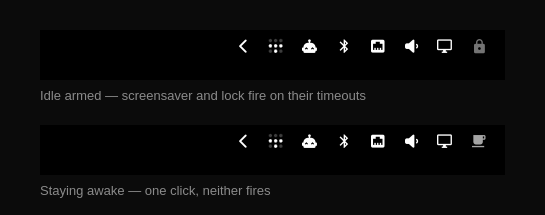
| Icon | State | Meaning |
|---|---|---|
| (dimmed) | idle armed | Screensaver and lock fire on their normal timeouts |
| (highlighted) | staying awake | Neither the screensaver nor the lock will fire |
Install
omarchy plugin add https://github.com/bodhiblues/omarchy-idle-toggle.git --enable
Or manually:
git clone https://github.com/bodhiblues/omarchy-idle-toggle.git \
  ~/.config/omarchy/plugins/io.github.bodhiblues.idle-toggle
omarchy plugin enable io.github.bodhiblues.idle-toggle --section right --before omarchy.power
Remove it from the bar with omarchy plugin disable io.github.bodhiblues.idle-toggle.
Requires Omarchy 4.x (the Quickshell shell). Earlier releases handled idle
outside the shell and have no omarchy.idle service to drive.
How it works
The widget owns no state. It reads and writes the first-party omarchy.idle
service's stay-awake flag — the same state used by:
- the built-in StayAwake indicator in
omarchy.indicators omarchy toggle idleomarchy-shell idle toggle|enable|disable|status~/.local/state/omarchy/indicators/stay-awake
Flip it from any of those and the icon follows, and vice versa.
That service is internal shell surface rather than part of the documented plugin contract, so the widget never assumes it is there:
- The lookup (
bar.shell.firstPartyServiceFor) is guarded and wrapped, and the service is only used oncesetIdleEnabledandstayAwakeare confirmed present and of the expected type. - Otherwise the widget degrades to the
omarchy-toggle-idleCLI, which writes the same state file: clicks shell out toomarchy-toggle-idle toggle, and the icon tracks reality by pollingomarchy-toggle-idle statusevery 5s. Polling only happens in this degraded mode. - State is read from
stayAwakerather than the service's ownidleEnabled, which stays false until the state file has been read back and would otherwise flash the widget into "staying awake" at every shell start.
Timeouts themselves live in ~/.config/omarchy/shell.json under
idle.screensaver and idle.lock (seconds).
Settings
One option, editable from the widget's settings or inline in shell.json:
{ "id": "io.github.bodhiblues.idle-toggle", "notify": true }
notify(boolean, defaultfalse) — desktop notification on each toggle.
Development
manifest.json and shell.json hot-reload, but an already-rendered bar
widget keeps its old QML — after editing BarWidget.qml run:
omarchy restart shell
(omarchy-shell shell rescanPlugins refreshes the registry but does not
re-instantiate a live widget.)
Validate and check it loaded:
omarchy plugin validate ~/.config/omarchy/plugins/io.github.bodhiblues.idle-toggle
qs log -p /usr/share/omarchy/shell --tail 100 | grep -i idle-toggle
(qmllint -I /usr/share/omarchy/shell <file>, as the plugin docs suggest,
exits 255 silently on some setups — including on Omarchy's own widgets — so the
shell log is the reliable check.)
Optional: keybinding
No plugin code needed; the shell already exposes the route:
-- ~/.config/hypr/bindings.lua
o.bind("SUPER SHIFT", "A", "Toggle screensaver & lock", "omarchy-shell idle toggle")
License
MIT — see LICENSE.