
Whatsmarchy
WhatsApp notifications in your Omarchy bar.
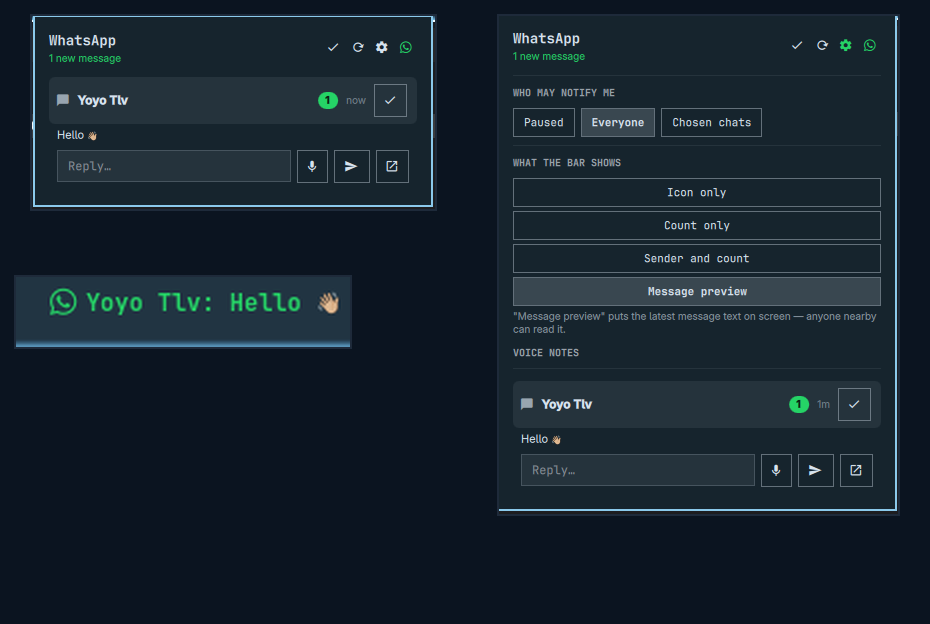
By default, the bar just shows who's waiting and how many messages — never what they said. Click it to read, reply, listen to voice notes, and open photos/videos/documents, all without leaving your desktop.
What it does
- 🔔 Shows unread senders and counts in the bar (message content stays off by default — there's an opt-in "show everything" mode if you want it)
- 🖼️ Read what people send you: photos and voice notes play right in the panel; videos and documents open in one click with your default app
- 💬 Reply by typing — including with
voxtypeor any other dictation tool, if you have one installed, since it just types into whatever field is focused - 🎙️ Or reply with a voice note — you always hear it back before it sends
- ✅ Mark a chat as read from the panel — it really marks it read on your phone too, not just in the widget
- 🔒 Read-only access to your messages: nothing here can modify or delete anything in your WhatsApp history
How it works
Whatsmarchy doesn't talk to WhatsApp directly. It relies on wacli, a small open-source tool that links to WhatsApp as an extra device (the same way WhatsApp Web or WhatsApp Desktop do) and keeps a local copy of your messages on your own machine. Whatsmarchy just reads that local copy.
your phone ─► WhatsApp ─► wacli (linked device) ─► local database on your machine
                                                          │
                                                          ▼
                                                 Whatsmarchy bar widget
Install
1. Install wacli and link it to your WhatsApp (you'll scan a QR code from your phone, same as linking WhatsApp Web):
VER=0.17.1   # check https://github.com/openclaw/wacli/releases for the latest
cd "$(mktemp -d)"
curl -fLO "https://github.com/openclaw/wacli/releases/download/v$VER/wacli_${VER}_linux_amd64.tar.gz"
curl -fLO "https://github.com/openclaw/wacli/releases/download/v$VER/checksums.txt"
sha256sum -c --ignore-missing checksums.txt
tar xzf "wacli_${VER}_linux_amd64.tar.gz"
install -Dm755 wacli ~/.local/bin/wacli
wacli auth
WhatsApp allows up to 4 linked devices at once, so this won't disturb WhatsApp Web or WhatsApp Desktop if you already use those.
2. Keep it syncing in the background — a ready-made service is included:
mkdir -p ~/.config/systemd/user
cp contrib/whatsmarchy-sync.service ~/.config/systemd/user/
systemctl --user daemon-reload
systemctl --user enable --now whatsmarchy-sync
3. Install the plugin and add it to your bar:
omarchy plugin add https://github.com/boyoyooo/whatsmarchy --enable
That's it — the widget should appear in your bar. If sync ever stops running, the panel tells you plainly rather than silently showing a stale count.
Settings
Open the panel and click the gear icon (⚙️) for:
- Who may notify me — everyone, nobody (paused), or a hand-picked list of chats
- Hide muted chats — suppress chats while their WhatsApp mute is active; timed mutes appear again automatically when they expire
- What the bar shows — icon only, count only, sender + count (default), or sender + a preview of the message itself if you'd rather see it at a glance ("nothing to hide" mode)
A few more options (refresh interval, how many messages to preview, whether to include Channels) are in Omarchy's own widget settings.
Using it
- Click a chat to open it and read the recent messages.
- Type a reply and hit Enter, or record a voice note (you always get to listen back before it sends — nothing sends automatically).
- Click the checkmark on a chat, or "mark everything as read" at the top, to clear it — both send a real read receipt to WhatsApp, so it shows as read on your phone too. This briefly restarts the background sync (a couple of seconds per chat), so it isn't instant when clearing several at once.
- A second click on an already-open chat hands off to the full WhatsApp Web app — useful for anything the panel doesn't do itself. WhatsApp doesn't provide a way to link directly to one conversation, so this opens the inbox rather than that exact chat.
Privacy, in short
- Everything is read-only where it can be: the widget opens the local database read-only and never touches your WhatsApp encryption keys.
- Message content, your contact list, and anything you type stay off the
command line — they're passed through safer channels precisely so that
another program on your machine can't casually read them off a process
list. The one unavoidable exception: a chat's phone number/group id is
briefly visible in the process list while an action for that chat is
running (a normal
waclilimitation, not something this plugin can hide). - Downloaded photos/videos/voice notes are cached privately under
~/.cache/omarchy-whatsmarchy/, readable only by you. - Nothing is ever installed, changed, or sent without you explicitly asking for it in the panel.
Uninstall
omarchy plugin remove io.github.boyoyooo.whatsmarchy
rm -rf ~/.config/omarchy/whatsmarchy ~/.cache/omarchy-whatsmarchy
systemctl --user disable --now whatsmarchy-sync
rm -f ~/.config/systemd/user/whatsmarchy-sync.service
This doesn't unlink your WhatsApp device — for that, run wacli auth logout
or remove the linked device from your phone's WhatsApp settings.
Troubleshooting
# What does the widget actually see right now?
~/.config/omarchy/plugins/io.github.boyoyooo.whatsmarchy/bin/wa-status.sh | jq

# Is the background sync alive?
systemctl --user status whatsmarchy-sync
wacli doctor
License
MIT — see LICENSE.
Not affiliated with, endorsed by, or connected to WhatsApp or Meta.