
OmaDrives
OmaDrives puts your drives in the Omarchy bar. Click a drive to mount it, open it, repair supported filesystem errors, or eject it safely — without opening a terminal.
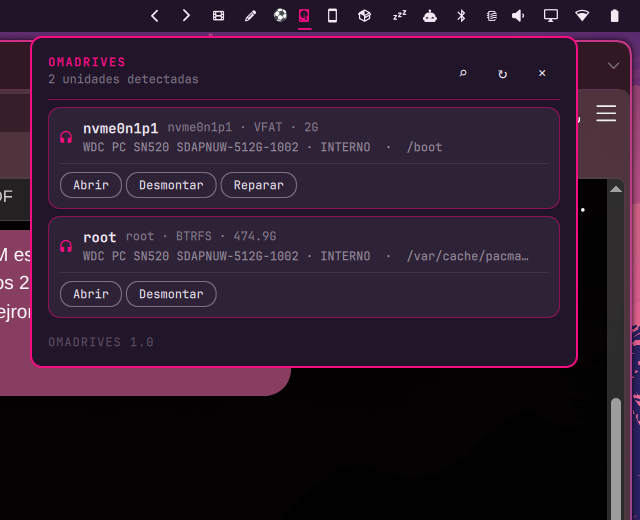
What it does
- Detects mounted and unmounted filesystem partitions.
- Mounts writable volumes through
udisksctl. - Opens mounted volumes in the desktop file manager.
- Unmounts partitions cleanly.
- Safely ejects removable disks by unmounting and powering them off.
- Repairs supported filesystem issues through a polkit prompt:
- NTFS (
ntfsfix) - FAT/VFAT (
fsck.fat) - exFAT (
fsck.exfat) - ext2/ext3/ext4 (
fsck.*)
- NTFS (
- Re-scans hardware when a drive does not appear.
- Shows filesystem type, mount state, model, size, and mount path.
- Adapts interface labels to the system locale while keeping the product documentation in English.
Safety by design
- Repair and eject require an explicit confirmation step.
- The widget never formats a disk.
- It does not implement destructive file deletion; use the file manager after opening a mounted volume. That keeps deletion in the tool designed for browsing, trash, undo, and permissions.
- Virtual devices such as zram, loop devices, and md arrays are hidden.
- Unsupported filesystem types do not get a fake Repair action.
- No credentials are stored.
Install
Clone or download this repository into the Omarchy local plugin directory:
mkdir -p ~/.config/omarchy/plugins/io.github.brm-src.omadrives
git clone https://github.com/brm-src/omadrives.git ~/.config/omarchy/plugins/io.github.brm-src.omadrives
omarchy-shell shell rescanPlugins
Add io.github.brm-src.omadrives to a bar section through Omarchy's plugin configuration. Restart the shell if an already-running bar does not pick up the new entry point.
Remove
Remove the plugin directory and remove its ID from your bar layout:
rm -rf ~/.config/omarchy/plugins/io.github.brm-src.omadrives
omarchy-shell shell rescanPlugins
Removing the plugin does not delete files from any drive.
Controls
- Left click: open or close the drive panel.
R: refresh the device list.- The magnifier action: ask the kernel to rescan storage hosts.
- Mount / Open / Unmount / Eject / Repair: operate on the selected partition.
Esc: close the panel.
Requirements
- Omarchy / Quickshell with the
qs.Commonsandqs.Uiimports. udisks2andudisksctl.findmntandlsblk.- Optional filesystem repair tools for the Repair action.
polkit/pkexecfor privileged repair and hardware rescan operations.
The widget asks for authorization only when an operation genuinely needs it. It does not store the password.
Development checks
python3 -m unittest discover -s tests -q
python3 -m py_compile omadrives.py
qmllint -I /usr/share/omarchy/shell main.qml Panel.qml
omarchy plugin validate .
git diff --check
License
MIT.