
OmaWhy
<p align="center"> <a href="https://www.ko-fi.com/brmcl"><img src="https://ko-fi.com/img/githubbutton_sm.svg" alt="Support me on Ko-fi" /></a> </p>Ask why Omarchy did that — and get an answer backed by its real configuration.
OmaWhy is an Omarchy diagnostic service that turns opaque Hyprland/Omarchy config into a readable answer. It only reports what it can evidence: files, PATH state, and running processes. It never invents a cause.
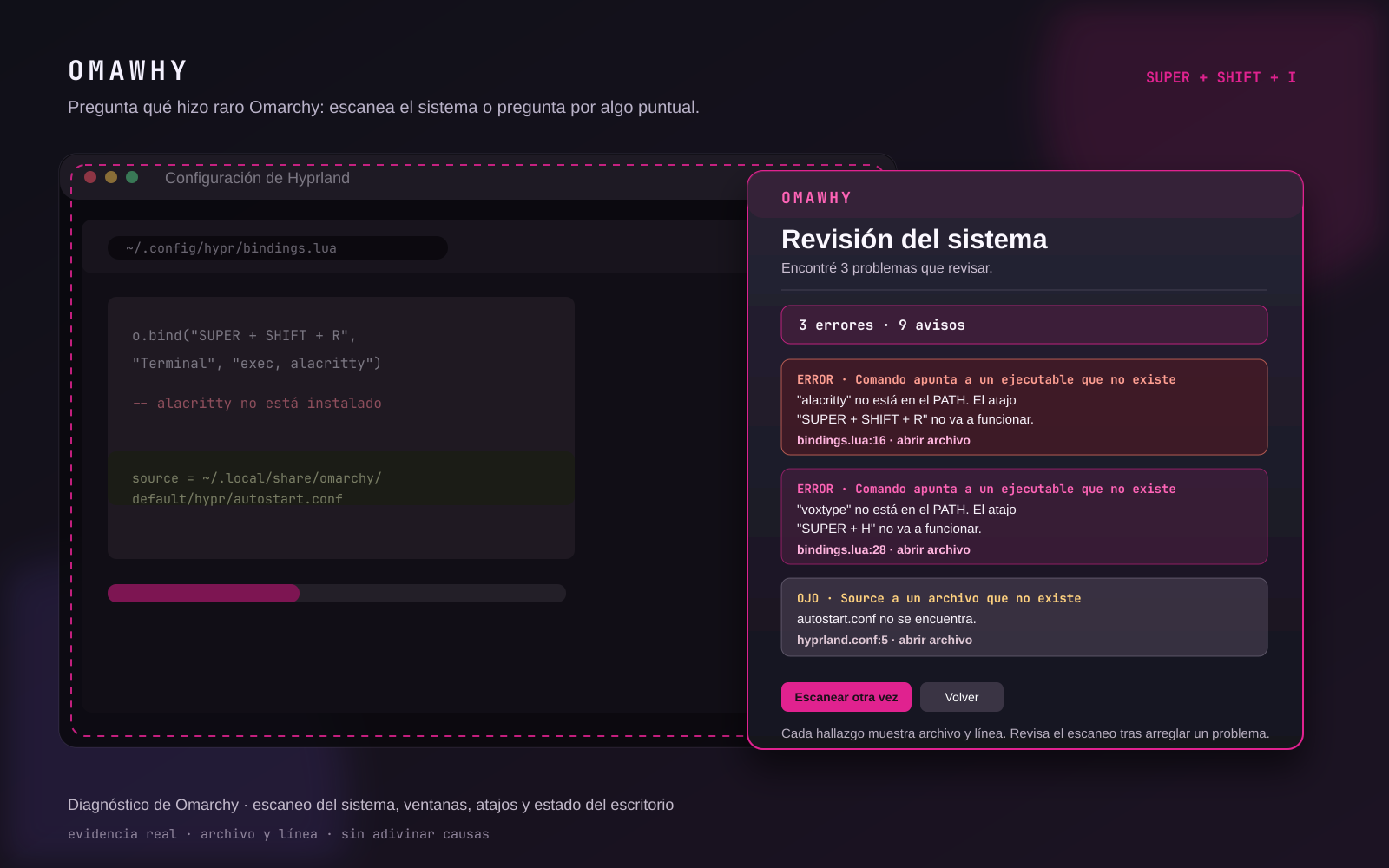
Illustrated product preview based on the plugin interface; it is not a desktop screenshot.
The main feature: system scan
Press Super + Shift + I and choose Revisar el sistema completo. OmaWhy scans your active configuration and reports real, verifiable problems with the file, line, and a plain-language explanation:
- Atajos rotos — a shortcut whose command points to an executable that is not on your PATH (e.g. a key that opens
alacrittywhen Alacritty is not installed). - Atajos duplicados — the same combo bound more than once; Hyprland silently uses the last one, which is why the first stopped working.
- Fuentes perdidas —
source =orrequire(...)lines pointing to files that do not exist. - Reglas inválidas —
windowrulelines with a regex that cannot compile, so they never match anything. - Estado base — no active Hyprland config, Hyprland not responding, or Quickshell not running.
Every problem shows its source file and line, with an abrir archivo action. Re-run the scan after a fix to confirm, or use Copiar diagnóstico to copy the whole report to your clipboard for a bug report or a quick paste into a chat.
Keyboard
EscorSuper + Wcloses OmaWhy.Ctrl + Enterruns the current shortcut/status check again.
Ask a pointed question
- A window ended up wrong: click the window and OmaWhy finds the rule that matches it, or proves no static rule did.
- A shortcut does nothing: type it as you press it (
Super Shift I) and OmaWhy finds where it is defined, replaced, or explicitly disabled. - Desktop status: verifies the active Hyprland configuration, Hyprland + Quickshell, and OmaWhy's own shortcut.
For a window, OmaWhy reads modern Omarchy Lua rules (o.window(...)) and classic windowrule files. It reports one of three useful facts:
- A placement rule matches: it shows the exact file, line, effects (workspace, monitor, floating, etc.) and whether the live state agrees.
- Only style rules match: opacity or tags affect the app, but they do not explain its workspace or monitor.
- No static rule matches: the position is coming from the layout, the app itself, or another automation — not a hidden line in your config.
Install
omarchy plugin add https://github.com/brm-src/omawhy.git --enable --yes
~/.config/omarchy/plugins/io.github.brm-src.omawhy/configure-shortcut.sh
The second command adds exactly one marked binding and reloads Hyprland. It uses ~/.config/hypr/bindings.lua on current Omarchy and falls back to bindings.conf on classic configurations:
Super + Shift + I
It does not install packages, elevate permissions, access the network, or run automatically during omarchy plugin add.
Use
- Press
Super + Shift + I. - Start with Revisar el sistema completo when something looks off — it finds broken shortcuts, missing files, and invalid rules in one pass.
- Or choose the pointed question that matches what went wrong.
- For a window, click it and read the answer: a placement rule, style-only rules, or no static rule.
- For a shortcut, write it as you press it and OmaWhy finds its definition or tells you it is disabled/missing.
- Only then use a small action or choose Recordar to create a reversible placement rule.
Actions
- Copy app ID, XWayland class, title, or the generated rule.
- Move the selected window to the current workspace.
- Center it.
- Toggle floating, fullscreen, or pinning.
- Open the OmaWhy rule file.
- Undo the most recent saved rule.
Remember this position
Before writing anything, OmaWhy shows the selected window's workspace, monitor, floating state, and other live facts.
On confirmation it writes a dedicated rule file and adds one marked include to your active configuration:
Current Omarchy: ~/.config/hypr/omawhy.lua + require("hypr.omawhy") in hyprland.lua
Classic Hyprland: ~/.config/hypr/apps/omawhy.conf + source = … in apps.conf
It creates a timestamped backup in:
~/.local/state/omawhy/backups/
Undo restores both files exactly to their state before the last Remember action.
Rules use an anchored app identifier: o.window("^app_id$", …) on current Omarchy and anchored match:class on classic Hyprland. The identifier is a Wayland app_id for native clients and an X11 class for XWayland clients. A remembered rule therefore applies to future windows with that same application identifier—not to an unverified title match. Edit the OmaWhy rule file if you want a narrower rule.
Remove
~/.config/omarchy/plugins/io.github.brm-src.omawhy/configure-shortcut.sh --remove
omarchy plugin remove io.github.brm-src.omawhy --yes
The first command removes only OmaWhy's marked hotkey block; it leaves the rest of your bindings alone.
Requirements
- Omarchy Quattro
- Hyprland
python3,hyprctl, andwl-copy(present on standard Omarchy installs)
No API keys, account, background service, external server, or telemetry.
Development checks
python3 -m unittest discover -s tests -v
python3 -m py_compile omawhy.py
qmllint -I /usr/share/omarchy/shell OmaWhy.qml
omarchy plugin validate .
License
MIT