
Plugin Control Center
A compact Omarchy bar widget for seeing and managing the plugins already installed on your system.
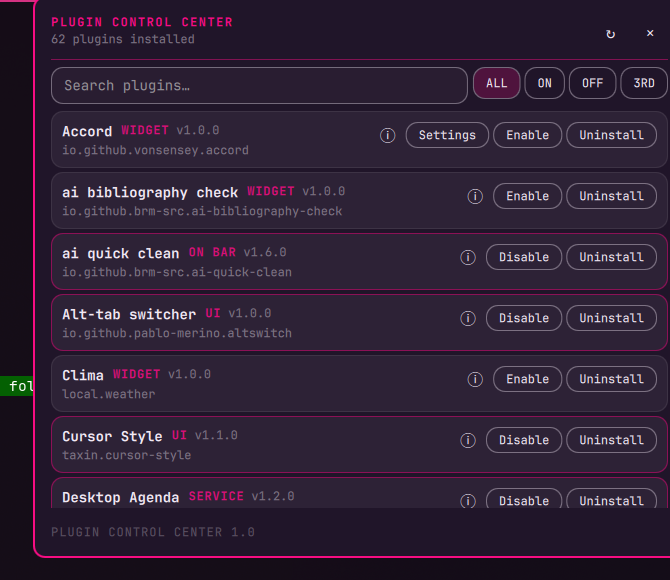
Why it exists
Omarchy makes it easy to install plugins, and community plugins accumulate quickly. After a while, it becomes difficult to answer basic questions:
- What is installed?
- What is enabled or disabled?
- Which plugins are third-party?
- What does a plugin do?
- Which plugin is currently in the bar?
- Which bar widgets expose settings?
Plugin Control Center exists for that inventory problem. It puts the installed plugin registry in one small panel instead of making you inspect shell.json, plugin folders, or individual marketplace pages.
What it does
Open the widget from the bar to:
- list every discovered plugin;
- search by plugin name or ID;
- filter all, enabled, disabled, or third-party plugins;
- read a plugin's declared description and author with the info button;
- see its version, kind, ID, and whether it is in the bar;
- enable or disable plugins;
- edit declared bar-widget settings inline;
- uninstall third-party plugins after confirmation.
The panel reads the live Omarchy PluginRegistry. It does not maintain a second catalog or duplicate plugin metadata.
How it differs from Plugin Control
Plugin Control and Plugin Control Center solve different problems:
- Plugin Control is a keyboard-first command palette and lifecycle tool. It searches the marketplace catalog and local cache, adds plugins, enables or disables them, removes them, refreshes catalog sources, and exposes commands such as
plug-add:andplug-remove:. It is optimized for taking an action quickly and can run as a background service. - Plugin Control Center is an installed-plugin inventory and maintenance panel. It shows the complete local registry at once, explains what each plugin does, exposes enabled/bar/third-party state, and edits bar-widget settings where the manifest provides a schema. It does not install plugins, search the marketplace, or maintain a catalog cache.
In short: Plugin Control finds and changes plugins; Plugin Control Center tells you what you already have and helps keep that installation understandable.
Install
omarchy plugin add https://github.com/brm-src/plugin-control-center.git --enable
Then place the widget in the bar if Omarchy does not add it automatically:
omarchy plugin enable io.github.brm-src.plugin-control-center
Click its bar icon to open the panel. The widget also exposes the standard Omarchy IPC target:
omarchy-shell io.github.brm-src.plugin-control-center open
omarchy-shell io.github.brm-src.plugin-control-center close
omarchy-shell io.github.brm-src.plugin-control-center toggle
Settings support
A plugin's settings button appears only when its manifest declares a barWidget.schema. Values are edited as JSON so strings, numbers, booleans, and structured options remain unambiguous.
Plugins without a declared schema still appear in the inventory and can still be inspected, enabled, disabled, or removed when allowed.
Safety and scope
- Plugin metadata comes from Omarchy's live registry.
- Uninstall is limited to third-party plugins and requires confirmation.
- Plugin IDs are passed safely to the Omarchy CLI; they are not interpolated into a shell command.
- The plugin adds no packages, services, network calls, or elevated-privilege requirements.
- Like every Omarchy plugin, it runs inside the unsandboxed shell process and should be reviewed before installation.
Development
The plugin is intentionally only three runtime files: main.qml, Panel.qml, and manifest.json.
Run the local checks from the repository root:
qmllint -I /usr/share/omarchy/shell *.qml
omarchy plugin validate .
omarchy-shell shell rescanPlugins
For a live check, open the widget and inspect the rendered panel:
omarchy-shell io.github.brm-src.plugin-control-center open
For deterministic English screenshots or QA, launch the shell with PLUGIN_CONTROL_CENTER_LANG=en. Without that override, the widget follows the system locale.
License
MIT. See LICENSE.