
Omarchy Keyboard RGB
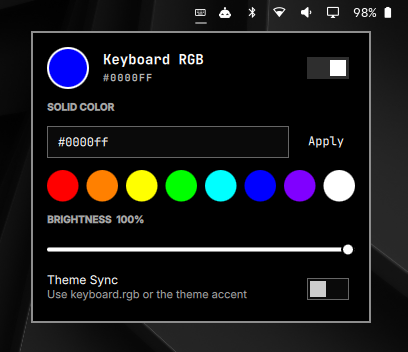
An Omarchy Quattro bar plugin for the SteelSeries per-key RGB keyboard in the MSI Stealth GS66 12U. It provides solid colors, brightness, power control, saved profiles, startup restore, and optional Omarchy theme synchronization.
Compatibility
The currently verified hardware is:
- MSI Stealth GS66 12U
- SteelSeries KLC USB ID
1038:113a - US keyboard layout
The controller deliberately refuses to target any other USB ID. Other MSI models may use a similar keyboard, but they are unsupported until tested.
Requirements
- Omarchy Quattro with the plugin system enabled
- Python 3
- Arch Linux
hidapipackage (omarchy-pkg-add hidapi)
Install
Add and enable the plugin:
omarchy plugin add https://github.com/bruno-g-soares/omarchy-keyboard-rgb.git --enable
cd ~/.config/omarchy/plugins/io.github.bruno-g-soares.omarchy-keyboard-rgb
./setup.sh
setup.sh installs the bundled controller under ~/.local, registers uniquely
named theme/startup hooks, and generates a device rule restricted to your user.
It does not request elevated privileges. Run the three commands it prints to
install and activate that rule; those are the only privileged installation
steps.
The runtime plugin never invokes sudo or pkexec.
Use
- Left-click the bar icon to open the panel.
- Right-click it to toggle the keyboard lighting.
- Choose a fully saturated color or enter a six-digit hex color.
- Use the slider to adjust software brightness.
- Enable Theme Sync to follow
keyboard.rgbfrom the active Omarchy theme, falling back to the theme'saccentvalue.
The controller is also available from the command line:
omarchy-keyboard-rgb set '#8d8d8d'
omarchy-keyboard-rgb brightness 70
omarchy-keyboard-rgb off
omarchy-keyboard-rgb auto-theme enable
omarchy-keyboard-rgb auto-theme disable
omarchy-keyboard-rgb profiles save work
omarchy-keyboard-rgb profiles apply work
omarchy-keyboard-rgb status --json
Safety
This release sends only the steady-color (0x0e) and apply (0x09) packets
validated on the 1038:113a controller. It does not expose the older bundled
hardware-effect presets or generate undocumented effect packets.
The power key's RGB element is included. Its separate blue/amber GPU-status LED is firmware-controlled and is never addressed by this plugin.
Brightness is implemented by scaling RGB intensity because this keyboard does not expose a host-side brightness command. The keyboard's firmware brightness hotkey remains independent.
Theme and startup behavior
Theme Sync is off by default. When enabled, the theme-set hook reapplies the
active theme color. The post-boot hook restores the saved enabled state,
color, and brightness after login.
State is stored under ${XDG_STATE_HOME:-~/.local/state}/omarchy-keyboard-rgb.
Saved profiles are stored under
${XDG_CONFIG_HOME:-~/.config}/omarchy-keyboard-rgb.
Remove
From the installed plugin directory, run:
./uninstall.sh
The script removes user-space plugin files, controller files, and hooks while retaining state and saved profiles. It prints the optional privileged command for removing the system device rule.
Development
bash tests/test-controller.sh
bash tests/test-protocol.py
bash tests/test-release.sh
omarchy plugin validate .
/usr/lib/qt6/bin/qmllint -I /usr/share/omarchy/shell BarWidget.qml Panel.qml
License and attribution
The plugin is MIT licensed. It vendors the MIT-licensed msi-perkeyrgb backend
by Askannz; its original license is retained at
vendor/msi-perkeyrgb.LICENSE.