
CLIAMP for Omarchy
An Omarchy bar widget for CLIAMP, the retro
terminal music player. See what's playing at a glance and control playback without leaving
your workflow — works with the CLIAMP TUI and with cliamp --daemon alike. When Spotify or
YouTube playback is detected, the widget follows and controls those too.
Features
- Now playing in the bar — play/pause state glyph plus a scrolling title · artist label.
- One-click transport — left click toggles play/pause, middle click skips ahead, and the scroll wheel moves through the playlist.
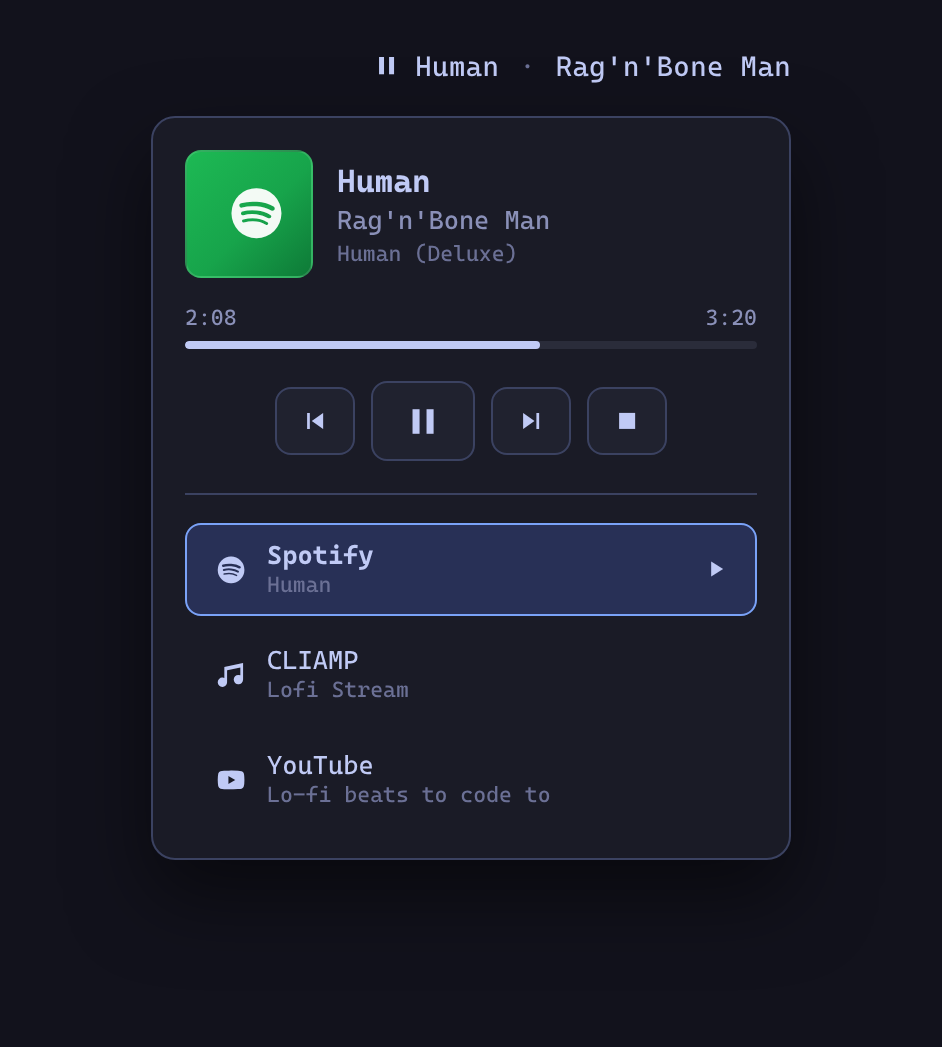
- Detail popup — right click opens track details with album art, previous / play-pause / next / stop buttons, a progress bar for regular tracks, a LIVE badge for radio streams, and the current playlist position.
- Spotify and YouTube, when detected — the Spotify desktop app and YouTube / YouTube Music (in a browser or as a PWA) are picked up over MPRIS. The widget auto-follows whichever source is playing, preferring cliamp, and the popup grows a picker to pin a source when more than one is around.
- Party Mode — turn the whole top bar into a beat-reactive synthwave light show, in your choice of a cliamp-style spectrum visualizer or a scrolling gradient wash. See below.
- Scriptable — the plugin's service exposes IPC methods, so keybindings get the same on-screen-display feedback as Omarchy's built-in media controls.
Party Mode

Right-click the widget and hit Party Mode to wash the entire Quickshell top bar in a beat-reactive synthwave light show. Two styles, switchable from the popup or settings:
- Bars — a cliamp-style spectrum analyser with falling peak caps, drawn straight from
cliamp's live audio bands (
cliamp visstream). - Gradient — a scrolling neon wash with parallax layers and light-sweeps.
The colours are derived from your active Omarchy theme accent and re-derive automatically when you switch themes. Playback drives the motion: cliamp gets the real spectrum, while Spotify and YouTube — which expose no audio data over MPRIS — get a lively synthetic visualizer that dances while they play and settles the moment they pause.
The overlay is purely decorative: it never intercepts clicks, scrolls, or keyboard input on the bar beneath it. The popup's quick controls switch style and nudge the intensity; the persistent defaults live in the widget settings.
Requirements
- Omarchy with the plugin-capable shell (
omarchy pluginavailable). cliampon yourPATH. The widget talks to the running instance through cliamp's own remote-control CLI, so no MPRIS proxy is needed.- Spotify and YouTube support needs nothing extra — those sources are detected through the MPRIS players the apps already register.
Install
omarchy plugin add https://github.com/bscott/cliamp-oma-plugin.git --enable
Then place the CLIAMP widget in your bar from the Omarchy bar settings (category Media).
Usage
| Input | Action |
|---|---|
| Left click | Play / pause |
| Middle click | Next track |
| Scroll wheel | Previous / next track |
| Right click | Open the detail popup |
The widget dims to a note glyph while no media source is reachable. Start cliamp (or
cliamp --daemon for headless playback), Spotify, or a YouTube tab and it lights back up
on the next poll. All controls target the active source, shown in the popup's picker.
Settings
Configurable from the widget's bar settings:
| Setting | Default | Description |
|---|---|---|
| Refresh interval | 2 s | How often to poll cliamp status --json. |
| Max label width | 180 px | Label width before the title scrolls. |
| Hide when unavailable | off | Remove the widget entirely while cliamp isn't running. |
| Party Mode style: spectrum bars | on | On shows the spectrum analyser; off shows the gradient wash. |
| Party Mode intensity | 34 % | Strength of the effect painted over the bar (8–60%). |
| Party Mode reacts to the beat | on | Drive the effect from cliamp's real audio bands. |
IPC / keybindings
The service registers the cliamp IPC target, so playback can be driven from scripts or
Hyprland keybindings with on-screen-display feedback:
omarchy-shell cliamp playPause
omarchy-shell cliamp next
omarchy-shell cliamp previous
omarchy-shell cliamp stop
omarchy-shell cliamp status   # JSON playback state, including active/detected sources
omarchy-shell cliamp source spotify   # pin a source: cliamp, spotify, or youtube
omarchy-shell cliamp party             # toggle Party Mode (also partyOn / partyOff)
omarchy-shell cliamp partyStyle bars   # set style: bars or gradient (partyStyleToggle to flip)
Example Hyprland binding (~/.config/hypr/bindings.conf):
bindd = SUPER SHIFT, P, Toggle CLIAMP playback, exec, omarchy-shell cliamp playPause
Plain cliamp toggle works too — the IPC route just adds the OSD popup.
Development
Install the plugin with omarchy plugin add (above), then edit it in place under
~/.config/omarchy/plugins/io.github.bscott.cliamp. After changes:
omarchy plugin validate ~/.config/omarchy/plugins/io.github.bscott.cliamp
omarchy-restart-shell   # reload the shell so the service and overlay pick up edits