
Omazel
Hazel for Omarchy. Omazel watches folders and acts on the files that land in them — sorting downloads, filing documents, expiring old clutter, unpacking archives, encrypting drop folders, and shipping files to your phone or cloud — driven by rules that run quietly in the background while a bar widget shows what happened.
If you have used Hazel on macOS, this is that workflow for your Omarchy desktop.
Listed on the Omarchy Plugin Marketplace (approved and verified) · Releases
Features
- Watch any folders — instant reaction to new files via inotify (with a built-in Qt directory watcher as a zero-dependency fallback for flat folders), plus a periodic sweep that fires age-based rules and catches files that arrived while the shell was off.
- Two ways to write rules — a built-in visual editor in the widget
popup (folders, conditions, and actions from dropdowns, validated before
saving), or plain TOML in
~/.config/omazel/rules.tomlwith your own editor. Both round-trip; either way, edits apply on save. - Hazel-grade conditions — name, extension, kind, size, age, created
date, path, real MIME type, the URL a file was downloaded from,
file contents (grep), and arbitrary script checks (exit 0 =
match), combined with
all/any/nonegroups. - Regex capture tokens — a
matchescondition exposes its capture groups to every pattern in the rule as{1},{2}, … so^Invoice-(\d{4})can file into~/Documents/Invoices/{1}. - Rich actions — move, copy, rename, sort into subfolders, trash, delete, open, extract archives, compress, desktop notifications, and run arbitrary commands.
- age encryption — encrypt files on arrival with age, with a checksum-verified round trip before the plaintext original may be removed (removal is opt-in and refuses to run unverified unless you say so explicitly).
- Cloud handoff — Taildrop to any tailnet device, Dropbox and Proton Drive presets, or any configured rclone remote (S3, Drive, B2, SFTP, …).
- Safe by default — collision-safe naming (
report (2).pdf), hidden files and partial downloads never touched, settle delay before judging fresh files, per-rule cooldowns, loop protection so rules cannot chew on their own output, and a global dry-run switch that logs what rules would do without touching anything. - Bar widget — engine status at a glance, per-folder pause toggles, a recent-activity feed, rule-problem and missing-tool warnings, pattern- variable hints (ⓘ), a docs shortcut, and one-click plugin updates.
- Scriptable — pause, resume, dry-run, reload, and sweep over
omarchy-shellIPC for keybindings.
Install
omarchy plugin add https://github.com/bscott/Omazel.git --enable
Add the Omazel widget to your bar (Omarchy bar settings, category System), click the broom, and either Build rules visually or Create starter rules to begin from a commented example file.
Everything works out of the box: flat folders are live-watched by a built-in
Qt watcher, and the rules file hot-reloads natively. Installing
inotify-tools (sudo pacman -S inotify-tools) upgrades watching to
inotify — sharper events, and required for recursive = true folders. Other
tools are only needed by the rules you actually write, and the popup warns
when something is missing.
A taste
[[folder]]
path = "~/Downloads"

  # The classic Hazel showcase: match by real content type, download origin,
  # and text inside the file — file it by the year captured from its name.
  [[folder.rule]]
  name = "File bank statements"
  all = [
    { field = "mime", is = "application/pdf" },
    { field = "source", contains = "mybank.com" },
    { field = "contents", contains = "Account Statement" },
    { field = "name", matches = "statement-(\\d{4})" },
  ]
  actions = [{ do = "move", to = "~/Documents/Bank/{1}" }]

  [[folder.rule]]
  name = "Expire old downloads"
  all = [{ field = "age", gt = "30d" }]
  actions = [{ do = "trash" }]
Prefer clicking to typing? The same rules can be built entirely in the visual editor — open the widget popup and hit Edit rules.
<img src="docs/editor.png" width="400" alt="The visual rule editor: folders, condition rows with field/operator dropdowns, actions with per-action inputs, and reordering">Documentation
- How-to guide — every condition, action, and pattern token; the visual editor; encryption safety; how the engine works; settings; troubleshooting.
- Rule cookbook — ready-to-paste recipes: downloads triage, invoice filing with captures, encrypt-and-ship drop folders, Taildrop, script-gated rules, catch-alls, and more.
The ⓘ button in the widget and editor links here too.
Widget
| Input | Action |
|---|---|
| Left / right click | Open the popup |
| Middle click | Pause / resume the whole engine |
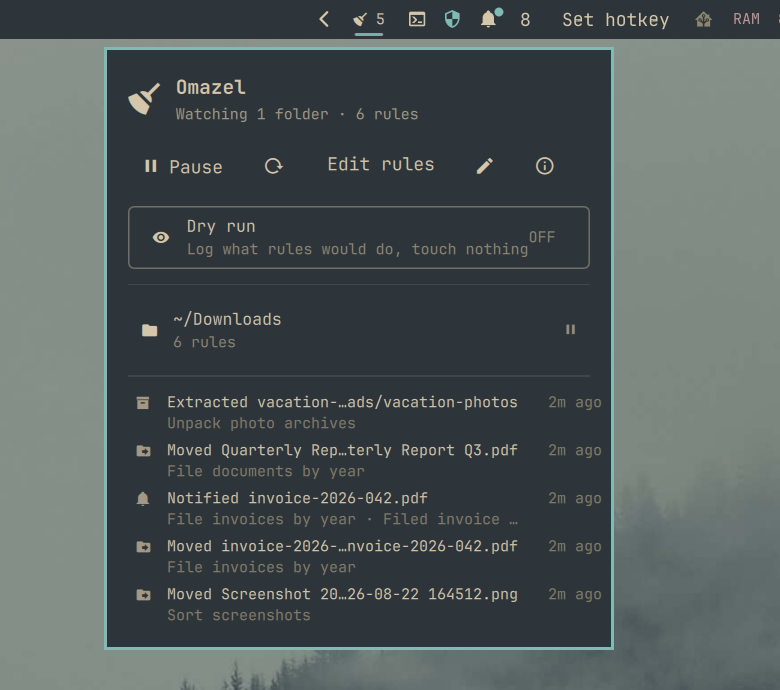
The popup shows engine status, pause and dry-run toggles, a manual sweep button, the visual rule editor, a text-editor shortcut, every watched folder with its own pause toggle, the recent activity feed (including what dry-run would have done), rule problems, and missing-tool warnings.
Scripting
omarchy-shell omazel status     # JSON engine state
omarchy-shell omazel toggle     # pause / resume (also pause, resume)
omarchy-shell omazel dryRunToggle
omarchy-shell omazel sweep      # evaluate everything now
omarchy-shell omazel reload     # re-read the rules file
omarchy-shell omazel show       # open the widget popup
omarchy-shell omazel editor     # open the visual rule editor
Example Hyprland binding (~/.config/hypr/bindings.conf):
bindd = SUPER SHIFT, O, Toggle Omazel, exec, omarchy-shell omazel toggle
Development
Install the plugin with omarchy plugin add (above), then edit it in place
under ~/.config/omarchy/plugins/io.github.bscott.omazel. After changes:
node tests/model.test.js   # rule engine unit tests
omarchy plugin validate ~/.config/omarchy/plugins/io.github.bscott.omazel
omarchy-restart-shell      # reload the shell so the service picks up edits
The rule engine (Model.js) is pure JS and fully unit-tested; actions are
one shell script invocation each (scripts/omazel-act.sh), and everything
Omazel does is appended to ~/.local/state/omazel/activity.log.