
Workspace Preview
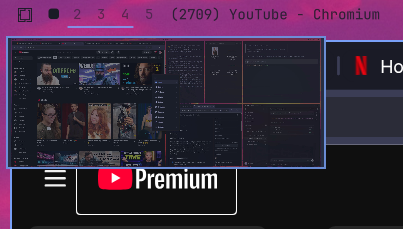
Hover a workspace number in the Omarchy bar to preview that desktop as a thumbnail. The same panel can be summoned from a shortcut.
Install
omarchy plugin add https://github.com/leofle/omarchy-workspace-preview.git --enable
This plugin is a drop-in replacement for the built-in workspace numbers. Omarchy does not run install scripts, so the swap happens when the plugin is enabled: it takes the omarchy.workspaces slot on the bar. Disabling or removing this plugin puts the built-in widget back.
If an older install left both sets of numbers on the bar, enable this plugin again after updating (or disable omarchy.workspaces once):
omarchy plugin disable io.github.bubblepaxi.workspace-preview
omarchy plugin enable io.github.bubblepaxi.workspace-preview
Usage
- Hover a workspace number to open its thumbnail.
- Click a number or a preview card to focus that workspace.
- Hovering the visible workspace refreshes its screenshot. The popup briefly hides during capture to keep itself out of the image.
- Hovering an inactive workspace takes fresh per-window snapshots without switching desktops. These are arranged over the wallpaper using the window geometry; compositor shadows and exact overlapping-window order may differ.
- Previews are snapshots, not continuous video streams. Hover again for another frame.
Summon or hide the panel from a keybinding:
omarchy-shell shell summon io.github.bubblepaxi.workspace-preview '{}'
omarchy-shell shell hide io.github.bubblepaxi.workspace-preview
Example Hyprland binding in ~/.config/hypr/bindings.lua:
o.bind("SUPER + TAB", "Workspace Preview", "omarchy-shell shell summon io.github.bubblepaxi.workspace-preview '{}'")
Dependencies
These are already present on a normal Omarchy install:
- Hyprland (
hyprctl) grimto capture the focused monitorjqto choose that monitor- Python 3 for bounded capture and image validation
Thumbnails are written to ~/.cache/omarchy/workspace-previews/. No sudo or pkexec is required. The plugin does not install packages and does not change files outside its cache directory.
Remove
omarchy plugin remove io.github.bubblepaxi.workspace-preview
Removing an enabled copy restores omarchy.workspaces in the same bar slot. If the built-in numbers are still missing afterward:
omarchy plugin enable omarchy.workspaces
Cached thumbnails are left in ~/.cache/omarchy/workspace-previews/ and can be deleted by hand.