
RDP Manager for Omarchy
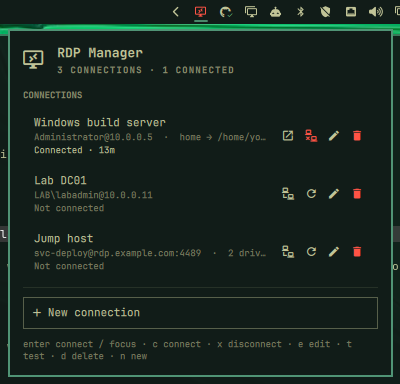
Saved RDP connections in the Omarchy bar. Click the icon to open a panel, connect with one keystroke, watch live session state — and keep passwords in the system keyring instead of the process list.
Built for Omarchy 4 ("Quattro"), whose shell is a single long-running
Quickshell instance with a real plugin system. Backed by
xfreerdp3 (FreeRDP 3).
Why
Driving xfreerdp3 by hand means the host, the flags and the drive mappings live
only in shell history, and there is nothing on the desktop to tell you a session is
up. The obvious fix — putting /p:yourpassword in the command — is worse: FreeRDP
itself warns that "passing credentials or secrets via command line might expose
these in the process list".
This plugin keeps the convenience and drops the exposure.
Install
FreeRDP is not part of a stock Omarchy install, so install the freerdp package
from the Arch repositories first.
Then add the plugin:
omarchy plugin add https://github.com/cahva/omarchy-rdp-manager.git --enable --yes
The other dependencies — jq, gnome-keyring and libsecret — are all in
omarchy-base.packages, so they are already there.
Check the pieces are in place:
xfreerdp3 --version
# `search` answers 0 even when nothing matches, so a clean exit means the
# keyring is reachable and unlocked. (Don't probe with `secret-tool --version`
# or `--help` — neither is a supported flag and both exit 2.)
secret-tool search --all service omarchy-rdp >/dev/null && echo "keyring ok"
To place or move the bar icon:
omarchy bar move io.github.cahva.rdp-manager --after omarchy.clock
Remove
omarchy plugin remove io.github.cahva.rdp-manager
That takes the bar widget out of shell.json and deletes the plugin directory. It
deliberately leaves your data alone, so reinstalling picks up where you left off.
To remove that too:
# saved connections (contains no passwords)
rm -rf ~/.config/omarchy-rdp

# every password this plugin stored, in one call
secret-tool clear service omarchy-rdp
Two things the plugin does not own and does not clean up:
~/.config/freerdp/server/*.pem— FreeRDP's own trust-on-first-use records, shared with any other FreeRDP client you run.$XDG_RUNTIME_DIR/omarchy-rdp/— per-session state, gone at your next reboot.
How passwords are handled
The password never appears in ps, in the environment, or on disk in plaintext.
FreeRDP 3 supports /args-from:fd:N, which moves the entire argument list —
password included — onto a file descriptor. So the launcher does this:
xfreerdp3 /args-from:fd:3 3< <(printf '%s\n' "${args[@]}")
and ps shows only:
$ ps -eo args | grep freerdp
/usr/bin/xfreerdp3 /args-from:fd:3
The password's whole journey is: keyring → a shell variable in the launcher → an
anonymous pipe on fd 3 → FreeRDP. It is never an argv element, never written to a
file, and never put in the environment (/args-from:env: would have been readable
through /proc/<pid>/environ, which is why fd: is used instead).
Storage is gnome-keyring via secret-tool, under service=omarchy-rdp with the
connection id as the second attribute. Writes go over a pipe too — secret-tool store reads the secret from stdin, so the panel never passes it as an argument.
You can manage secrets by hand:
# store (prompts, or pipe it in)
bin/omarchy-rdp-secret store my-server
# read back
bin/omarchy-rdp-secret lookup my-server
# forget
bin/omarchy-rdp-secret delete my-server
Deleting a connection in the panel removes its keyring entry too.
What is not protected
The keyring is unlocked for the length of your desktop session, so anything running
as your user can read these passwords — same as your gh token or your SSH agent.
This raises the bar against ps snooping, shell history and backed-up dotfiles; it
is not a defence against code already running as you.
Configuration
Connections live in ~/.config/omarchy-rdp/connections.json, created on first run.
It is plain JSON on purpose: readable, diffable, and safe to hand-edit. It never
contains a password — only a "secret": "keyring" marker.
{
  "version": 1,
  "connections": [
    {
      "id": "windows-build-server",
      "name": "Windows build server",
      "group": "Lab",
      "host": "10.0.0.5",
      "port": 3389,
      "user": "Administrator",
      "domain": "",
      "gateway": null,
      "secret": "keyring",
      "drives": [
        { "name": "home", "path": "/home/you/projects/shared" }
      ],
      "options": {
        "displayMode": "fixed",
        "resolution": "auto",
        "clipboard": true,
        "sound": true,
        "microphone": false,
        "cert": "tofu",
        "scale": "100"
      }
    }
  ]
}
Edits are picked up live — no reload needed. Notes:
-
idis generated from the name and is then immutable: it is the keyring lookup key and the/wm-classsuffix used to detect the session's window. Changing it by hand orphans the stored password. -
groupis the heading the list files the connection under, or""for none. It is a label, not an id:Workandworkare two groups, sorted next to each other. Ungrouped connections come first, then each group in alphabetical order. The form offers every group in use plus "new group", so a typo cannot quietly split one group in two. -
domainis honoured by the launcher but has no form field yet. -
porthas no dedicated form field either, but the Host field shows and acceptshost:portas one string — typing it in splitshost/portapart on save, and reopening a connection recombines them for display, so editing still shows the full address the way it always has. A bracketed IPv6 literal works too ([::1]:3389); an unbracketed one (2001:db8::1) is left alone rather than guessed at, since a bare IPv6 address is indistinguishable fromhost:portonce the colon count goes above one. -
gatewayis an optional RD Gateway to tunnel the session through, for hosts that are not reachable directly (behind a VPN, say):nullfor a direct connection, or{ "host": "gateway.example.com", "port": 443 }. The port defaults to 443 and the Gateway form field acceptshostorhost:port, empty meaning direct. The gateway signs in with the same user, domain and password as the connection itself (FreeRDP's same-credentials mode); separate gateway credentials are not supported yet. The targethostis resolved and reached by the gateway, not by this machine, so it can be a name only the gateway's network knows. The gateway's TLS certificate is checked under the samecertpolicy as the connection. -
soundplays the remote machine's audio on this one (FreeRDP's/sound). On by default; earlier versions never redirected audio, so connections that were silent before start playing sound after updating. Switch the "Audio output" toggle off per connection to get the old behaviour back. -
microphonesends this machine's audio input to the remote (FreeRDP's/microphone). Off by default, and only an explicittrueenables it. It redirects the OS default source, which is usually the microphone but can be any source you set as the default (a monitor of an output, say). Both audio options use FreeRDP's default audio subsystem, which is the pulse layer PipeWire provides on Omarchy. -
certistofu(trust on first use),ignore, ordeny. TOFU state is FreeRDP's own, in~/.config/freerdp/server/. -
resolutionisautoorWIDTHxHEIGHT.automatches the monitor the session opens on, clamped to 2560x1440 so a large or ultrawide display does not become a framebuffer that is slow to push over a WAN. Each axis is clamped on its own: a 5120x1440 ultrawide asks for 2560x1440, not 2560x720. -
displayModedecides what resizing the window does:Mode FreeRDP flag Resizing the window Server involvement fixednone letterboxes none scaled/smart-sizingscales the desktop none dynamic+dynamic-resolutionrenegotiates the desktop size display driver fixedis sharpest anddynamicfollows the window most faithfully, butdynamicputs every resize through the server's indirect display driver, which on Windows isRdpIdd.dll. If that crashes it takes the session with it, soscaledis the resizable option that keeps the server out of it. FreeRDP refuses/smart-sizingand+dynamic-resolutiontogether, exiting 22, which is why this is one setting rather than two switches. -
displayModereplaced an olderdynamicResolutionboolean. Files that still have the boolean keep working:truereads asdynamic,falseasfixed, and absent asdynamic, which is what the old default did. -
scaleis FreeRDP's/scale:DPI scaling factor —100(normal),140(medium), or180(large), the only values it accepts.100emits no flag; anything else on disk falls back to100rather than reaching FreeRDP with a bad value. This is independent ofdisplayMode:displayModedecides what resizing the window does,scaledecides how large the remote desktop's own UI renders regardless of window size.
Widget preferences live on the widget's entry in ~/.config/omarchy/shell.json:
omarchy bar set io.github.cahva.rdp-manager notifyOnDisconnect false
omarchy bar set io.github.cahva.rdp-manager hideWhenIdle true
| Setting | Default | Effect |
|---|---|---|
notifyOnDisconnect |
true |
Notify when a session ends, not just when it fails |
hideWhenIdle |
false |
Hide the bar icon unless a session is connecting or connected |
Using it
Click the bar icon, or bind omarchy-shell shell toggle io.github.cahva.rdp-manager.
The same list also opens as a real window: middle-click the bar icon, press w
in the panel, or click the window button in the panel's header. It is tiled by
Hyprland like any other app, can be resized, and stays open while you work, which
the panel cannot. When it is wide enough, the connections within each group sit
side by side in as many columns as fit; the groups themselves always stack, and
h / l step sideways while j / k step a row. For a keybind, window shows it, brings it forward if it is
on another workspace, or hides it when it already has focus:
-- ~/.config/hypr/bindings.lua
o.bind("SUPER + R", "RDP Manager", "omarchy-shell io.github.cahva.rdp-manager window")
| State | Bar icon |
|---|---|
| Idle | Plain glyph (hidden entirely with hideWhenIdle) |
| Connecting | Pulsing |
| Connected | Highlighted, with a count when more than one session is live |
| Last attempt failed | Tinted urgent; the reason is in the tooltip |
In the panel or the window:
| Key | Action |
|---|---|
j / k |
Move between connections |
Enter |
Connect — or focus the window if already connected |
c / s |
Connect / disconnect |
e / d |
Edit / delete |
t |
Test the connection without opening a window |
n |
New connection |
Enter, h / l |
On a group heading: fold or unfold it |
w |
Open the window (panel only) |
Esc |
Close the panel or window, or back out of the form |
Connections with a group sit under a heading of their own, which folds on a
click or on Enter, h and l, and shows how many it hides while folded. Fold
state belongs to the panel or window it was folded in and is not written
anywhere; a shell restart unfolds everything.
In the form, Tab walks the controls. On a dropdown, typing a letter picks the next option whose label starts with it, and Esc backs out of the form from any control, not only a text field.
x also deletes, because Omarchy's shared panel key handler reserves it for that
across every panel and consumes it before this plugin sees it. Disconnect is s
rather than x for that reason.
Test runs FreeRDP with +auth-only, which authenticates and stops before
opening a window. It is only ever run when you ask for it: it touches the network,
and a stale stored password on a timer could contribute to an account lockout.
Command line
The helpers are real CLI tools, not just plumbing for the widget — which is how you debug a connection that misbehaves. They live in the installed plugin directory:
cd ~/.config/omarchy/plugins/io.github.cahva.rdp-manager

bin/omarchy-rdp-launch my-server              # connect
bin/omarchy-rdp-launch my-server --dry-run    # print the FreeRDP args, password redacted
bin/omarchy-rdp-launch my-server --test       # +auth-only probe; exit code is the answer
bin/omarchy-rdp-status                        # one JSON line describing every session
bin/omarchy-rdp-focus my-server               # focus the session window
bin/omarchy-rdp-disconnect my-server          # close a session
There is also an IPC surface:
omarchy-shell io.github.cahva.rdp-manager list
omarchy-shell io.github.cahva.rdp-manager status
omarchy-shell io.github.cahva.rdp-manager connect my-server
omarchy-shell io.github.cahva.rdp-manager disconnect my-server
omarchy-shell io.github.cahva.rdp-manager window      # show, focus or hide the window
omarchy-shell io.github.cahva.rdp-manager show        # the window, definitely up
omarchy-shell io.github.cahva.rdp-manager hide        # the window, definitely gone
Hyprland window rules
Every session gets the window class omarchy-rdp-<id>, so one rule covers every
saved connection. Omarchy 4 configures Hyprland in Lua:
-- ~/.config/hypr/hyprland.lua
o.window("^omarchy-rdp-.*", { center = true })
o.window("^omarchy-rdp-.*", { workspace = "9" })
Note the trailing .*. Hyprland matches the pattern against the whole class,
so "^omarchy-rdp-" silently matches nothing: it is a prefix, and the class is
longer than it. A rule that does not match produces no error, it just never fires.
Resist adding float = true. FreeRDP already decides it, and better than a rule
can: a fixed or scaled desktop cannot be resized, so the window arrives with
fixed size hints and Hyprland floats it, while a dynamic desktop is resizable
and tiles, letting the remote resolution follow the tile. Forcing float takes
that away and leaves every dynamic session in a floating window it did not need.
center is the right half to keep: it tidies the floating case and is ignored
for a tiled window.
Without any rule a floating session opens wherever the compositor puts it, which
on a large monitor tends to be the top-left corner. Do not add a size rule
either: the plugin already asks FreeRDP for a resolution, and a size rule fights
it.
That class is also how the plugin distinguishes connecting from connected, and how it tells a dropped session from one that never connected: FreeRDP maps no window until the connection actually succeeds, so window presence is a far better signal than the process merely being alive. Focusing a session switches to its workspace, so the class is all the plugin needs to find it again.
If you are on Hyprland older than 0.56, note that hyprctl dispatch gained a Lua
interface in 0.56 and bin/omarchy-rdp-focus prefers it, falling back to the
pre-0.56 dispatcher.
Why the window matters twice
FreeRDP maps no window until the connection actually succeeds, so a window existing is a far better "really connected" signal than the process being alive. The launcher watches for its own window and records that it appeared, because the same exit code means different things either side of that moment. Exit 147 at connect time means the socket opened but nothing there speaks RDP, which is worth asking about the port over. The same 147 an hour into a session just means the link died, and telling you to check the port would send you after something that was never wrong.
Without hyprctl the watch simply never fires, and a dropped session falls back
to the connect-time wording. Nothing else depends on it.
Sessions outlive the shell
Sessions are started detached (setsid), so restarting or reloading the shell will
not take your RDP session down with it. State is tracked in $XDG_RUNTIME_DIR/omarchy-rdp/, which is
how a freshly started shell re-attaches to a session already running.
That directory must be owned by you and mode 0700, and the helpers refuse it
otherwise — including if it is a symlink. omarchy-rdp-disconnect turns a pid read
out of a file there into a SIGTERM, so a directory anyone else can write to would
let them choose the target. There is deliberately no /tmp fallback.
For the same reason a pid is not trusted on its own. Each session records the launcher's process start time next to its pid, and both must match before a session counts as live or is signalled, so a stale state file plus a recycled pid cannot make the plugin terminate something unrelated.
Troubleshooting
"No password stored yet" — open the connection's edit form and set one, or run
bin/omarchy-rdp-secret store <id>.
"Cannot run …/bin/omarchy-rdp-status" — the helpers lost their executable bit.
chmod +x bin/* in the plugin directory.
A connection fails with a reason you want more detail on — FreeRDP's stderr is
kept per session at $XDG_RUNTIME_DIR/omarchy-rdp/<id>.log.
Exit codes. FreeRDP encodes connection failures as 135 + low byte of ERRCONNECT_*, so 140 is host-not-found, 141 connect-failed, 144
authentication-failed, 156 wrong-password. The panel decodes the common ones; the
full table is in /usr/include/freerdp3/freerdp/error.h.
The keyring is locked — every secret-tool call is wrapped in timeout, so a
locked keyring surfaces as an error rather than hanging the bar. Unlock it and retry.
Development
From a clone of this repository:
./dev-sync.sh                    # rsync into ~/.config/omarchy/plugins/ + reload
omarchy plugin enable io.github.cahva.rdp-manager right
omarchy restart shell            # required after any .qml change, see below

node tests/model.test.js         # pure logic
node tests/manifest.test.js      # manifest + repo hygiene
tests/launcher.test.sh           # launcher/Model.js argv parity
Omarchy launches Quickshell with QS_DISABLE_FILE_WATCHER=1, so QML is not
hot-reloaded. Saving a file under ~/.config/omarchy/plugins/ makes Omarchy
re-register the plugin, and omarchy-shell shell rescanPlugins forces that, but
neither rebuilds a QML component: Qt caches compiled types by URL for the life of
the process, so even disabling and re-enabling the plugin re-instantiates the old
one. Only omarchy restart shell picks up a .qml edit.
bin/ and Model.js are different. The launcher is a script executed afresh on
every connect, so a change there is live as soon as dev-sync.sh has run.
Model.js holds every pure function and is shared by Service.qml, the QML views
and the tests. Service.qml is loaded once per shell session and owns all
state, the poll timer, every file write, and the window. Panel.qml is built
once per monitor and is a view — putting state there gives a two-monitor user
two of it. What the panel shows lives in ConnectionsView.qml, which
ConnectionsWindow.qml hosts too, so a change to the list or the form lands in
both surfaces at once.
Two things worth knowing if you hack on this:
omarchy-shell shell rescanPluginsdoes not re-instantiate an already-loadedkeepLoadedservice, so QML changes needomarchy-restart-shellto take effect. Screenshotting stale code is an easy way to waste an hour.qmllintis useless here — it exits 0 even forItem { nonExistentProperty: 5 }. To actually resolveqs.Uiandqs.Commons, load the QML in a throwaway Quickshell config under a real Wayland session (offscreen has no layer-shell backend, soKeyboardPanelwill not build).
If you work on this from a machine with private hostnames or client names lying
around, drop them in an untracked .private-denylist (one term per line) and
tests/manifest.test.js will fail if any of them reach the tree. It reports only the
file and the term's length, never the term.
License
MIT — see LICENSE.