
MBTA for Omarchy
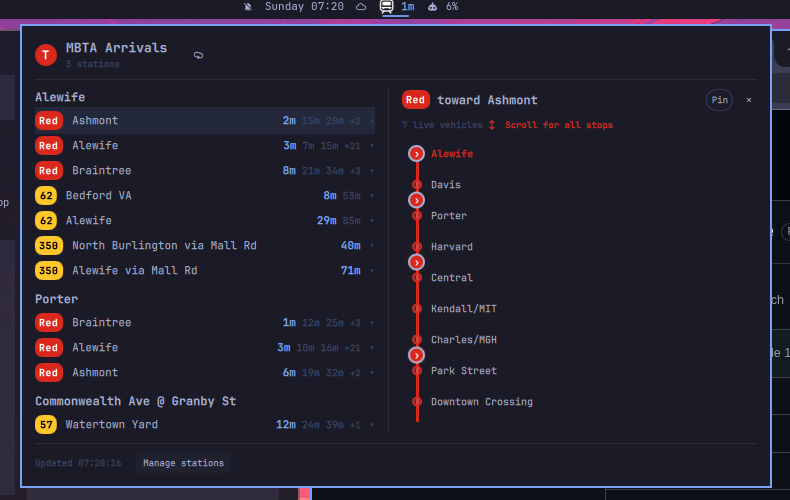
Live MBTA departure times in the Omarchy bar. A T badge with the next
departure across your stations; click it for a full departure board — subway,
Silver Line, bus, commuter rail, and ferry, with real-time countdowns and the
MBTA's official route colors.
Install
omarchy plugin add https://github.com/cgaray/omarchy-MBTA.git --enable
Usage
- Bar pill shows the next departure at any configured stop, or the exact station and destination row pinned from the panel. Middle/right click forces a refresh.
- Click the pill to open the board: departures grouped per station and route/direction. Selecting a row opens a scrollable stop-order strip with live vehicle markers; tap a marker for that vehicle's label and position.
- Pin in the line pane makes that station and destination feed the bar countdown until it is unpinned.
- Manage stations opens the picker:
- By name — search every station in the system ("Davis", "North Station").
- Near address — type your address, place, or raw
lat,lon, set a radius in km, and hit Find. When several places match the name, candidates are listed so you can pick the right one. The location is saved for future sessions; ⌖ Saved location reuses it without retyping.
- Selected stations persist in shell.json (per-widget settings) and survive restarts.
Late at night, when real-time predictions go quiet, the board falls back to scheduled times and says so in the footer.
Keyboard: Esc closes (clears the search field first), Tab switches panels,
and ↑/↓+Enter select results in the name picker.
Configure
Everything lives in the widget's settings entry:
omarchy bar move io.github.cgaray.mbta --section right
| Setting | Default | What it does |
|---|---|---|
stopIds |
Downtown Boston five | Stations on the board (the picker edits this) |
refreshSec |
60 | Prediction fetch interval (60–300s) |
perGroupCap |
3 | Countdown chips kept per route/direction row |
scheduleFallback |
true | Show scheduled times when predictions are empty |
pinnedLine |
empty | Internal station/line selection set by the panel's Pin control |
lastAddress |
empty | Your saved address, place, or coordinates for nearby stations |
The plugin uses anonymous MBTA access and does not store API credentials.
IPC
omarchy-shell io.github.cgaray.mbta toggle     # open/close the panel
omarchy-shell io.github.cgaray.mbta refresh    # force a fetch
omarchy-shell io.github.cgaray.mbta status     # JSON summary of the board
omarchy-shell shell summon io.github.cgaray.mbta '{}'
Data sources
- MBTA V3 API — predictions, schedules, stops, nearby search, trips, and vehicles. No key required for light use.
- OpenStreetMap Nominatim — address → coordinates for the "near address" flow (sends an identifying User-Agent).
Predictions are requested at startup and every 60–300 seconds (60 seconds by default). Empty predictions may use a schedule response cached for five minutes. A visible line view requests vehicles every 60 seconds; polling stops when the panel or line view is hidden. All MBTA requests share a conservative rolling budget of 12 requests per minute, below the anonymous API limit of 20; throttled line details retry without sending additional requests. Address requests only occur after the corresponding user action.
Selected stop IDs, the optional pinned line, picker mode, radius, and saved location are retained in Omarchy's widget settings. Removing the plugin may leave its widget settings in Omarchy's shell configuration; clear the saved location and pin in the panel before removal if desired.
Runtime dependencies: Python 3 and the standard library. Network responses are fetched through the bundled allowlisted adapter with endpoint-specific byte and time limits.
Development
The repo is the plugin; sync it into place after edits:
./dev-sync.sh          # rsync into ~/.config/omarchy/plugins/io.github.cgaray.mbta
omarchy-restart-shell  # cold reload (rescanPlugins can serve stale QML)
journalctl --user -t omarchy-shell   # plugin QML errors land here
./tests/run.sh         # node tests + contract checks + qmllint
Remove
omarchy plugin remove io.github.cgaray.mbta
License
MIT — see LICENSE.