
Voxtype Mode — Omarchy bar widget
Shows whether the voxtype dictation daemon is running on CPU or GPU, switches between them, and names the model each mode loads.
| State | Icon | Meaning |
|---|---|---|
| CPU mode | | Small model on the CPU. Zero VRAM held — the gaming state. |
| GPU mode | (highlighted) | Large model on the GPU. Best accuracy, ~1.5 GB VRAM resident. |
| Switching | (dimmed) | Daemon restarting and loading the new model. |
Left click opens the panel · right click switches straight away.
The panel
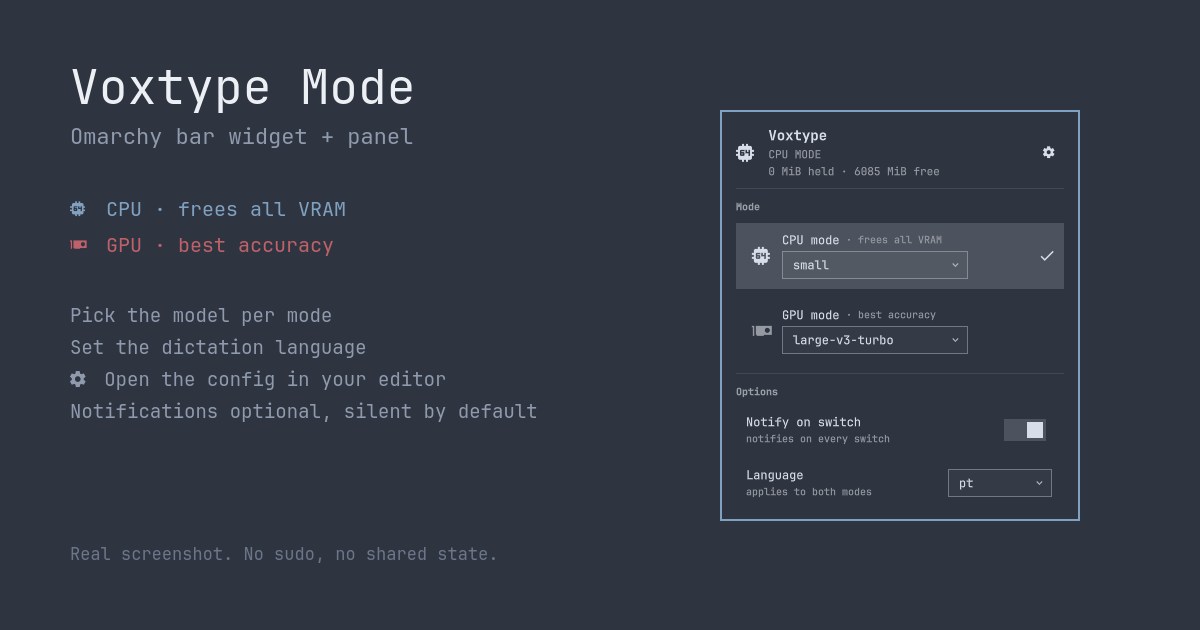
- Which mode is active, the model it loaded, and how much VRAM is held versus free.
- Both modes side by side. Click either to go there directly, rather than toggling and hoping.
- A model picker per mode. Lists the Whisper models actually installed on the machine,
so you can give CPU mode
smalland GPU modelarge-v3-turbowithout editing TOML. Changing the model of the mode you are in restarts the daemon, because voxtype only reads the model at startup — the panel does that for you rather than leaving the config and the running daemon disagreeing. With a single model installed there is nothing to choose, so the picker collapses to a plain label and the rows shrink with it. - Language, applying to both modes. One control on purpose: dictating in Portuguese on the GPU and English on the CPU would be a trap, not a feature. Per-mode language is still reachable by editing the configs.
- in the header opens the active mode's
config.<mode>.tomlin your Omarchy default editor, viaomarchy-launch-config-editor. - Notify on switch — off by default. The bar icon already reports the switch, so a notification on top of it is redundant; turn it on for when the bar is not where you are looking.
Arrows or j/k move between the mode rows and the notify toggle, enter activates, esc
closes. The dropdowns and the gear are mouse-driven.
Everything the panel shows is re-read when it opens, so a config you edited by hand is never shown stale.
Why
The voxtype daemon loads its Whisper model at startup and keeps it resident for as long as
it runs — there is no idle-unload setting. On an 8 GB card, large-v3-turbo is ~19% of
your VRAM gone before a game even starts. Stopping the service frees it but costs you
dictation entirely.
This widget is the one-click front end for switching between the two, without giving up dictation in either state.
Requirements
This widget is a front end. It does nothing on its own — it needs the voxtype-mode
CLI on your PATH:
| Dependency | Why | License |
|---|---|---|
voxtype-mode, recent enough to support models and set-model |
Provides every command this widget runs: status --json, models --json, toggle, cpu, gpu, set-model, set-language, config |
MIT |
| voxtype | The dictation daemon being switched | see upstream |
| Omarchy Quattro (4.x) | The Quickshell bar host that loads the plugin | — |
nvidia-smi is optional; without it the VRAM lines are simply omitted.
Install the CLI first:
git clone https://github.com/Chernicharo/voxtype-mode ~/personal/voxtype-mode &&
  git -C ~/personal/voxtype-mode checkout --detach de9c2ef95addd6df889d274b61dee6b22956ee04 &&
  ~/personal/voxtype-mode/install.sh
That is v1.0.0 of the CLI, and the commit is pinned rather than left on main on purpose:
install.sh executes code from that clone, and a branch or a tag can be moved after anyone
has reviewed it. The single && chain is part of the same guarantee — if the checkout fails,
the installer never runs against whatever the branch happens to point at.
To follow the CLI later, run git checkout main && git pull in that clone and re-run
./install.sh — a deliberate step, rather than something that changes under you.
Verify it before installing the widget — if both of these work, so will the panel:
voxtype-mode status --json    # needs a "models" object and a "language" field
voxtype-mode models           # the models installed on this machine
Install
omarchy plugin add https://github.com/Chernicharo/omarchy-plugin-voxtype-mode --enable
omarchy restart shell
Run interactively (no --yes) and Omarchy asks which bar section to put it in, defaulting
to right — the defaultSection this plugin declares. To place or move it afterwards:
omarchy bar move io.github.chernicharo.voxtype-mode --section right
omarchy restart shellis not optional. The hot reload that followsplugin addrenders the icon but does not register the plugin's IPC target, so the keybinding andomarchy-shellcalls below stay dead until the shell has been started once with the plugin present. The same applies after editing the QML.
Remove
omarchy plugin disable io.github.chernicharo.voxtype-mode
omarchy plugin remove io.github.chernicharo.voxtype-mode
Removing the widget does not touch the voxtype-mode CLI, your voxtype configs, or the
active mode. Uninstall the CLI separately with its own ./uninstall.sh.
Keybinding
Two routes, so you can bind the switch, the panel, or both:
| Call | Does |
|---|---|
omarchy-shell io.github.chernicharo.voxtype-mode toggleMode |
Switch CPU ⇄ GPU |
omarchy-shell io.github.chernicharo.voxtype-mode toggle |
Open/close the panel |
omarchy-shell io.github.chernicharo.voxtype-mode setMode gpu |
Go to a specific mode |
omarchy-shell io.github.chernicharo.voxtype-mode toggleNotify |
Flip the notification setting |
omarchy-shell io.github.chernicharo.voxtype-mode setModel gpu small |
Change a mode's model |
omarchy-shell io.github.chernicharo.voxtype-mode setLanguage en |
Change the dictation language |
omarchy-shell io.github.chernicharo.voxtype-mode editConfig gpu |
Open that config in your editor |
toggle means open/close the popup, matching every other Omarchy panel — the mode switch
is toggleMode.
Suggested keys: SUPER + CTRL + SHIFT + X to switch, SUPER + CTRL + ALT + X for the
panel. Omarchy already keeps voxtype on X (SUPER + CTRL + X toggles dictation, F9
is push-to-talk), so these read as "toggle how dictation runs" on the same key. Neither
combo is claimed by stock Omarchy.
In ~/.config/hypr/bindings.lua:
o.bind("SUPER + CTRL + SHIFT + X", "Toggle voxtype CPU/GPU mode",
  [[bash -c 'omarchy-shell io.github.chernicharo.voxtype-mode toggleMode 2>/dev/null || notify-send -a voxtype "voxtype" "$(voxtype-mode toggle 2>&1)"']])

o.bind("SUPER + CTRL + ALT + X", "Voxtype mode panel",
  [[omarchy-shell io.github.chernicharo.voxtype-mode toggle]])
The || fallback covers the window described above, and any session where the shell is not
running: it calls the CLI directly and notifies, since there is no widget to report
anything.
Widget, keybinding and terminal all end up in the same CLI, so they cannot disagree about the current mode.
Behaviour notes
- The widget is a reader, not the source of truth. The mode is also switchable from a
keybinding and from the terminal, so it polls
voxtype-mode status --jsonevery 30 seconds and refreshes immediately after any switch it starts. - It hides itself when the CLI is missing rather than showing a broken icon, and collapses to zero width so it leaves no gap in the bar.
- Switching is not instant. The daemon restarts and waits for the model to load; the icon dims to for the duration and further switches are ignored until it completes — deliberately, so a double press cannot queue two switches that cancel out.
- No sudo, no system files, no shared state. Everything runs through the systemd user
service, and the active mode lives in
$XDG_RUNTIME_DIR(per-user, wiped on logout) — not in/tmp. - Settings persist in two places, by design:
notifyOnSwitchis a widget setting and lives in~/.config/omarchy/shell.json; model and language are voxtype's own settings and are written to~/.config/voxtype/config.{cpu,gpu}.toml, only ever in response to an explicit choice in the panel.
License
MIT — see LICENSE.
Not affiliated with, sponsored by, or endorsed by Omarchy, 37signals, or voxtype.