
Share Cloak
One key builds a presenter desktop. Marked windows vanish onto special:cloak, notifications pause, a clean theme plate covers the wallpaper, and an ON AIR frame stays up until you uncloak.
This is an Omarchy shell plugin (service + overlay + bar-widget). It runs inside the long-lived omarchy-shell process. It does not start a second Quickshell instance.
Auto-cloak is on by default: start a full-output share (Zoom / Meet / OBS / wf-recorder) and the desktop dresses itself.
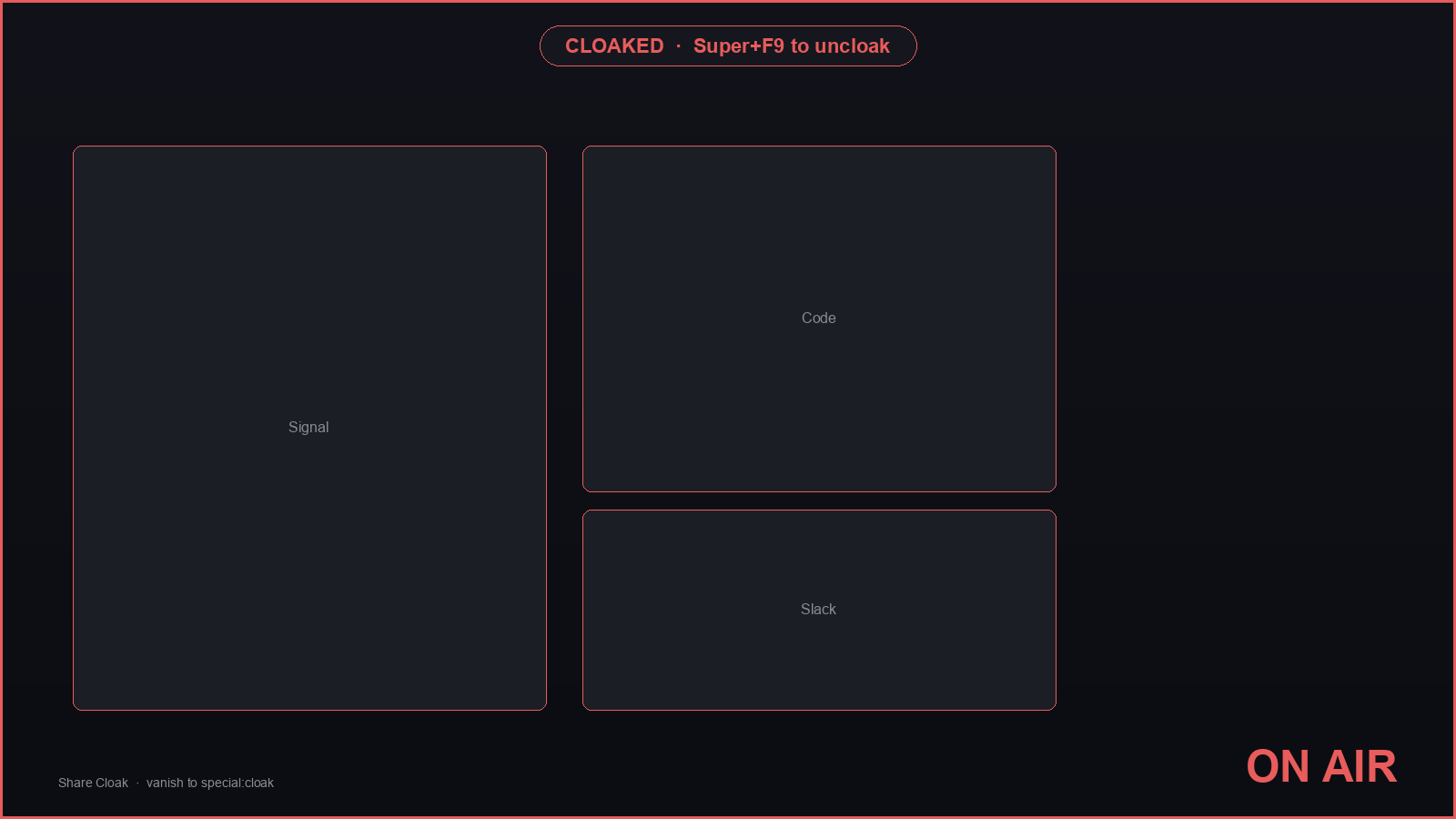
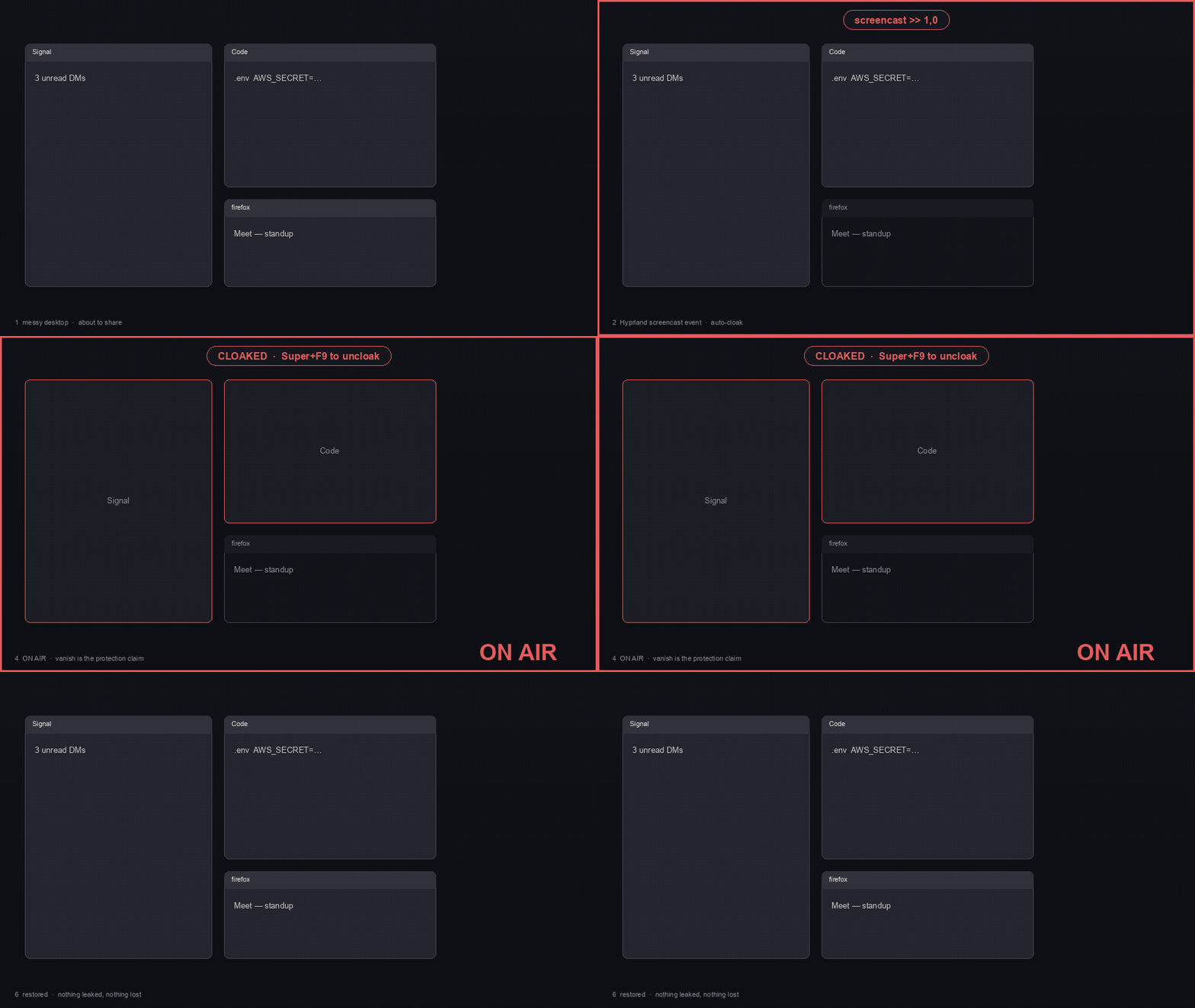
The GIF is a constructed six-beat storyboard of the real sequence (messy desktop → screencast>>1,0 → vanish to special:cloak → ON AIR → restore). It is not a live Hyprland capture from this machine.
Install
omarchy plugin add https://github.com/ccdwyer/omarchy-share-cloak.git --enable
Then, on the Omarchy machine, build the optional helper (pw-dump parsing + 0600 session files). There is no committed Linux binary from this Mac — ./build.sh compiles it on the target, and GitHub Actions (.github/workflows/ci.yml) publishes a Linux cloak-probe artifact. The plugin QML works without the binary.
~/.config/omarchy/plugins/io.github.chris.share-cloak/build.sh
Install is the git clone above. ./scripts/pack-plugin.sh can write a gitignored dist/share-cloak.git.tar.gz from HEAD for a one-off copy; that tarball is not committed (a checked-in archive goes stale). GitHub Actions uploads a fresh pack as a CI artifact.
Put the chip on the bar if --enable did not:
omarchy bar put io.github.chris.share-cloak --section right
Reload plugins if the shell was already running:
omarchy-shell shell rescanPlugins
Usage
| Combo | Action |
|---|---|
| Super+F9 (opt-in) | Toggle cloak / uncloak (also restores an interrupted session) |
| Super+F10 (opt-in) | Mark the focused window's class (stays marked forever). Tiled windows of that class vanish too. |
| Bar chip, left click | Same as Super+F9 |
| Bar chip, right click | Open the mark list |
| Bar Set hotkey | Opt-in: writes Super+F9 / Super+F10 if those combos are free |
| Bar hotkeys chip, right click | Remove this plugin's bindings.lua block |
Hotkeys are opt-in from the bar. The plugin never writes ~/.config/hypr/bindings.lua on first load. If no Share Cloak hotkey is installed, the bar chip offers Set hotkey. Only that explicit click writes Super+F9 / Super+F10, or Super+Alt variants when the preferred combo is already occupied (including stock Omarchy hotkeys). Super+F9 is fine next to voxtype PTT (F9 without Super). It never hl.unbinds someone else's key. After a successful write it notifies with the keys it assigned. When hotkeys are set, the bar shows them; right-click removes this plugin's marked o.bind block. Previously auto-installed hyprctl keyword bind Super+F9/F10 leftovers are still torn down on disable when they are exclusively this plugin's expected command.
Cloak toggle/mark hit the plugin's IpcHandler (the service). omarchy-shell shell call … toggle would invoke the overlay UI, not cloak. The handler requires a third argument (empty string when unused):
omarchy-shell io.github.chris.share-cloak toggle ''
omarchy-shell io.github.chris.share-cloak markFocused ''
If a bind collides with one you already have, the bar chip still works. Occupied preferred combos are skipped or replaced with Super+Alt variants.
What cloak does
- Snapshot windows, workspaces, floating geometry, special workspaces, and notification mode to
~/.local/state/share-cloak/session.json. Every mutation is recorded with ownership. - Marked floating windows move to
special:cloak. Marked tiled windows stay in the layout: Hyprlandno_screen_shareblacks them out of the screencast,opacity 0hides them on your display,no_focuskeeps them from eating keys. Siblings do not reflow. Uncloak reverses those props. Cover cards can draw over the empty tile. - Catch new windows from marked apps the same way (tiled in place, floating to
special:cloak). - Optionally dim unmarked windows via per-address
set_prop opacity(nowindowrulev2accumulation). - Cover the wallpaper with an owned below-windows layer plate (theme background + a slight gradient). Restore = destroy the surface.
- Pause notifications with mako only when a configured suppression mode exists (
[mode=…]withinvisible=1orinhibit=1). Guessed names are never added. After-a, Cloak re-readsmakoctl modebefore claiming notifications are managed. Uncloak removes only a mode this plugin added. - Draw a 3 px ON AIR frame and a
CLOAKED · Super+F9 to uncloakchip on the overlay layer.
Uncloak replays owned mutations in reverse, verifies vanished floating windows are off special:cloak, and lists anything unrestorable in a toast. If hyprctl or a restore batch fails, session.json is kept and Super+F9 retries. User changes made while cloaked (you moved a vanished floating window off special:cloak) are preserved.
Bar chip states: cloak (idle) / CLOAK (armed, watching for a share) / ON AIR.
Honest limitations
- Tiled hide is in-place. Hyprland 0.56
no_screen_sharedraws a black rectangle in the screencast instead of the window buffer. Localopacity 0hides the tile without leaving the layout. Cover cards are optional placeholders over that hole. - Floating windows still vanish onto
special:cloak. That does not reflow tiles. - Window-share bypass. If you share a single window, Cloak cannot hide that window's own pixels, and layer surfaces (plate, ON AIR frame, cover cards) are not visible to viewers. The
screencastevent's owner field detects this: Cloak warnsWINDOW SHARE — Cloak protects full-screen sharesand still runs DND + the workspace guard + vanish of other marked windows. Demo with a full-output share. - One-frame flash on unsafe workspace switches. While cloaked, a workspace event whose target is not in the safe list (the workspace(s) visible at cloak time) covers the output immediately. Safe-list switches never flicker. A one-frame flash of the unsafe workspace is possible; the zero-frame pattern is: share one output, keep unsafe workspaces on the other.
- Notifications are mako-only. No dunst path. Omarchy does not ship mako, so cloak continues with
notifications: unmanagedinstead of stalling. Only a mako config section that actually suppresses notifications is used. If none is configured, or add+re-read fails, the chip saysnotifications: unmanaged. A suppression mode the user already had on is left alone. Missingmakoctlmust not freeze the bar chip or Super+F9/F10. - Helper binary is optional.
bin/cloak-probeis built bybuild.sh. If it is missing, QML falls back tocompat/cloak-probe.shand, for share corroboration, to an in-processpw-dumpJSON parse. Auto-cloak's primary trigger is Hyprland'sscreencastsocket2 event, not the helper. - Keybinds are opt-in from the bar. Super+F9 / F10 are not written on first load. Set hotkey on the bar chip appends a marked
o.bindblock to~/.config/hypr/bindings.luaafter checkinghyprctl -j binds. Occupied combos (including stock Omarchy hotkeys) are skipped or replaced with Super+Alt variants. Neverhl.unbindof someone else's shortcut. When hotkeys are set, the bar shows them and right-click removes that block. Previously ownedhyprctl keyword bindSuper+F9/F10 leftovers are still torn down on disable via a detached helper (compat/unbind-owned.sh) that re-reads live binds and unbinds only exact owned exec commands. Mixed plugin+user or same-plugin/different-method combos are left untouched. Writing or removing thebindings.luablock and keyword teardown needpython3(Omarchy ships it). The bar chip is always the control. - ON AIR frame tracks the layer-shell output the overlay landed on (typically the focused / primary screen). The
screencastevent does not name which monitor is shared. - Crash mid-cloak leaves windows on
special:cloak. On the next shell start, Share Cloak offers one-key restore (Super+F9) rather than mutating the layout unattended.
Settings
These keys are read only from the bar-widget layout entry in shell.json. The same keys on a plugins[] service entry are ignored, so load order cannot fight the widget.
| Key | Default | Meaning |
|---|---|---|
autoCloak |
true |
Cloak when a share starts |
workspaceGuard |
true |
Cover workspaces that were not visible at cloak time |
dimOthers |
true |
setprop alpha 0.85 on unmarked windows |
coverCards |
true |
Cosmetic cards at hidden windows' last geometry (full-output only) |
Marks (class + title regex) persist in ~/.local/state/share-cloak/marks.json. They are a growing list from Super+F10 / the popup, not widget settings.
Tests (off-device)
node tests/run.js
sh tests/probe-fallback.test.sh
sh scripts/omarchy-plugin-validate.sh
sh tests/live-roundtrip.sh          # Omarchy only: full-set hyprctl round-trip (not run in GitHub CI)
# optional:
./scripts/pack-plugin.sh            # gitignored dist/ tarball from HEAD; not the install path
# optional, needs cargo:
cargo test --manifest-path src/cloak-probe/Cargo.toml
Remove
Hotkeys are opt-in from the bar. Strip this plugin's marked o.bind block from ~/.config/hypr/bindings.lua and uninstall the plugin (run the helper first, while it is still on disk; or right-click the hotkeys chip while the plugin is loaded):
python3 ~/.config/omarchy/plugins/io.github.chris.share-cloak/compat/install-binds.py --remove io.github.chris.share-cloak
omarchy plugin remove io.github.chris.share-cloak
If the helper is already gone, delete the -- BEGIN io.github.chris.share-cloak … -- END io.github.chris.share-cloak section from ~/.config/hypr/bindings.lua by hand. Owned leftover hyprctl keyword bind Super+F9/F10 combos are torn down when the service unloads.
License
MIT. See LICENSE.