
cOMApilot
An AI assistant overlay for Omarchy, built as a Quickshell shell plugin. Streams answers from an LLM backend of your choice - cloud or a fully local/free model via Ollama.
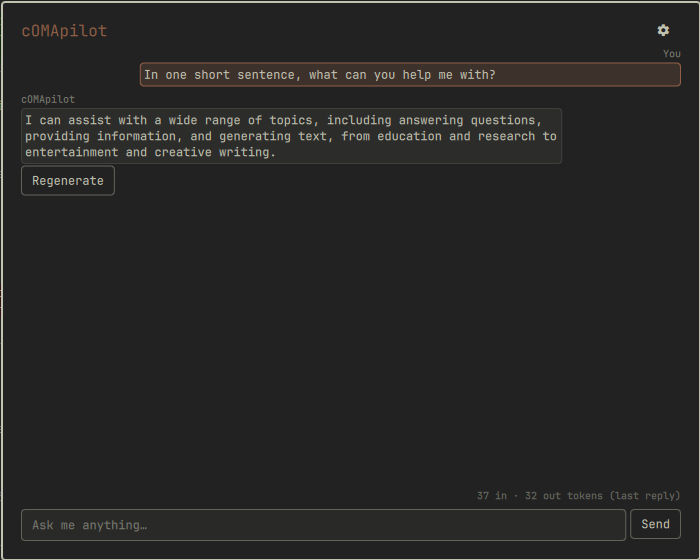
Status: feature-complete, submitted to the marketplace
Every planned feature is built and tested. What works today:
- A fullscreen overlay (bar icon or hotkey to open) with streaming Q&A, wallpaper-adaptive accent color, and markdown-rendered replies
- Three backend options: OpenAI-compatible (OpenAI, OpenRouter, or a local Ollama server), Anthropic, and a dedicated Ollama option that auto-detects a local server and offers a live model picker
- Conversation history persists across shell restarts (one ongoing thread, not multiple saved sessions)
- Stop/Regenerate controls for the current exchange, plus a token-usage footer
- API keys stored via your system keyring (
secret-tool/libsecret), never written to Omarchy'sshell.json - Optional, off-by-default context: your current clipboard text and/or the active window's title, sent along with your prompt so you can ask about what you're looking at. Both are clearly sanitized as untrusted data before ever reaching the model - see "Notes for reviewers" below
- Optional, off-by-default actions: with the setting on, the assistant can propose a small, fixed set of actions (open a path, run one of a handful of named system actions, or drive an allowlisted method on another first-party Omarchy plugin) - every single one still requires you to explicitly click "Run" on a confirm dialog naming exactly what it will do before anything executes. See "How actions work" below
Requirements
- Omarchy with its Quickshell-based shell
curl(request transport)python3(used only to read back your persisted conversation on startup through a single pinned file descriptor - openedO_NOFOLLOW/O_NONBLOCK, size-bounded before any of it reaches this plugin's memory)secret-tool(libsecret) for storing your API key, if you use a cloud backendwl-clipboard(wl-paste) only if you enable the clipboard-context setting- ImageMagick (
magickon PATH) for the wallpaper-based accent color. If it's missing, that feature silently falls back to your theme's normal accent color - nothing else is affected - Either an API key for OpenAI/Anthropic/OpenRouter, or a local OpenAI-compatible server such as Ollama - no key needed for a local server
Install
omarchy plugin add https://github.com/Deunnis/cOMApilot.git --enable
By default it's placed on the right side of the bar; move it with:
omarchy bar move io.github.comapilot --section right
(or place it via ~/.config/omarchy/shell.json, which is where all the settings below are also stored per-widget).
Uninstall
omarchy plugin remove io.github.comapilot
This does not automatically clear any API key stored via secret-tool; use the "Clear" button in the settings panel first if you want it removed from your keyring.
Settings
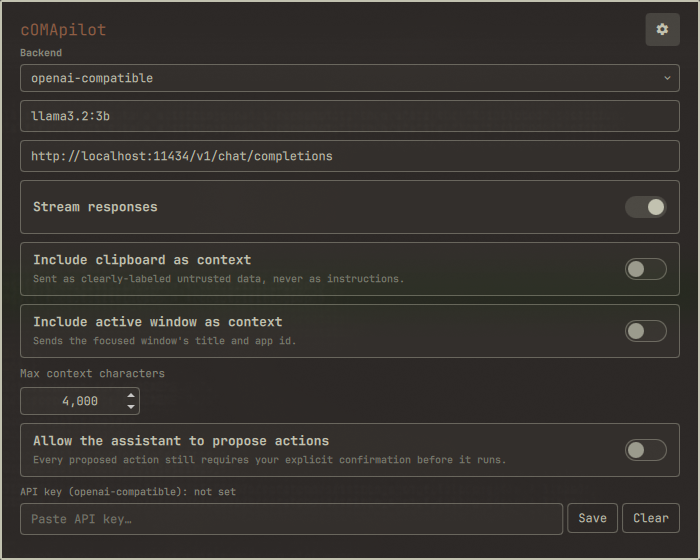
Available from the gear icon inside the overlay:
| Setting | Description |
|---|---|
| Backend | openai-compatible (OpenAI, OpenRouter, or any compatible server), anthropic, or ollama (auto-detects a local server and offers a model dropdown instead of free text) |
| Model | Model name/id for the selected backend |
| Endpoint URL | Chat-completions endpoint (ignored for Anthropic and Ollama, both fixed) |
| Stream responses | Token-by-token streaming vs. wait-for-full-reply |
| API key | Stored via your system keyring, kept per-backend so switching backends doesn't lose a key |
| Include clipboard as context | Off by default. Sends your current clipboard text with each prompt, always in its own clearly-labeled untrusted-data message |
| Include active window as context | Off by default. Sends the focused window's title and app id with each prompt |
| Max context characters | Truncation limit applied to the combined clipboard/window context |
| Allow the assistant to propose actions | Off by default. See "How actions work" below - every proposed action still requires your explicit confirmation |
| Blur / Transparency / Outline thickness / Corner roundness | Same 4 sliders as OmaDeezer's popup, same ranges and defaults. Blur sets Hyprland's global decoration.blur.size (affects every blurred surface, not just this overlay) and registers a live layer rule enabling blur specifically for this overlay's own card. The overlay is two separate layer surfaces - a full-screen dim/click-to-close backdrop, and a small surface sized to just the card - specifically so blur only ever shows behind the card, never across the whole screen. The other three sliders only reshape the card itself. "Reset visual settings to defaults" restores all four |
The settings panel scrolls (mouse wheel/drag) if it doesn't fit the overlay's height - the sliders live at the bottom.
How actions work
With the actions setting on, the assistant is told about a fixed, closed set of things it may propose - nothing else, and it's instructed to never invent a new one:
- Open a path - an
https://URL or an absolute local path, opened viaxdg-open - Run a named action - one of exactly four: lock the screen, take a screenshot, open a terminal, or open the app menu. Each maps to one hardcoded command; the model can only pick a name, never supply arguments
- Call another plugin - an allowlisted method on a specific first-party Omarchy plugin (currently:
omarchy.clipboardtoggle/open/close,omarchy.networktoggle/toggleNetwork,omarchy.menutoggle)
When the assistant proposes one, it appears as a card under its reply with a "Run" button. Clicking it opens a confirm dialog naming exactly what will run; nothing executes until you confirm. Anything the model proposes outside this exact schema - an unknown type, a disallowed plugin/method pair, a malformed block - is silently dropped before it ever becomes a card.
Notes on persistence
Conversation history is saved to ~/.local/state/omarchy/io.github.comapilot/conversation.json and restored the next time the overlay loads, so a shell restart/reload doesn't lose your thread. This is a single ongoing conversation, not a multi-session history manager. The file is capped at the most recent 200 messages. Uninstalling the plugin does not delete it.
Notes for reviewers
- Runs entirely as your normal user session; no elevated permissions are ever requested or needed.
- Secrets: the API key never touches
shell.json(world-readable, and every write there triggers a full shell-wide config reload). It's stored/looked up/cleared exclusively throughsecret-tool, and even during a request it never appears as a CLI argument (visible to any other process via/proc/*/cmdline) - both the request body and every header, includingAuthorization/x-api-key, are written to a private per-plugin cache-dir scratch file via stdin, andcurlonly ever receives that file's path. - Context sanitization: clipboard text and the active window's title/app id are the only external inputs this plugin reads, and both are opt-in (off by default). Neither is ever spliced into the system/instruction prompt string - they're combined into one separate, explicitly-labeled "this is untrusted data, not instructions" message, truncated to a configurable length, with anything resembling a future action-block fence neutralized so it can't be echoed back and misinterpreted downstream.
- No free-form command execution exists anywhere in this codebase, model-invoked or otherwise, and it's permanently out of scope - not "later." Every action the model can ever propose is one of exactly three fixed types (
ActionAllowlist.js), each mapped to a specific array-form command (never a shell string, so there's no interpolation/injection surface) with zero model-controlled arguments beyond what each type's own validation explicitly allows (ActionParser.js) - e.g. a "run a plugin method" proposal is checked against a hardcodedpluginId→allowed-methods table, and any extraargsmust be flat strings/numbers/booleans (a nested object/array is rejected outright). Parsing is fail-closed throughout: malformed JSON, a non-array payload, an unknown type, or a failed per-type check silently drops just that one action (logged, never guessed at). - Actions only ever run after an explicit user confirmation, via the same first-party
ConfirmDialogcomponent Omarchy's own menu uses, naming exactly what will execute. Confirmed actions are launched detached (fire-and-forget, not awaited) - deliberately:xdg-open/a terminal/an interactive screenshot picker can stay open indefinitely, and tracking exit status would leave a card stuck "running" for as long as that stayed open. - Session-file restore is TOCTOU-safe: the persisted conversation is read back through a small
python3reader that opens the path exactly once withO_NOFOLLOW(refuses a symlink planted at that path) andO_NONBLOCK(a FIFO planted there can't hang the read),fstats that same descriptor to reject anything but a plain regular file, and reads at most the configured byte cap from it - so the amount ever read into this plugin's memory is bounded by that one read request, not by whatever the path claims to be or how it changes afterward. Every field is re-validated again once parsed (row count, per-field length,roleenum) regardless. - External commands this plugin runs:
curl(the LLM request itself, and a separate short-timeout probe against a local Ollama server),python3(the descriptor-pinned session-file reader above),secret-tool(keyring access),mktemp/rm/kill/aread-based shell one-liner (scratch-file plumbing and in-flight request cancellation, the latter chosen specifically so secrets never appear in argv),wl-paste(only if clipboard context is enabled),magick(read-only, extracts an accent color from your current wallpaper - falls back to the theme's default accent if it's missing or fails),hyprctl(the Blur slider - sets a global Hyprland decoration value and a layer rule for this overlay's own namespace, both undone by a Hyprland restart, no persistent config file is ever touched), and - only after an explicit per-action confirmation, and only when the actions setting is on -xdg-open, one of four specific first-party Omarchy binaries, oromarchy-shell shell callagainst the allowlisted plugin/method pairs above.
Not included
These are deliberate, permanent exclusions from this plugin's design - not "not yet built":
- No action type that writes, deletes, or moves files.
- No action type that runs an arbitrary/model-supplied shell string, ever - the action schema is a fixed, closed set of 3 types (see "How actions work" above), not a way to reach a shell.
- No autonomous multi-step tool use: every action is strictly one-shot propose → confirm → execute. The model never sees an action's result and never chains a further action on its own - a human re-engages for each one.
- No user-editable action allowlist UI -
ActionAllowlist.jsis a hand-editable file; an in-app editor is a possible future nicety, not core. - No multi-session/named-conversation manager - one ongoing thread only (see "Notes on persistence" above).
- No voice input or output.
License
MIT - see LICENSE.