
Query Menu for Omarchy
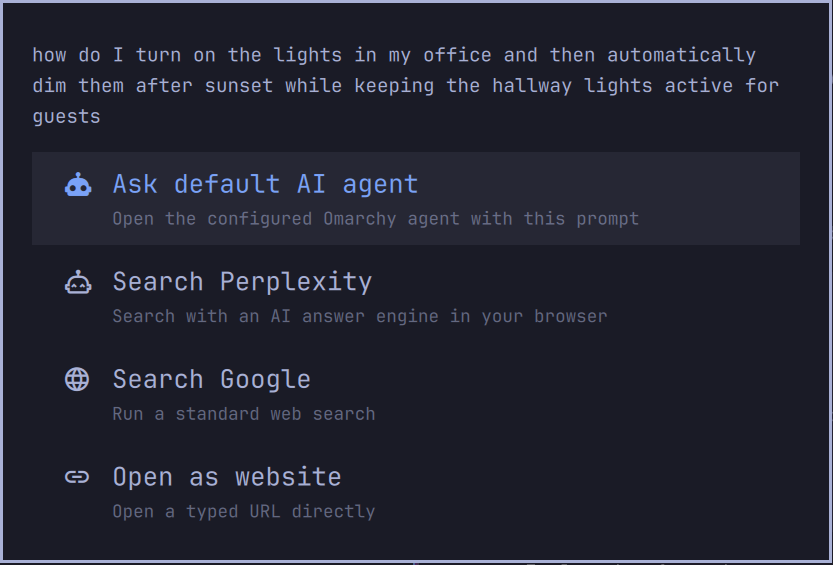
Turn the Omarchy launcher into a keyboard-first command palette for AI prompts, answer engines, normal web search, and direct URLs.
Features
- Keeps Omarchy's application, command, and settings search.
- Shows four actions when text does not match a normal menu item:
- ask the configured default Omarchy AI agent;
- search a configurable AI answer engine;
- run a configurable web search;
- open the text as a direct URL.
- Expands long questions and wraps them over a configurable number of lines.
- Opens browser actions through
xdg-open, matching normal link behavior. - Provides settings from
Setup > Search & AIand by right-clicking its bar icon.
Requirements
- Omarchy 4.0 or newer with the Quattro shell.
jqandxdg-open, both included with Omarchy.- An Omarchy default agent for the agent action. Configure one under
Setup > Defaults > Agent.
There are no downloaded dependencies, background daemons, privileged commands, or installation hooks. Like every Omarchy shell plugin, this code runs unsandboxed as your user inside the long-lived shell process.
Installation
Install and enable the plugin:
omarchy plugin add https://github.com/cryptobredda/omarchy-query-menu.git --enable
To use it on SUPER + SPACE, add this override to
~/.config/hypr/bindings.lua:
hl.unbind("SUPER + SPACE")
o.bind(
  "SUPER + SPACE",
  "Query menu",
  [[omarchy-shell shell toggle io.github.cryptobredda.query-menu '{"menu":"root"}']]
)
Apply it with:
hyprctl reload
Leave the built-in omarchy.menu plugin enabled. Query Menu reads Omarchy's
standard menu definitions, while its settings flow uses the built-in text
input surface.
Usage
- Press
SUPER + SPACE. - Type an application, Omarchy action, question, search, or URL.
- For unmatched text, choose an action with the arrow keys or mouse.
- Press
Enter.
Ctrl + Enter sends the current text directly to the configured normal web
search provider.
Configuration
Open Setup > Search & AI inside Query Menu, or right-click its bar icon.
Settings are stored on the plugin's entry in ~/.config/omarchy/shell.json.
Configurable values include:
- agent option label and prompt executable;
- AI search label and URL template;
- normal search label and URL template;
- direct-website label and URL opener;
- expanded menu width and maximum wrapped lines.
Use {query} in provider URL templates. Examples:
https://duckduckgo.com/?q={query}
https://www.perplexity.ai/search?q={query}
https://grok.com/?q={query}
https://search.brave.com/search?q={query}
The agent and browser settings accept an executable name, not a shell command line. Use a wrapper script if your custom executable needs fixed arguments.
Removal
Remove the SUPER + SPACE override from ~/.config/hypr/bindings.lua, reload
Hyprland, then uninstall the plugin:
hyprctl reload
omarchy plugin remove io.github.cryptobredda.query-menu --yes
The stock Omarchy SUPER + SPACE binding will be active again after the
override is removed and Hyprland reloads.
Attribution
This plugin is derived from Omarchy's MIT-licensed first-party menu plugin and retains its menu model and visual behavior. Query actions, provider settings, text wrapping, bundled launch scripts, and standalone plugin integration are the modifications provided by this repository.
License
MIT. See LICENSE.