
Keybinding Guide
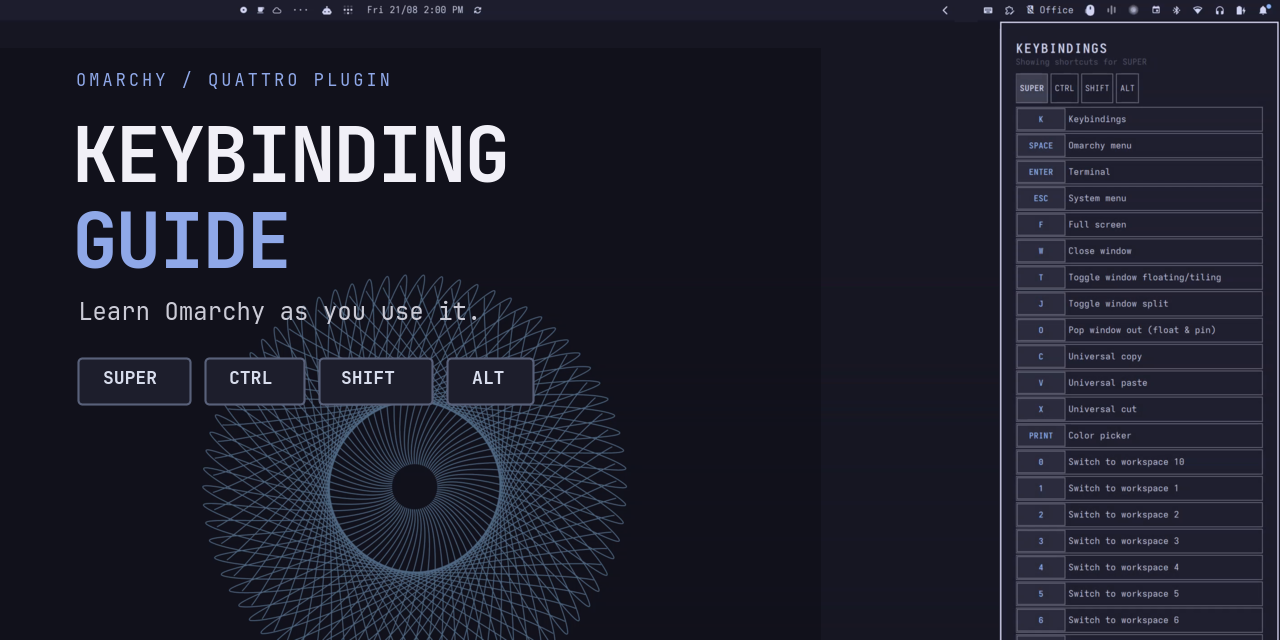
Keybinding Guide is an Omarchy Shell plugin that makes shortcuts easier to discover while you work. Hold Super, Ctrl, Shift, or Alt briefly and a compact guide appears at the right edge with only the bindings for that exact modifier combination.
Add or release a modifier and the list updates immediately. Move the pointer over the guide and use the Up and Down arrow keys to scroll one row at a time. While the pointer is over the guide, only conflicting arrow and pointer bindings are paused; every other shortcut remains available. The paused bindings resume immediately when the pointer leaves. The guide never requests keyboard focus or resizes the workspace, and releasing every modifier dismisses it. Omarchy's searchable keybinding menu remains unchanged: Super + K and Learn > Keybindings continue to use the built-in interface.
The plugin reads the bindings Omarchy exposes from the active Hyprland configuration, including custom bindings. On Omarchy builds with the structured keybinding API, clickable rows invoke their registered dispatcher directly rather than synthesizing a keypress, and active submaps are respected. Stock Quattro remains fully usable as a read-only guide through its existing printable keybinding inventory.
Demo

The small keystroke display in the recording is a capture aid only. It is not included with, installed by, or required by Keybinding Guide.
Requirements
- Omarchy Quattro.
jq,lua,flock, andxkbcli, provided by a standard Omarchy installation.
The plugin does not patch Omarchy during installation. Structured inventory and direct row actions are detected automatically when the running Omarchy version provides them; otherwise rows are reference-only while modifier filtering and hover-scoped arrow-key scrolling continue to work. Pointer input is accepted only over the visible guide. Existing Super mouse bindings remain active elsewhere and are paused while the pointer is over the guide.
Install
OMARCHY_SHELL_IPC_TIMEOUT=15s omarchy plugin add https://github.com/ctl0v0/omarchy-keybinding-guide.git --enable
The longer one-command timeout gives Omarchy's shell time to load the plugin's QML during its first enable; it does not change persistent shell settings. Enabling the plugin adds its keyboard icon to the bar with Learning Mode on by default. It does not change Super + K or Omarchy's Learn menu.
Learning Mode needs a passive Hyprland key-state bridge. Replace the existing require("default.hypr.omarchy") line in ~/.config/hypr/hyprland.lua with this guarded loader:
local guide_root = (os.getenv("HOME") or "") .. "/.config/omarchy/plugins/io.github.ctl0v0.keybinding-guide/hypr"
local function load_guide_file(name)
  local path = guide_root .. "/" .. name
  local file = io.open(path, "r")
  if file then
    file:close()
    dofile(path)
  end
end

load_guide_file("keybinding-guide-preload.lua")
require("default.hypr.omarchy")
load_guide_file("keybinding-guide.lua")
Reload Hyprland to start the modifier-key bridge:
hyprctl reload
The bar icon toggles Learning Mode. A crossed-out keyboard means it is disabled; click the icon again to resume the guide when modifier keys are held.
Remove
Disable Learning Mode before removing the repository:
~/.config/omarchy/plugins/io.github.ctl0v0.keybinding-guide/bin/keybinding-guide-toggle off
Replace the guarded Hyprland loader block above with require("default.hypr.omarchy") (or leave it in place, where it safely becomes a no-op), run hyprctl reload, then uninstall the plugin:
omarchy plugin remove io.github.ctl0v0.keybinding-guide
rm -f ~/.local/state/omarchy/toggles/keybinding-guide{,-disabled,.lock}
The plugin stores an explicit disabled preference at ~/.local/state/omarchy/toggles/keybinding-guide-disabled. Removing it after uninstall restores the default-on state for a future installation.
Development
Validate the package and run its tests from the repository root:
omarchy plugin validate .
./test/all