
Omashelf
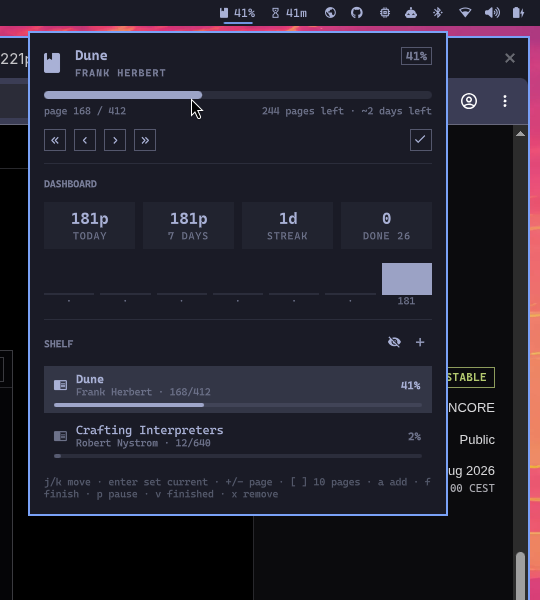
A reading tracker for the Omarchy shell. The bar shows how far you are into the book you're reading; the popup is a small reading dashboard plus your whole shelf.
What it does
- Bar pill — book icon plus the remaining/completed percentage of your current read. Scroll it or right/middle-click it to log a page without opening anything.
- Now reading — title, author, a progress track, page count, pages left, and an estimated "~N days left" based on your recent pace.
- Mini dashboard — pages today, pages over 7 days, current reading streak, and books finished this year, with a seven-day bar chart.
- Shelf — every book with its own progress track. Finished books are hidden until you ask for them.
- Add books from the panel, or from the bundled
omashelfCLI.
Everything is stored in one JSON file that the widget watches, so the panel and the CLI stay in sync without a restart.
Install
omarchy plugin add https://github.com/daniel-felipe/omarchy-plugin-omashelf.git
omarchy plugin enable io.github.daniel-felipe.omashelf
Plugins land disabled so you can read the source first. To move the pill:
omarchy bar move io.github.daniel-felipe.omashelf --section right
Remove
omarchy plugin disable io.github.daniel-felipe.omashelf
omarchy plugin remove io.github.daniel-felipe.omashelf
Your library file is left alone; delete
~/.local/state/omarchy/omashelf/library.json if you want it gone too.
Keyboard
Inside the panel:
| Key | Action |
|---|---|
j / k (or arrows) |
Move through the shelf |
Enter |
Make the highlighted book the current read |
+ / - |
Log one page forward/back |
] / [ |
Log a big step (10 pages by default) |
a |
Add a book |
f |
Mark the highlighted book finished |
p |
Pause/resume the highlighted book |
v |
Show or hide finished books |
x |
Remove — press twice, the first press only arms it |
Esc |
Close |
Page keys act on the highlighted book once you've moved the cursor, and on your current read before that; the controls row names the book when the two differ.
Mouse: click a row to make it current, right-click to jump a big step forward, middle-click to go back, scroll for single pages.
CLI
bin/omashelf edits the same library file:
omashelf add "Dune" 412 "Frank Herbert"
omashelf read dune 30        # log 30 pages
omashelf page dune 168       # set the exact page
omashelf finish dune
omashelf list
omashelf stats
Put it on your PATH if you want it handy:
ln -s ~/.config/omarchy/plugins/io.github.daniel-felipe.omashelf/bin/omashelf ~/.local/bin/omashelf
Settings
Configured per bar entry in ~/.config/omarchy/shell.json, or through
Setup > Plugins.
| Key | Default | What it does |
|---|---|---|
barLabel |
percent |
percent, title, both, or icon |
barTitleLimit |
18 |
Max title characters shown in the bar |
pageStep |
10 |
Pages moved by ]/[ and the « / » buttons |
libraryPath |
(blank) | Alternate library file |
{ "id": "io.github.daniel-felipe.omashelf", "barLabel": "both", "pageStep": 25 }
IPC
omarchy-shell omashelf toggle
omarchy-shell omashelf status     # "Dune — page 168/412 (41%) · ~2 days left"
omarchy-shell omashelf advance 20 # log 20 pages on the current book
Library format
~/.local/state/omarchy/omashelf/library.json
{
  "version": 1,
  "books": [
    {
      "id": "bk-...",
      "title": "Dune",
      "author": "Frank Herbert",
      "totalPages": 412,
      "currentPage": 168,
      "status": "reading",
      "started": "2026-08-01",
      "finished": "",
      "rating": 0,
      "log": [{ "date": "2026-08-23", "pages": 168 }]
    }
  ]
}
status is one of reading, paused, finished, wishlist. The log
entries are what the dashboard counts, so streaks and pace only reflect
progress you actually logged.
Limits
The library file is plain JSON that you (or the CLI) can edit, so the plugin treats it as untrusted input and refuses to let it grow without bound:
| Limit | Value | Enforced by |
|---|---|---|
| Library file size | 1 MiB | The widget never opens the file itself. bin/omashelf-io opens the path once with O_NOFOLLOW/O_NONBLOCK, verifies on that descriptor that it is a regular file within the cap, and passes only those bounded bytes to the widget — so the bytes read are always the bytes that were measured. Over the cap (or not a regular file) nothing is loaded, nothing is written, and the panel says why; it re-checks about once a second. The CLI exits 1 with the same message. |
| Books | 500 | Extra books are dropped at parse time; add refuses past the cap. |
| Log entries per book | 400 | Oldest entries are dropped on read and on every CLI write. |
| Title / author length | 300 chars | Truncated at parse time and on add. |
| Markup in any label | removed | < and > are stripped from titles, authors and ids, along with control and bidi-override characters. Labels in the shell are painted by Text elements using Qt's default rich-text autodetection, so a title shaped like <img src="http://…"> would otherwise make the shell fetch it. Stripping the angle brackets is what stops that detection; the plugin's own Text elements also set textFormat: Text.PlainText. The CLI applies the same rule, which additionally keeps a title carrying an ANSI escape from rewriting the terminal that ran omashelf list. |
Because writes are blocked whenever reads are, a library the plugin cannot read or cannot parse is never overwritten with the empty fallback — shrink it below the cap and the widget picks it up again on its own. Writes go through the same helper: it refuses anything over the cap, refuses a path that is not already a regular file, and writes to a fresh file in the same directory that it renames into place, so the library is never left half written.
A write the helper refuses is reported in the panel rather than dropped, and
the widget re-reads the file straight after, so the shelf on screen is never
showing a change that is not in the file. The omashelf CLI reads and writes
through that same helper, so it inherits all of it: it will not follow a symlink
planted at the library path, and it never leaves a partly written library
behind.
Titles and authors are rewritten in place by the first write that touches them — a hand-edited library carrying markup keeps it until the widget or the CLI saves that book, at which point the stripped form is what lands on disk.
Dependencies
- Omarchy shell (Quickshell) — the plugin host.
- A Nerd Font for the icons; Omarchy ships one by default.
python3— used bybin/omashelf-io, the helper the widget reads and writes the library file through, and by the optionalbin/omashelfCLI.
License
MIT — see LICENSE.