
VeraCrypt Vaults for Omarchy
Mount and unmount your VeraCrypt containers straight from the Omarchy bar, instead of opening the VeraCrypt GUI and clicking through it every time.
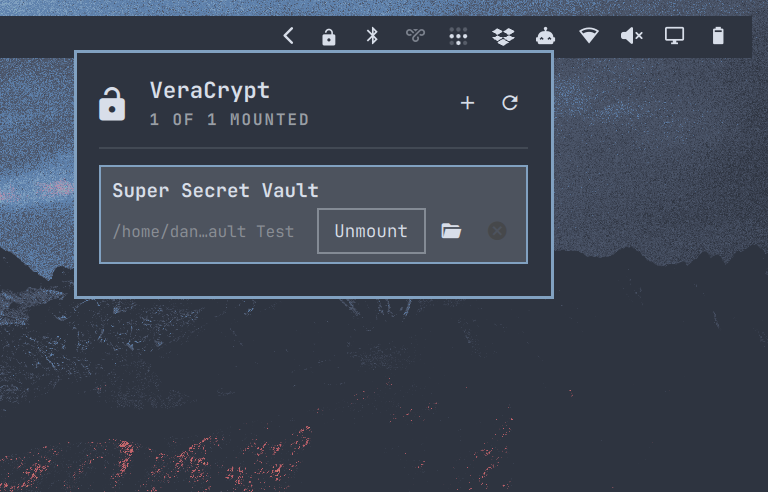
It's an Omarchy Quattro bar-widget plugin with a dropdown panel and a small CLI wrapper. The plugin never stores or handles your passphrases. Mounting hands off to VeraCrypt itself, so VeraCrypt does the credential prompt.
Listed in the Omarchy plugin directory.
Install
omarchy plugin add https://github.com/dannymcc/omarchy-veracrypt.git --enable
omarchy restart shell
The shell hot-reloads plugin code on save, but a widget added while it is
running can end up with a component load that never finishes, and the shell
skips a widget whose load is still in flight. If the lock icon does not show
up on the bar, omarchy restart shell clears it.
For local development:
mkdir -p ~/.config/omarchy/plugins
cp -r "$PWD" ~/.config/omarchy/plugins/io.github.dannymcc.veracrypt-vaults
omarchy-shell shell rescanPlugins
omarchy plugin enable io.github.dannymcc.veracrypt-vaults
omarchy restart shell
Add your vaults
Open the dropdown and use the + in the header. On a machine with nothing configured
yet the form is already open, since it is the only useful thing the panel has
to offer.
Each vault needs a name, a container file and a directory to mount it on. The two path fields have a built-in picker:
- The file picker shows directories plus anything that looks like a container
(
.hc,.tc,.vc,.veracrypt,.truecrypt), marked with a padlock. Containers carry no magic bytes — the header is encrypted — so the extension is the only hint there is. Show all files lifts the filter when your container is named something else. - The directory picker can make the mount directory for you with New folder here, because a mount point usually does not exist yet.
The picker is built into the panel rather than being a GTK file dialog: the Omarchy panel dismisses on any click outside it, so an external chooser takes the panel down with it before it can hand a path back.
Both fields stay editable, so you can paste a path instead. Pressing Enter on an empty path field opens its picker; arrow keys and Enter drive it.
The ✕ on a row removes that vault from the config. It never touches the
container itself, and it refuses while the vault is mounted.
Or edit the file
The config is a tab-separated file at ~/.config/omarchy/veracrypt-vaults.tsv:
name<TAB>container_path<TAB>mount_directory
Blank lines and lines starting with # are ignored. There's a
config.example.tsv in the repo to copy from.
Use
The plugin appears as a padlock on the Omarchy bar — closed while everything is
locked, open once at least one vault is mounted. The tooltip carries the count.
Click it to open the dropdown, where + adds a vault and the arrow refreshes.
Each configured vault shows:
- mount status
- container path, or mount path once mounted
Mount/UnmountOpen, when mounted✕to drop it from the config
Unmount all appears once more than one vault is mounted. It only closes
the vaults in your config, never volumes mounted outside the plugin. The CLI
has a matching mount-all.
Passphrases
Where the passphrase prompt appears depends on which VeraCrypt you have:
- The GUI build asks in its own window.
veracrypt-console-binhas no GUI and asks on a terminal, so the plugin opens a floating Omarchy terminal for the mount. sudo asks for its password in the same window.
Either way the passphrase goes straight to VeraCrypt. The plugin never sees it.
Unmounting needs no passphrase, only root, so it never opens a terminal. It escalates in three steps:
- VeraCrypt's own sudo, if it is still authenticated from an earlier mount.
--use-dummy-sudo-passwordis VeraCrypt's documented way of trying that without prompting, so an unmount inside the sudo window is silent. - polkit, which asks for the admin password in Omarchy's own dialog.
- a terminal, only on a system with no polkit agent to ask.
Either way the result comes back to the panel, so a failure says why. The usual reason is that something still has the mount open — a file manager sitting in the directory will do it. Close that and try again.
VeraCrypt's definitive answers ("not mounted", "in use") are reported as they are, so the plugin never asks for an admin password only to tell you the vault was not mounted.
The dropdown also answers to IPC, so you can bind it to a key or drive it from a script:
omarchy-shell io.github.dannymcc.veracrypt-vaults toggle
omarchy-shell io.github.dannymcc.veracrypt-vaults refresh
omarchy-shell io.github.dannymcc.veracrypt-vaults status   # "2/3", or "Vaults"
You can also drive the wrapper directly:
scripts/veracrypt-vaults list              # list configured vaults
scripts/veracrypt-vaults status            # mount status for all vaults
scripts/veracrypt-vaults mount Personal
scripts/veracrypt-vaults unmount Personal
scripts/veracrypt-vaults mount-all
scripts/veracrypt-vaults unmount-all
scripts/veracrypt-vaults open Personal
scripts/veracrypt-vaults add Personal ~/vaults/personal.hc ~/Vaults/Personal
scripts/veracrypt-vaults remove Personal
scripts/veracrypt-vaults config            # where the config file lives
To prompt for the passphrase in the terminal rather than the VeraCrypt GUI:
VERACRYPT_VAULTS_TEXT=1 scripts/veracrypt-vaults mount Personal
Dependencies
- Omarchy 4 / Quattro shell
- VeraCrypt on
PATH, either build findmntxdg-openfor theOpenaction- A terminal, only for the console build of VeraCrypt: the plugin uses
omarchy-launch-floating-terminal-with-presentation, falling back toxdg-terminal-exec, so VeraCrypt has somewhere to ask for the passphrase
On Arch and Omarchy, VeraCrypt comes from the Arch repositories or the AUR, depending on how your package sources are set up.
Security notes
Omarchy plugins run unsandboxed inside the long-lived Omarchy shell process. Read this plugin before you enable it.
By design, it does not:
- store VeraCrypt passwords
- pass passphrases on the command line
- add systemd units
- ship privilege-elevation helpers
- install packages for you
Mounting still gives VeraCrypt access to the configured container and mount directory, and a compromised user session can reach anything the user can reach. The plugin narrows the attack surface, it doesn't remove it.
Validate
On an Omarchy machine:
omarchy plugin validate .
The CLI works without Omarchy, so you can smoke-test it against the example config:
VERACRYPT_VAULTS_CONFIG=./config.example.tsv scripts/veracrypt-vaults list
Remove
omarchy plugin disable io.github.dannymcc.veracrypt-vaults
omarchy plugin remove io.github.dannymcc.veracrypt-vaults
Delete the config yourself if you're done with it:
rm ~/.config/omarchy/veracrypt-vaults.tsv