
Todoist Quick Add for Omarchy
A native, theme-aware Omarchy overlay for creating one Todoist task at a time with Todoist's official Quick Add parser.
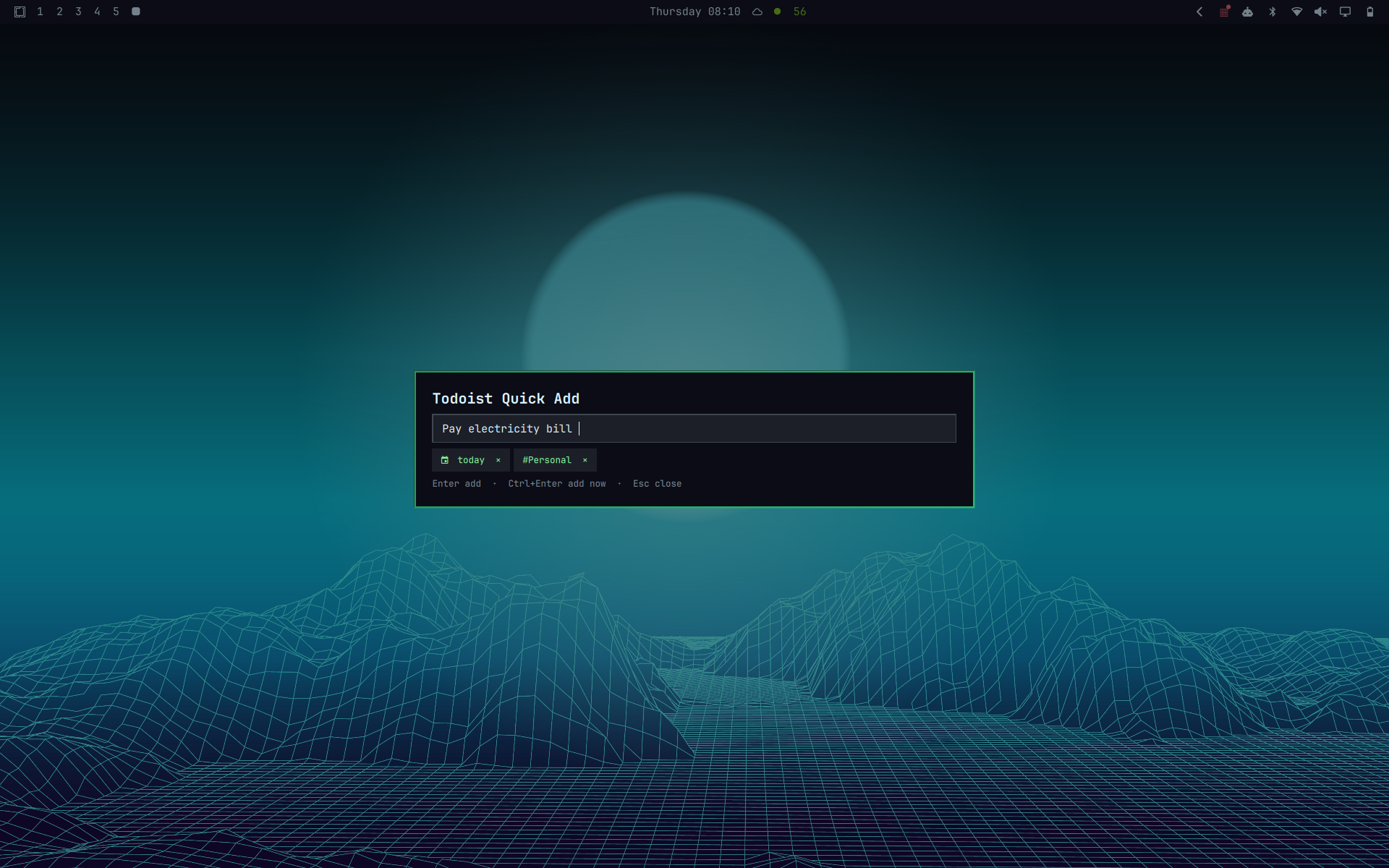
Summon it with:
omarchy-shell shell toggle io.github.davidojedalopez.todoist
The overlay moves the first recognized date phrase and accepted project suggestions out of the composer and into removable chips below it. Later date phrases remain ordinary task text. At submission it reconstructs the extracted tokens before any // description, while leaving unrecognized syntax such as @label, p1, /Section, +Assignee, reminders, and descriptions untouched. Todoist remains authoritative for parsing the reconstructed Quick Add text.
Requirements and setup
-
Omarchy 4.0.0 or newer
-
The official Todoist CLI:
npm install -g @doist/todoist-cli
td auth login
On Linux, td auth login stores OAuth credentials in Secret Service/libsecret by default. This plugin never reads or stores the token. Do not opt into the CLI's plaintext credential mode for this plugin.
Installation
Install and enable the plugin from its GitHub repository:
omarchy plugin add https://github.com/davidojedalopez/omarchy-todoist.git --enable
For local development, install the current checkout instead:
omarchy plugin add "file://$PWD" --enable --yes
Add the shortcut as one isolated line in ~/.config/hypr/bindings.lua:
o.bind("SUPER + ALT + T", "Todoist quick add", "omarchy-shell shell toggle io.github.davidojedalopez.todoist")
Before choosing another chord, check for conflicts with:
omarchy menu keybindings --print
If a chord is already assigned, unbind it before replacing it as documented by Omarchy. After editing bindings, run hyprctl reload and verify hyprctl configerrors is empty.
Removal
Remove the plugin with:
omarchy plugin remove io.github.davidojedalopez.todoist --yes
Then delete only the Todoist shortcut line shown above from ~/.config/hypr/bindings.lua and run hyprctl reload. Removing the plugin does not uninstall td, revoke Todoist access, or delete Todoist tasks.
Keyboard controls
Up/Down: move through project suggestionsTaborEnter: insert an open project suggestion; pressEnteragain to addCtrl+Enter: add immediately without accepting a suggestionEscape: close suggestions first, then close the overlay- Click outside the card: close the overlay
Project names are cached only in the running shell process for five minutes. They are never written to disk. Exact duplicate project names are shown as ambiguous and cannot be selected. Transient project-loading failures are retried automatically; if all attempts fail, use Retry projects without closing the overlay or losing the draft.
Privacy and failure behavior
Task text travels to the bridge over stdin, never command-line arguments. The bridge returns small normalized JSON objects and never renders or logs raw CLI stderr, task content, OAuth tokens, account identifiers, project IDs, or task IDs. Successful notifications contain only Task added.
On failure, the draft remains in the composer. The UI exposes only allowlisted states: missing CLI, unauthenticated, read-only, account selection required, timeout, network failure, API rejection, or invalid response.
See SECURITY.md for the runtime boundary and vulnerability-reporting guidance.
Troubleshooting
- Sign-in screen: run
td auth loginor use the overlay's visible-terminal button. If the account is read-only, run normaltd auth loginagain. - Account selection required: run
td accounts list, thentd accounts use <account>in a terminal. The overlay never displays account identifiers. - CLI missing after install: ensure the npm global bin directory is on the graphical session's
PATH, then restart the shell withomarchy restart shell. - No project suggestions: use Retry projects when shown. If loading still fails, confirm
td project list --all --jsonworks in a terminal, then reopen after the five-minute cache expires or restart the shell. - Shortcut does nothing: check
omarchy plugin list,omarchy-shell shell ping,omarchy menu keybindings --print, andhyprctl configerrors.
Development and tests
./tests/run.sh
The suite covers date-token boundaries, project filtering/escaping/ambiguity, cursor insertion, keyboard-state behavior, overlay controller lifecycle, stdin-only transport, authentication and account modes, timeouts, malformed or oversized CLI output, API failure, and redaction.
No automated test creates a live Todoist task. Final acceptance should use a task you actually intend to keep, such as one containing tom #Kaya, then verify its parsed date and project in Todoist.
Scope
V1 creates one task per submission. Tasks without a date or project go to Inbox with no due date. It does not include bulk paste, attachments, structured metadata controls, or draft persistence.
License
MIT