
Omarchy Zen Themes Sync
Syncs Omarchy's Pywal palette into Zen Browser — pure CSS, no extensions, no privileged preferences, no native host, no background daemon, and live theme switches with no browser restart. Install as an Omarchy shell plugin or standalone script. Survives Zen updates gracefully.
Started as a fork of gstrand99/zen-auto-style by Gregory Strand (MIT) — original template, CSS and extension. It has since grown well past its source: Omarchy 4.x support, a hardened CSS-only install, WCAG-legible theming, themed selection on every site, and live reload with no extension or weakened prefs. The original extension lives on unchanged in
legacy/.
Screenshots
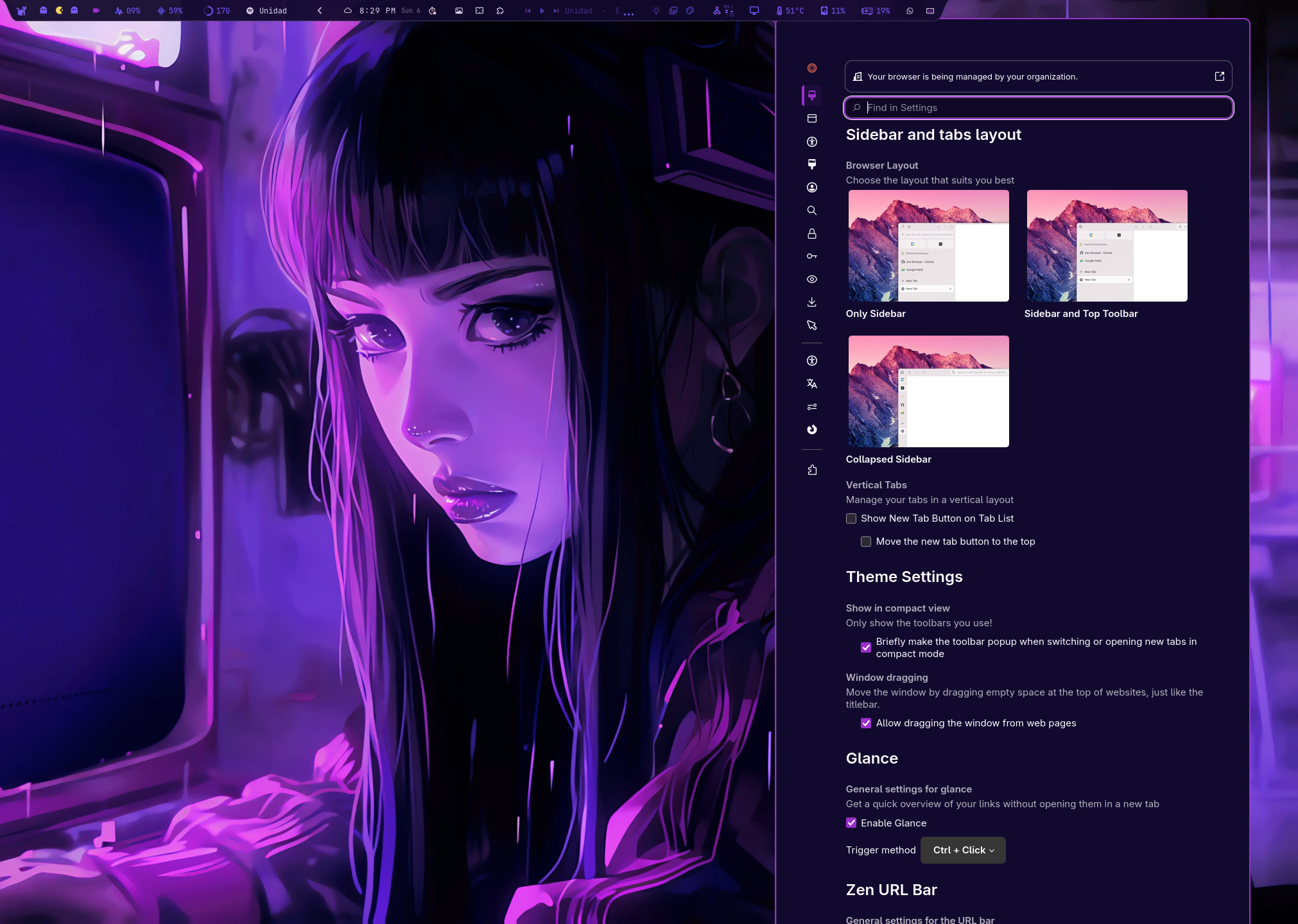
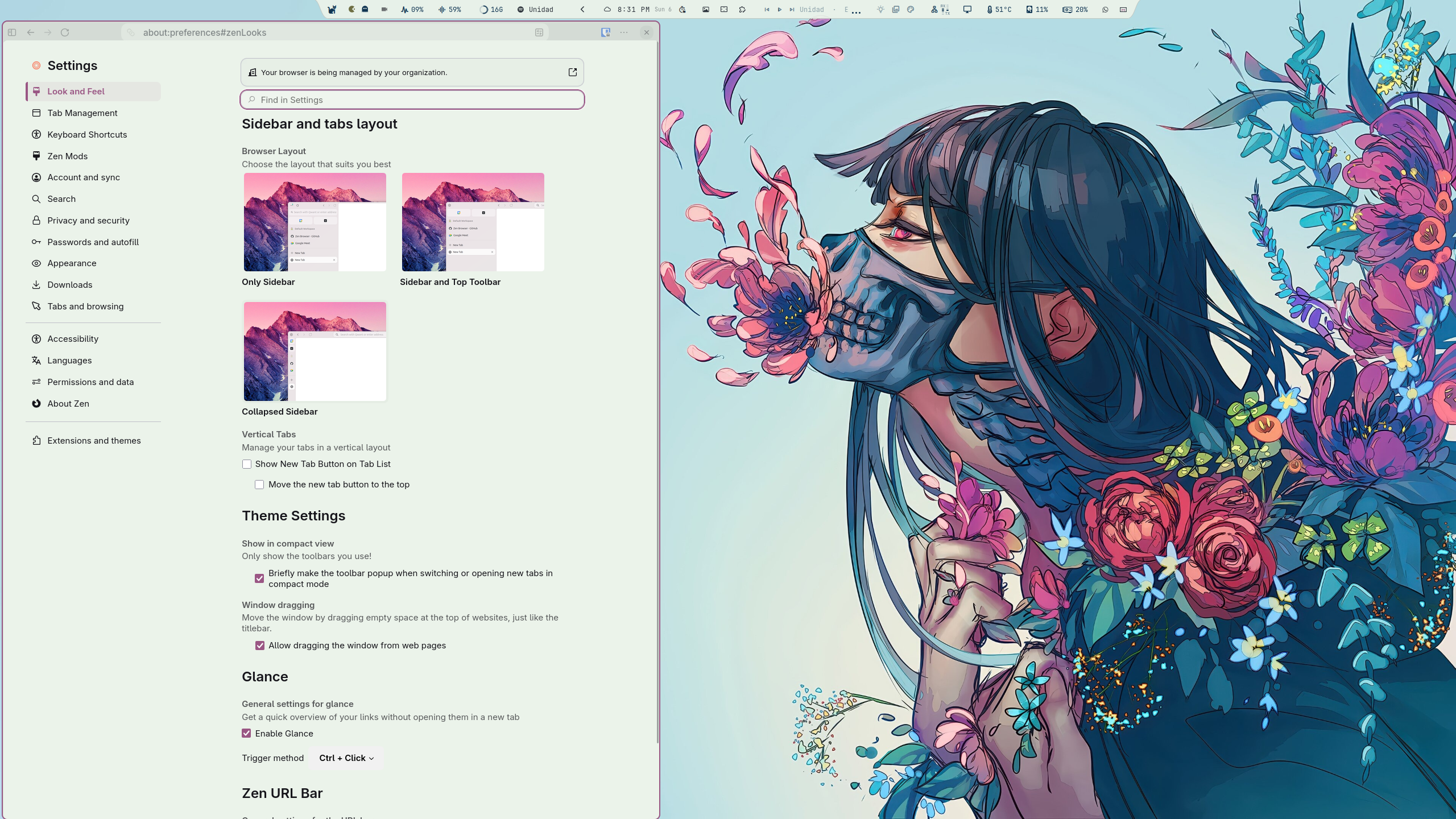
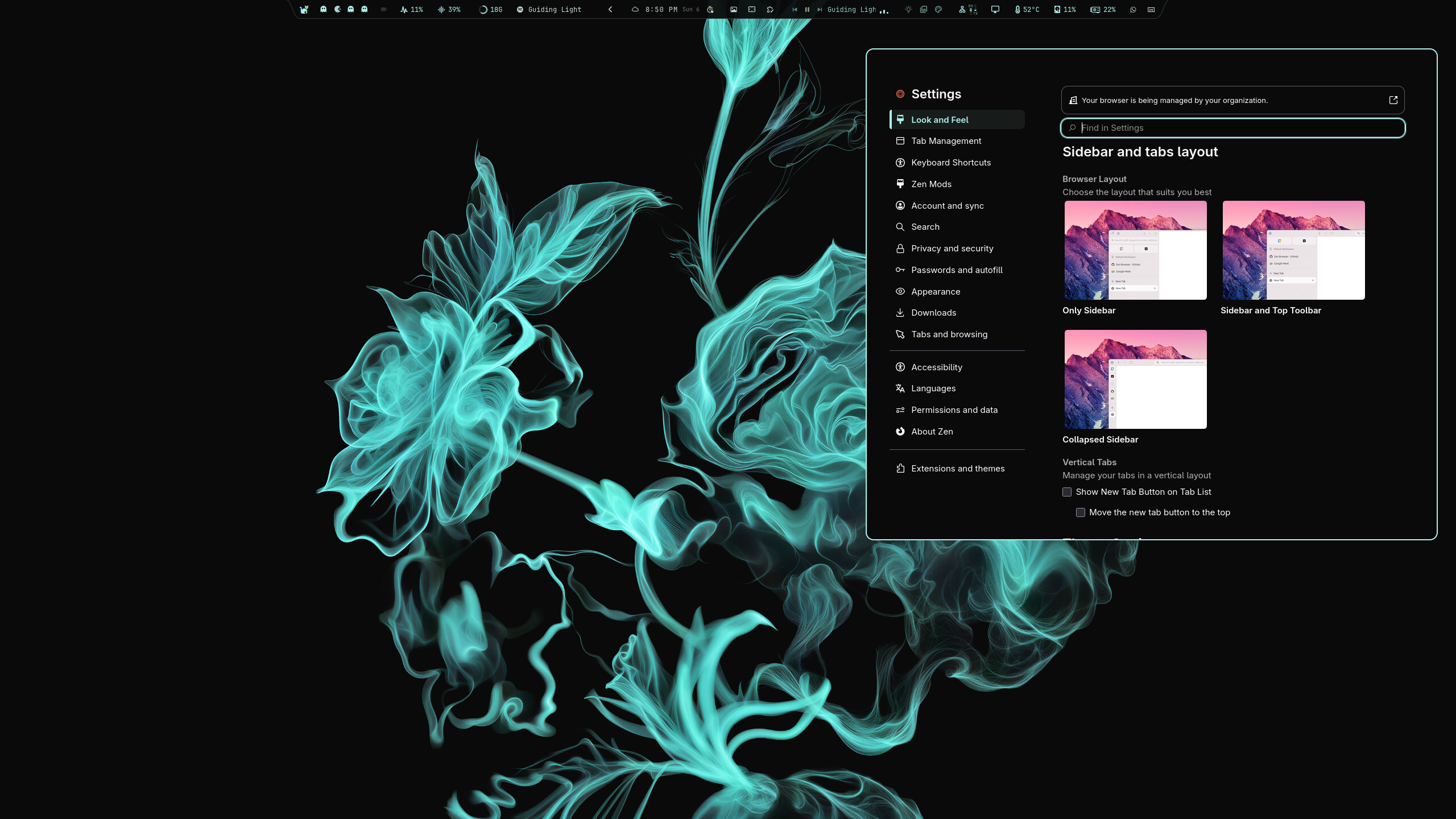
Themes used, left to right: Osiris, Woman with Floral Composition, BlackTurq. Osiris is available from xElectric9177/Osiris; Woman with Floral Composition is found through the omarchy-themes plugin (install themes directly from the marketplace); BlackTurq is available from HANCORE-linux/omarchy-blackturq-theme.
 |
 |
 |
Why Omarchy Zen?
- Live theme switches, no browser restart — run
./live.sh enableonce and every lateromarchy theme setrepaints Zen in about a second. You never close and reopen the browser to change themes again. Opt-in: onesudoprompt, then it stays out of the way. - No privileged prefs — only
toolkit.legacyUserProfileCustomizations.stylesheets = true(Mozilla standard). Noxpinstall.signatures.required=false, noextensions.experiments.enabled=true. - Pure CSS bridge — Omarchy renders
custom-zen.css.tpl→~/.local/state/omarchy/current/theme/custom-zen.css, Zen reads it via symlink inchrome/custom-zen.css. - Themed text selection — selected text in browser controls, internal pages, and websites uses the theme's selection background and foreground colors.
- Guaranteed legibility (WCAG AA) — the renderer binary-searches the minimum adjustment that keeps accent-derived text readable against the panel, in both light and dark palettes.
- Resilient — every
var(--custom-zen-*)has a fallback (#24283b,#7aa2f7etc.). If Zen renames a selector, the:rootlayer still cascades;verify.shchecks the selectors after a Zen update. - Omarchy-native — ships as a
serviceplugin (Service.qml) that auto-runsinstall.shon shell start. Also works standalone.
Install
Option A — As Omarchy plugin (recommended)
omarchy plugin add https://github.com/Davidxap/omarchy-zen.git --enable
# Service auto-runs install.sh on next shell start. Or run now:
~/.config/omarchy/plugins/io.github.davidxap.omarchy-zen/install.sh
One restart, ever. Restart Zen a single time to load userChrome.css, then run ./live.sh enable (one sudo prompt) and restart once more. From that point on, changing themes never requires closing the browser again — see Live reload.
Option B — Standalone
git clone https://github.com/Davidxap/omarchy-zen.git
cd omarchy-zen
./check.sh && ./install.sh
Both install:
~/.config/omarchy/themed/custom-zen.css.tpl(Pywal template)~/.config/omarchy/hooks/theme-set.d/00-zen-auto-style(hook — re-renders the sheet from the resolved palette and posts a desktop notification when the theme changes;00-so it runs before the slow app-retint hooks)~/.local/state/zen-auto-style/render-custom-zen.py(deterministic renderer used by the hook and the installer fallback)- Zen profile
chrome/zen-auto-style-chrome.css,zen-auto-style-content.css,chrome/custom-zen.css→ symlink user.jspreftoolkit.legacyUserProfileCustomizations.stylesheets
Restart Zen once → omarchy theme set <name> → the hook re-renders the sheet and notifies you with the theme name. With live reload enabled, the new palette appears immediately.
How it works
- Omarchy renders
custom-zen.cssfromcustom-zen.css.tplusing current palette (~/.local/state/omarchy/current/theme/on 4.x, fallback~/.config/omarchy/current/theme/). - Installer symlinks it into Zen's
chrome/ascustom-zen.css. - Managed
@importblocks inuserChrome.css/userContent.cssload themed vars. - The
theme-sethook re-renders the sheet deterministically from the resolvedcolors.toml(Omarchy skips template renders when the theme ships its owncustom-zen.cssor a theme switch was interrupted) and notifies with the theme name. omarchy theme refreshregenerates the stylesheet (install wraps it in a timeout and verifies the result, re-rendering fromcolors.tomlon mismatch); next Zen restart picks it up via symlink.
No extension, no host, no background process.
Requirements
- Omarchy with
omarchyon PATH - Zen Browser opened at least once
- Bash +
awk grep sed install mktemp
No python/zip/jq needed (except jq for legacy reconciler cleanup).
Plugin details
- ID:
io.github.davidxap.omarchy-zen(display name: Omarchy Zen Themes Sync) - Kind:
service→Service.qml(auto-installs onComponent.onCompletedviaQuickshell.Io.Process) - Validation:
omarchy plugin validate ./+/usr/lib/qt6/bin/qmllint -I /usr/share/omarchy/shell Service.qml - Disable leaves wiring intact; explicit
./uninstall.shto revert (or~/.config/omarchy/plugins/io.github.davidxap.omarchy-zen/uninstall.sh).
Verification
./verify.sh              # extracts omni.ja, checks #zen-* / .zen-* / --zen-* still exist
./test-fresh-install.sh  # throwaway profile in /tmp, no touch to real ~/.config/zen
All var() have fallbacks; warnings in verify.sh are non-fatal (cascade still provides colors).
Testing with a clean Zen profile
To test the plugin in a clean state (no Zen Mods, no third-party extensions, no leftover CSS):
- Back up your current Zen profile
chrome/directory. - Empty
userChrome.cssanduserContent.css(set to empty files). - Remove all
zen-auto-style-*files,zen-themes.css,zen-themes/, andcustom-zen.cssfromchrome/. - Run
./install.shfrom the plugin directory. - Restart Zen and verify the theme loads without visual artifacts.
Zen Mods (e.g. Better Letterboxing) and other CSS extensions can inject gradients, shadows, or borders that interfere with the plugin's theming. If you see unexpected lines or color artifacts, test with a clean profile first to isolate the issue.
Uninstall
Two install types exist — use the matching removal:
Standalone install (cloned repo + ./install.sh, not registered in Omarchy):
./uninstall.sh
Omarchy plugin install (via omarchy plugin install, registered):
~/.config/omarchy/plugins/io.github.davidxap.omarchy-zen/uninstall.sh
omarchy plugin remove io.github.davidxap.omarchy-zen --yes
omarchy plugin remove alone only unregisters the plugin; it does not
remove the Zen wiring (by design — the service never auto-uninstalls CSS).
Run uninstall.sh first for the wiring, then plugin remove if registered.
If plugin remove says "not installed", yours was a standalone install:
uninstall.sh alone is the complete removal.
Removes hook, managed imports, pref (preserving user CSS outside blocks), template if unchanged, legacy host/artifacts, ghost zen-auto-style@omarchy.local from prefs.js/weave/addonsreconciler.json (requires Zen closed). Restart Zen after uninstall — a running Zen keeps the old theme in memory.
Theme switch behavior
By default Zen reads userChrome.css only at startup, so a new palette needs a Zen restart after omarchy theme set. The theme-set hook posts a desktop notification — Theme changed: <theme> — so you always know which palette is now current.
Live reload (optional, no extension)
You do not have to close and reopen Zen to change themes. After a single
./live.sh enable,omarchy theme setrepaints the browser in about a second — sidebar, toolbar, menus, new tab and text selection, all live.
./live.sh enable    # asks for sudo once; restart Zen one last time
./live.sh status
./live.sh disable
From then on every theme switch repaints Zen within about a second, no restart. It uses Firefox's built-in autoconfig instead of an extension: live/omarchy-zen.cfg is copied into Zen's install dir and, at startup, polls chrome/custom-zen.css once per second and re-registers its --custom-zen-* variables when the file changes.
- No extension, native host, open port, daemon, signature bypass or experiments pref.
- Tradeoff: it writes two root-owned files into the Zen install dir (
omarchy-zen.cfg,defaults/pref/omarchy-zen-prefs.js) and runs that script with browser privileges. It is ~70 readable lines; it only reads the palette file and registers CSS. - Inert on profiles without Omarchy Zen, survives
zen-browser-binupgrades (pacman keeps unowned files), refuses to overwrite another autoconfig loader.uninstall.shdisables it.
Legibility guarantees (1.2.0)
Pywal palettes occasionally ship a low-contrast foreground/background pair or a washed-out accent, which can make typed text unreadable. The 1.2.0 renderer fixes this at the source: accent-derived colors (selected tab, menu hover, URL suggestions) are no longer a blind color-mix — the renderer binary-searches the minimum darkening/lightening that reaches WCAG AA (≥4.5:1) against the panel, per theme mode (light/dark). Menus and panels pin background and foreground to the same palette pair (the old version reverted the popup background to native white, producing white-on-white in dark themes). The result is that every theme — light or dark — keeps legible text.
Performance
The service re-runs install.sh on every shell start, but the install is gated: if the plugin version and wiring are unchanged, the script exits in milliseconds with no writes and no backups. Backups are rotated (last 5 kept) and file writes only happen when content actually changed (cmp before every install).
Legacy
Original XPI + Python host in legacy/ — not installed, kept for reference. Superseded by live.sh, which gives the same live reload without xpinstall.signatures.required=false or extensions.experiments.enabled=true. See legacy/README.md.
Credits
Two people besides the maintainer have work merged into this repository right now. Both of them are why it is better than the thing it started as.
- David Arturo Arroyave Pérez (Davidxap) — maintainer. Omarchy 4.x compat, CSS-only hardening, WCAG-legible theming, themed selection, live reload without extensions, and the
Omarchy Zen Themes Syncplugin packaging. - Gregory Strand (gstrand99) — released the original
zen-auto-style(template, CSS, extension) under MIT, and two of his commits (3c844a4,0ea205a) are still the foundation this repo is built on. His extension ships unchanged inlegacy/. Thank you for building something worth forking — and for licensing it so anyone else could. - BrunnoVert (caniswim) — opened PR #2, merged as
40dbcc8: he moved the::selectionrules out of the@-moz-documentURL-matched scope so page text selection follows the active theme on every website instead of only the pattern-matched ones. That is the headline feature of 1.3.0. Thank you for the careful CSS work.
Changelog
1.4.2
- The toast clears half as fast —
Theme changed: <theme>is posted atlowurgency. The shell clamps a toast to a floor of 8s fornormaland 5s forlow, sonormalwas pinning it on screen for eight seconds. Five seconds is the floor; nothing shorter is reachable from a sender.
1.4.1
- Notification no longer waits for the whole theme switch — the hook is installed as
00-zen-auto-styleinstead ofzen-auto-style.omarchy-hook theme-setrunstheme-set.d/*in alphabetical order and blocks on each one, so the old name sorted after the slow app-retint hooks (VS Code, Firefox, Zen, theme extras) andTheme changed: <theme>only appeared once they had all finished. It now runs first in the loop. - Credits rewritten: every contributor named, with the exact PR/commit each one shipped.
1.4.0
- Live theme reload without extensions (opt-in) —
./live.sh enableinstalls a Firefox autoconfig script that re-applies the palette within a second ofomarchy theme set, no Zen restart. Replaces the legacy XPI path and its two security-sensitive prefs. Verified on Zen 1.22.3b (Firefox 156) for atomic file swaps and in-place rewrites. - The theme-set notification now reads
Theme changed: <theme>— theme name only, no restart nag.
1.3.0
- Themed text selection on every website — the content stylesheet's
::selectionrules now sit outside the@-moz-documentURL scope, so page selection follows the palette on all sites instead of only the matched ones; the browser chrome gets its own::selectiontoo. (#2, thanks caniswim / BrunnoVert.) - Stale-stylesheet install bug fixed — the installer's fast path compared nothing before skipping, so a changed template could ship with the previous render. It now
cmps the deployed file against a fresh render. Reproduced onmainbefore the fix; passes after. - Verified legibility of the selection pair — all 22 shipped themes measure ≥4.5:1 (WCAG AA) on their selection foreground/background (worst: 4.88:1).
1.2.0
- Guaranteed legibility across light and dark themes — the renderer binary-searches accent-derived colors to WCAG AA (≥4.5:1) against the panel instead of a blind
color-mix; menus/panels always pin background + foreground to the same palette pair (fixes white-on-white in dark themes). - Deterministic theme→Zen sync — the
theme-sethook re-renders the sheet from the resolvedcolors.tomland notifies with the theme name; the installer wrapsomarchy theme refreshin a timeout and verifies the rendered background, re-rendering on mismatch. - Install hardening —
timeouton refresh, post-install palette verification with a deterministic re-render fallback, and a fast-path re-check so unchanged installs exit in milliseconds. - Reusable deterministic renderer —
tools/render-custom-zen.pyshared by the hook, the installer fallback, and the screenshot pipeline. - Branded theme screenshots — Osiris, Woman with Floral Composition, and BlackTurq; preview shows Osiris.
1.0.3
- Sidebar seam fixed — no more vertical line between sidebar and content.
- Testing docs — clean-profile instructions for troubleshooting; marketplace preview image.
1.0.2
- Bounded installer output — byte-ceiling guards so a runaway loop can't fill the log.
1.0.1
- Marketplace validation fixes — the Quickshell
StdioCollectoris now bounded (it was unbounded, a memory ceiling risk in a long-lived shell);uninstall.shgained a properbackup_file()and restructured guards so cleanup only runs against a real Zen profile. - Sidebar gaps closed — no black/white line at the top of the sidebar, and correct edge colours in light and dark themes.
1.0.0
- First marketplace release — plugin id
io.github.davidxap.omarchy-zen, headless Quickshell service, installer/uninstaller, pluscheck.sh,verify.sh, andtest-fresh-install.shas repo gates. - Rebrand to Omarchy Zen Themes Sync — CSS-only install path, with the legacy live-reload extension moved to
legacy/.
License
MIT — see LICENSE. Original and fork share MIT.