
Omahub
← All plugins
D

Z13 Flow Lights

by David Estes

Control ROG Flow Z13 keyboard and rear lightbar RGB from the Omarchy bar via z13ctl.

Security review

Review recommended · 6 findings

Deterministic scan — not a security guarantee

Medium
Risk level
Medium
Analyzed commit
90e97b1
Scanned
1 month ago
  • medium sudo Service.qml:263

    Command runs with sudo, elevating the process beyond the plugin environment.

    sudo z13ctl setup --group input"
  • medium sudo Panel.qml:511

    Command runs with sudo, elevating the process beyond the plugin environment.

    sudo udevadm trigger && systemctl --user restart z13ctl.service"
  • Docs sudo README.md:44

    Command runs with sudo, elevating the process beyond the plugin environment.

    sudo z13ctl setup --group input
  • Docs sudo README.md:45

    Command runs with sudo, elevating the process beyond the plugin environment.

    sudo udevadm control --reload-rules
  • Docs sudo README.md:46

    Command runs with sudo, elevating the process beyond the plugin environment.

    sudo udevadm trigger
  • Docs sudo PUBLISH.md:32

    Command runs with sudo, elevating the process beyond the plugin environment.

    sudo after HID setup (`z13ctl setup --group input`). Includes preview.png of the open bar panel on an empty workspace. Requires z13ctl user daemon.

Automated analysis only — not a security guarantee.

AI advisory review

No obvious issues detected

Language-model assessment · ~deepseek/deepseek-v4-flash-latest — advisory only

Low
AI risk level
Low
Recommendation
install
Model
~deepseek/deepseek-v4-flash-latest
Analyzed commit
90e97b1
Reviewed
1 month ago

The plugin is a bar widget that controls RGB lighting via the external z13ctl binary. The sudo commands flagged by the scan appear only in documentation and setup instructions, not in the plugin's executable code. The plugin itself does not elevate privileges or perform any suspicious actions.

  • The plugin relies on an external binary (z13ctl) which is not bundled; users must install it separately.
  • The README instructs users to run sudo commands for HID permissions, but these are user-initiated setup steps, not executed by the plugin.
How this check works

This review combines the deterministic scan (the rule-based results above) with an independent look at the plugin's code by a language model. The model reads a trimmed sample of the repository's files, the manifest, and the README, then gives a plain-language risk level and a recommendation: install (no notable danger), review (look closer first), or avoid (clearly dangerous).

It runs on the same analyzed commit as the deterministic scan and is strictly advisory — it is not a security guarantee and never blocks a plugin by itself. A human moderator still reviews plugins before they are listed.

AI advisory only — automated analysis, not a security guarantee.

Install
$ omarchy plugin add https://github.com/davydotcom/omarchy-z13flow-plugin --enable
Widgets #bar #quickshell #system

Z13 Flow Lights

Bar widget for Omarchy Quattro that controls keyboard and rear lightbar RGB on the ASUS ROG Flow Z13 (2025) through z13ctl.
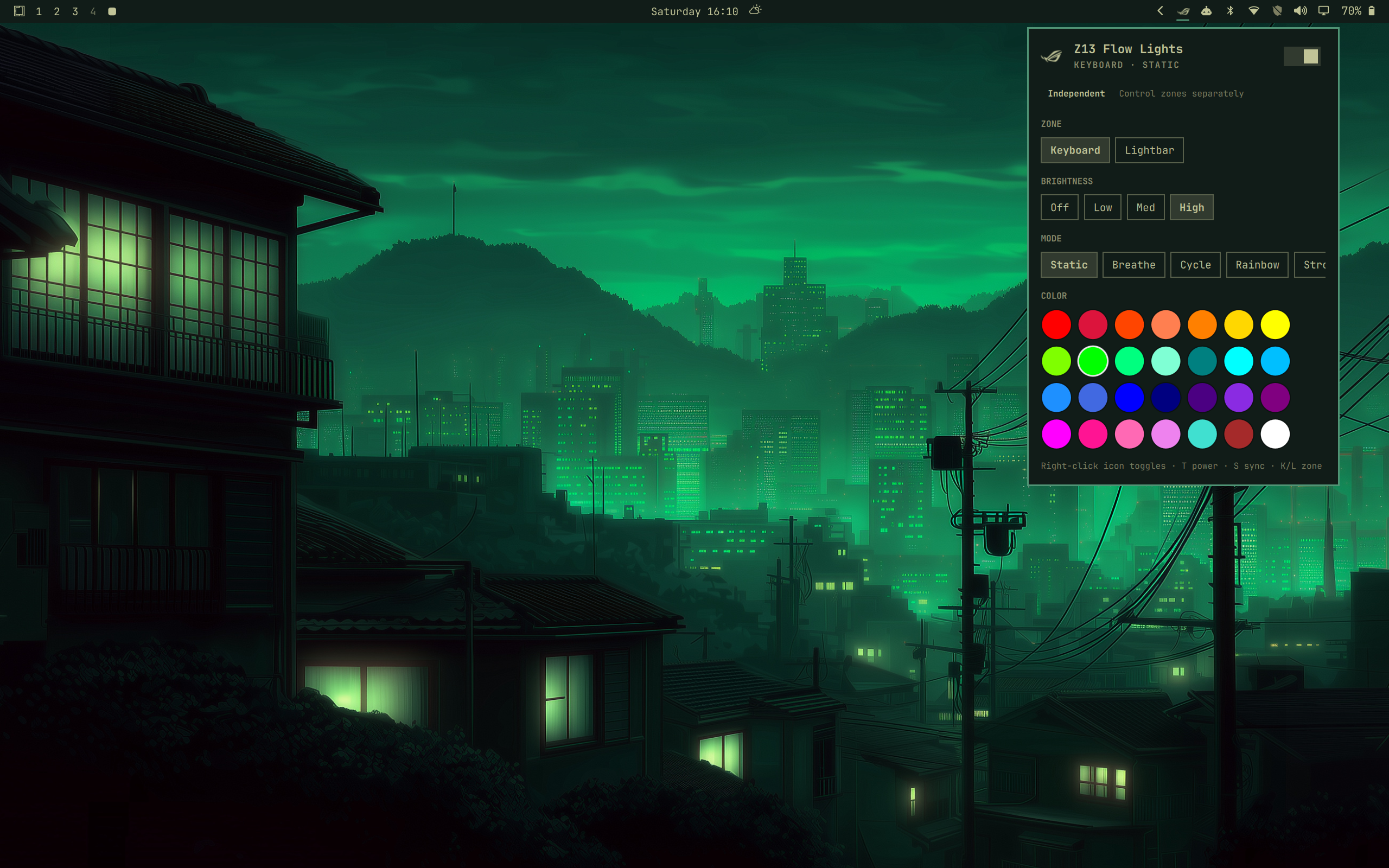
Preview

Requirements

  • ASUS ROG Flow Z13 (GZ302), or another machine where z13ctl can open the Aura HID devices (0b05:1a30 keyboard, 0b05:18c6 lightbar)
  • Omarchy Quattro / omarchy-shell
  • z13ctl on PATH (see below)

This plugin shells out to z13ctl (list, apply, brightness, off). It does not use OpenRGB or asusctl for lighting. It does not require root once HID permissions are configured.

Install z13ctl

z13ctl is the Z13-specific lighting / hardware CLI. On Omarchy / Arch:

# AUR package (CLI + user daemon)
yay -S z13ctl-bin
# or: paru -S z13ctl-bin

# Enable the user daemon (re-applies lighting across sleep / reboot)
systemctl --user enable --now z13ctl.service

Docs: https://dahui.github.io/z13ctl/
AUR: z13ctl-bin

Optional companion GUI (not required by this plugin): yay -S z13gui-bin

HID permissions

If z13ctl list shows permission denied on /dev/hidraw*, grant your login group access. Omarchy users are often already in input:

sudo z13ctl setup --group input
sudo udevadm control --reload-rules
sudo udevadm trigger
systemctl --user restart z13ctl.service
z13ctl list

Sanity check:

z13ctl apply --device keyboard --color cyan --brightness high

Install the plugin

omarchy plugin add https://github.com/davydotcom/omarchy-z13flow-plugin.git --enable

To place it on the bar explicitly:

omarchy plugin enable io.github.davydotcom.z13flow --section right

Usage

  • Left click: open the panel
  • Right click: toggle all lights on/off
  • Middle click: refresh device detection
  • Panel power switch: toggle lights
  • Synced (default): keyboard and rear lightbar share color/mode/brightness
  • Independent: pick Keyboard or Lightbar, then adjust that zone
  • Modes: static, breathe, cycle, rainbow, strobe
  • Keyboard: t toggle, s sync, k/l zone, c secondary breathe color, Escape closes

Remove

omarchy plugin remove io.github.davydotcom.z13flow

License

MIT. See LICENSE.

ROG Fearless Eye mark is a trademark of ASUSTeK Computer Inc.; used here only as a device-identifying icon.