
Network Routes for Omarchy
Widget da barra do Omarchy para gerenciar perfis Wi-Fi e Ethernet do NetworkManager e suas rotas estáticas persistentes.
Recursos
- Lista perfis Wi-Fi e cabeados, priorizando os que estão ativos
- Conecta e desconecta perfis existentes
- Lista separadamente rotas IPv4 e IPv6 de cada perfil
- Adiciona rotas com destino CIDR, gateway opcional e métrica opcional
- Remove rotas com confirmação
- Reaplica as rotas sem precisar desconectar uma conexão ativa
- Identifica perfis pelo UUID, evitando ambiguidades entre conexões com o mesmo nome
- Modo de privacidade para ocultar nomes e rotas durante capturas ou compartilhamento de tela
Screenshots
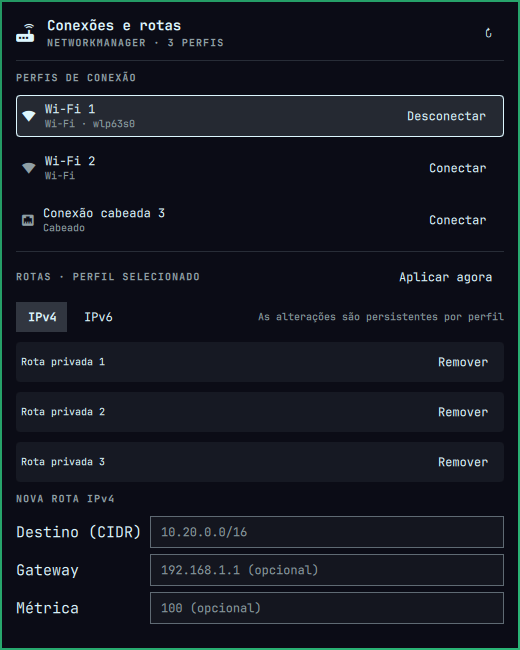
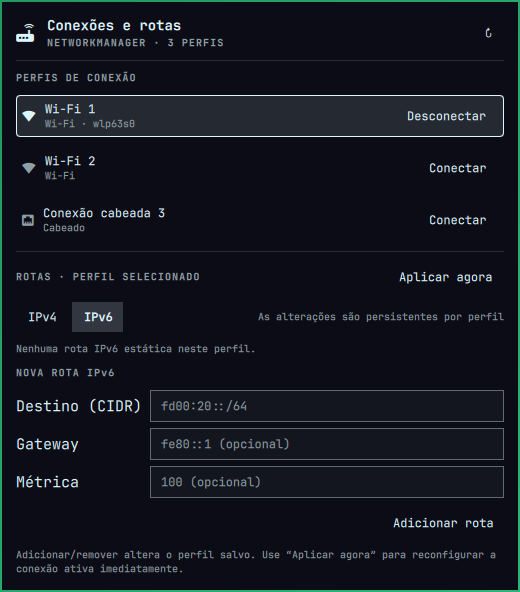
As rotas são gravadas diretamente em ipv4.routes ou ipv6.routes do perfil
do NetworkManager. Portanto, continuam associadas àquele Wi-Fi ou perfil
cabeado e são restauradas nas conexões futuras.
Requisitos
- Omarchy 4 ou mais recente
- NetworkManager e
nmcli - Agente Polkit do Omarchy ativo para autorizar alterações quando necessário
Instalação
Instale e habilite diretamente do GitHub:
omarchy plugin add https://github.com/denisdmarques/omarchy-network-routes.git --enable
Para testar diretamente a cópia local:
mkdir -p ~/.config/omarchy/plugins
ln -s "$PWD" ~/.config/omarchy/plugins/io.github.denisdmarques.network-routes
omarchy-shell shell rescanPlugins
omarchy plugin enable io.github.denisdmarques.network-routes
omarchy bar move io.github.denisdmarques.network-routes --section right
Remoção
Remova o plugin e sua entrada da barra com:
omarchy plugin remove io.github.denisdmarques.network-routes
O comando remove apenas os arquivos do plugin. As rotas já gravadas nos perfis do NetworkManager permanecem configuradas até serem removidas pelo próprio NetworkManager.
Uso
- Clique no ícone de rotas na barra.
- Selecione um perfil Wi-Fi ou cabeado.
- Escolha IPv4 ou IPv6.
- Informe o destino em CIDR; gateway e métrica são opcionais.
- Clique em Adicionar rota.
- Se a conexão já estiver ativa, clique em Aplicar agora.
Exemplos:
| Família | Destino | Gateway | Métrica |
|---|---|---|---|
| IPv4 | 10.20.0.0/16 |
192.168.1.1 |
100 |
| IPv4 | 172.16.30.8/32 |
vazio | 50 |
| IPv6 | fd00:20::/64 |
fe80::1 |
100 |
O widget não cria novos perfis Wi-Fi nem solicita senhas: essa parte permanece
com o painel nativo omarchy.network. Ele gerencia os perfis já salvos e as
rotas específicas de cada um.
Configuração
O intervalo de atualização pode ser alterado pela barra:
omarchy bar set io.github.denisdmarques.network-routes refreshIntervalSec 10
Para ocultar temporariamente nomes de perfis e detalhes de rotas durante uma captura ou compartilhamento de tela:
omarchy bar set io.github.denisdmarques.network-routes privacyMode true --json
Restaure a exibição normal com:
omarchy bar set io.github.denisdmarques.network-routes privacyMode false --json
Desenvolvimento
O helper pode ser usado separadamente:
./network-routes list
./network-routes routes UUID 4
./network-routes add UUID 4 10.20.0.0/16 192.168.1.1 100
./network-routes delete UUID 4 "10.20.0.0/16 192.168.1.1 100"
./network-routes apply UUID
Licença
MIT. Consulte LICENSE.