
Workspace Stash
The "clean slate" button Hyprland doesn't have. One gesture (or keypress) tucks every window on your current workspace out of sight; the same gesture in reverse brings them all back — laid back out the way you left them.
Think git stash, but for your desktop: there's one stash, not a slot per
window. Stash again from a different workspace and it just adds to the
pile; restore always brings everything back at once, wherever you currently
are.
Hyprland doesn't have conventional desktop minimization built in. Workspace
Stash implements it by parking windows on a private special:workspace-stash
workspace, remembering their exact Hyprland addresses to bring them back,
and reconstructing their original layout when it restores them.
Features
- Stashes every eligible window on the current workspace with one gesture or keypress, and restores the whole accumulated stash with another
- Repeated stashes accumulate into the same stash rather than creating separate slots — restore always releases everything at once
- Reconstructs your original tiled layout on restore — including genuine grids, real Hyprland groups, and pseudo-tiled windows, not just simple side-by-side splits (see Limitations for the one case that isn't exact)
- Restores floating windows to their exact captured position and size, clamped on-screen if the destination monitor is smaller than the one they were captured on
- Guards against Hyprland's own external-focus behavior ever revealing the private stash workspace as an unintended scratchpad
- Bulk workspace-move: send every window on the current workspace to another one, best-effort layout preserved, without following it there and without touching the stash at all
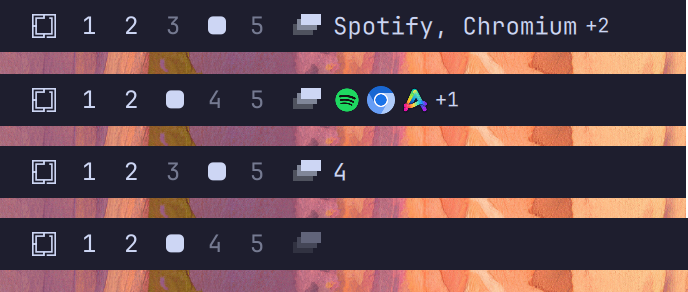
- A bar widget shows the stash as a count, application names, or icons, with a right-click menu for display settings, overflow-indicator settings, a one-click restore-defaults action, and a keybindings reference panel
- The bar widget is always visible — dimmed while the stash is empty, full opacity once it holds anything — so there's a discoverable entry point even before any keybinding is set up
- Tracks state reactively through Hyprland's live window model — no polling, no background daemon, no persisted state
- Reconstructs correctly after a Quickshell shell restart, purely by re-reading Hyprland
- Never moves the mouse cursor as a side effect of restoring or moving windows
Requirements
- Omarchy with the Quattro shell plugin system
- Hyprland running in Lua configuration mode
- Quickshell (bundled with Omarchy Quattro)
wl-clipboard, part of Omarchy's base install — used by the settings menu's keybindings page to copy a binding snippet to the clipboard
Install
Review the source before installing. Omarchy plugins run as unsandboxed code inside the long-running shell process.
omarchy plugin add https://github.com/devASstated/omarchy-workspace-stash.git --enable
The widget defaults to the left bar section. If you installed it without
--enable, enable it later with:
omarchy plugin enable io.github.devasstated.workspace-stash --section left
Gestures
The published default is a 3-finger swipe: down to stash, up to restore.
-- Add to ~/.config/hypr/input.lua
hl.gesture({
  fingers = 3,
  direction = "down",
  action = function() hl.dispatch(hl.dsp.exec_cmd("omarchy-shell -q workspace-stash stash")) end,
})

hl.gesture({
  fingers = 3,
  direction = "up",
  action = function() hl.dispatch(hl.dsp.exec_cmd("omarchy-shell -q workspace-stash restore")) end,
})
Check ~/.config/hypr/input.lua for an existing 3-finger vertical gesture
first — Omarchy's own defaults often bind one to the scratchpad. If you
already have one, change or remove it yourself; installing this plugin never
touches your Hyprland configuration. Change fingers = 3 to fingers = 4 if
you'd rather keep three fingers for something else — everything else about
the behavior is identical.
Keyboard
SUPER + M toggles the stash: stashes the current workspace if the stash is
empty, restores the whole stash onto the current workspace otherwise.
-- Add to ~/.config/hypr/bindings.lua
hl.bind(
  "SUPER + M",
  hl.dsp.exec_cmd([[omarchy-shell -q workspace-stash toggle]]),
  { description = "Toggle workspace stash" }
)
An optional power-user binding, SUPER + CTRL + M, always stashes
(cumulative, never restores) regardless of current stash state — useful for
building up a stash from several workspaces before restoring it all
somewhere else:
hl.bind(
  "SUPER + CTRL + M",
  hl.dsp.exec_cmd([[omarchy-shell -q workspace-stash stash]]),
  { description = "Stash current workspace (cumulative)" }
)
Bulk workspace-move is a separate, stateless operation — it never reads or
writes the stash. It moves every eligible window on the current workspace to
a target workspace, best-effort layout preserved, without following the view
there. The published default is SUPER + CTRL + SHIFT + 1 through 9, plus
0 for workspace 10:
-- Add to ~/.config/hypr/bindings.lua
for workspace = 1, 10 do
  local key = "code:" .. tostring(workspace + 9)
  hl.bind(
    "SUPER + CTRL + SHIFT + " .. key,
    hl.dsp.exec_cmd("omarchy-shell -q workspace-stash moveTo " .. tostring(workspace)),
    { description = "Move workspace to workspace " .. workspace }
  )
end
Before adding any of these, confirm the keys aren't already assigned:
omarchy menu keybindings --print
If it is, bind a different key instead of replacing the existing action. Apply and validate any change with:
hyprctl reload
hyprctl configerrors
See examples/bindings.lua for the complete, copy-pasteable version of all
of the above.
Use
| Input | Action |
|---|---|
3-finger swipe down (or SUPER+CTRL+M) |
Stash the current workspace, adding to any existing stash |
3-finger swipe up (or SUPER+M with a non-empty stash) |
Restore the entire stash onto the current workspace |
SUPER+M with an empty stash |
Stash the current workspace |
SUPER+CTRL+SHIFT+1-9,0 |
Move every window on the current workspace to workspace 1-10 (never touches the stash) |
| Left-click the bar widget | Stash the current workspace if the stash is empty, restore it otherwise — same as SUPER+M |
| Right-click the bar widget | Open the settings menu |
The bar widget is always visible: dimmed while the stash is empty, full opacity once it holds anything, so there's always a discoverable way to use the plugin even before any keybinding is set up.
Configuration
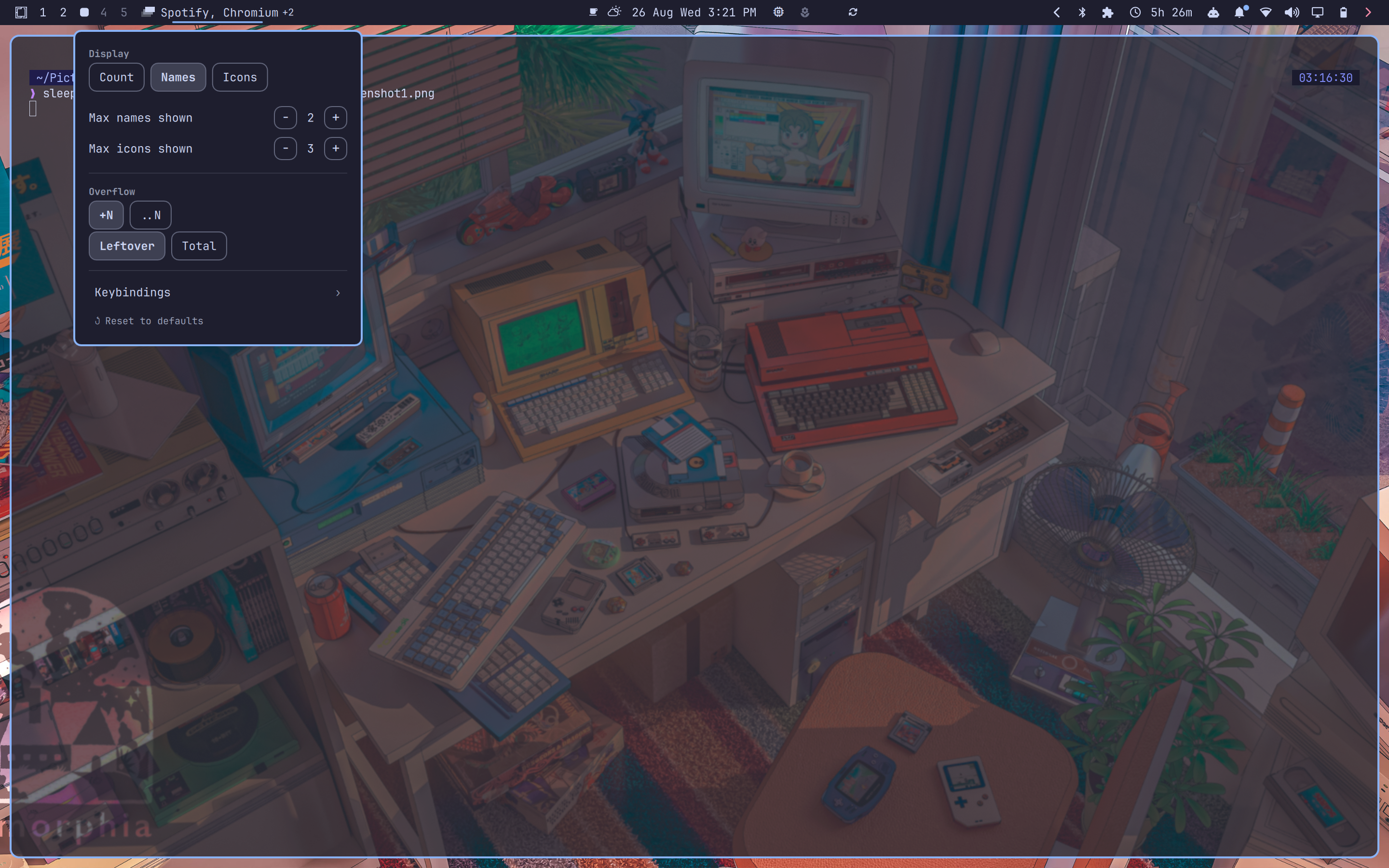
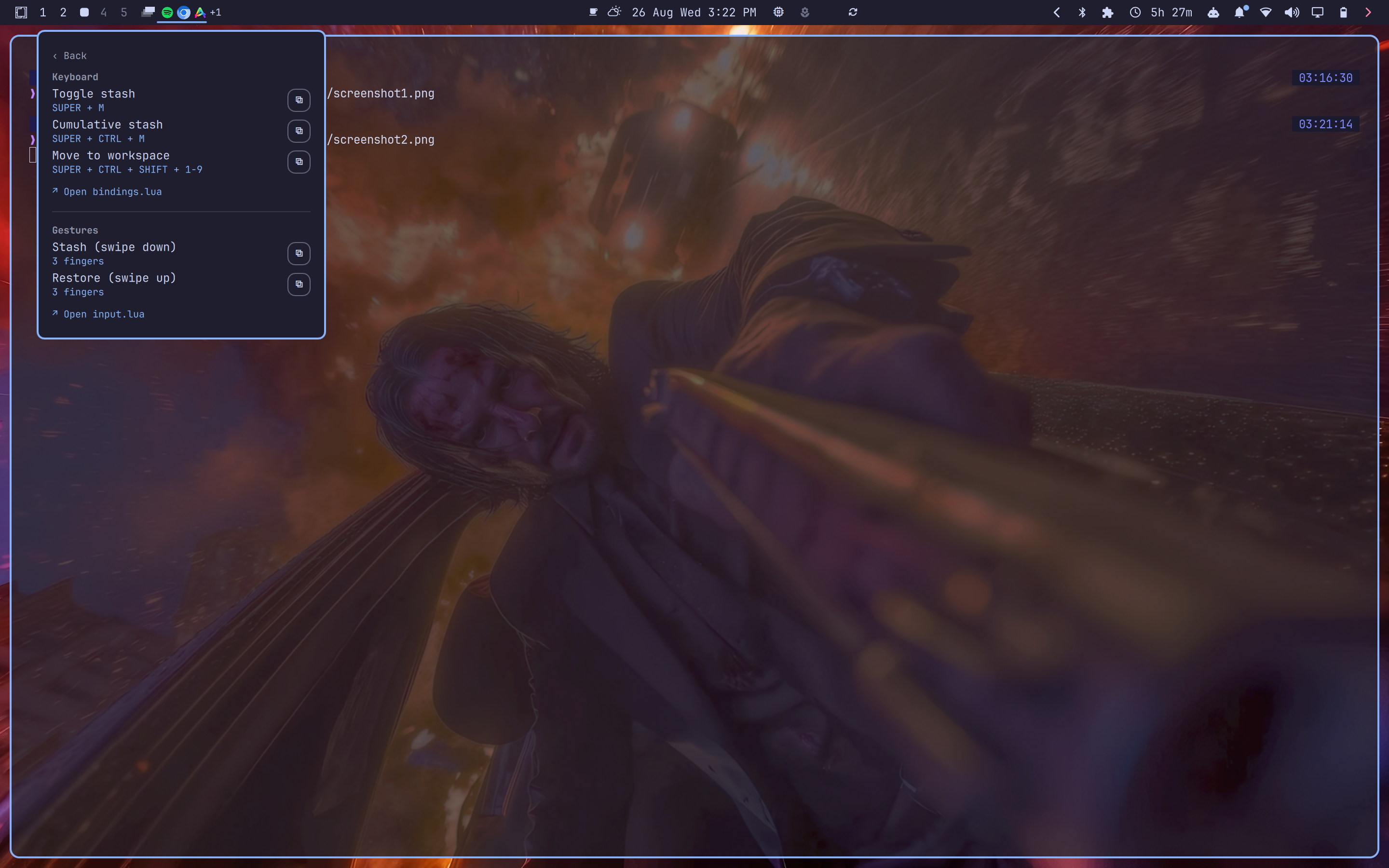
Right-click the bar widget to open the settings menu: display style (count / names / icons), name/icon overflow limits, the overflow indicator's style and count mode, a restore-defaults action, and a keybindings reference page with copy-to-clipboard and open-config-file buttons.
Settings can also be set from the command line:
omarchy bar set io.github.devasstated.workspace-stash displayMode names
omarchy bar set io.github.devasstated.workspace-stash maxNames 6
omarchy bar set io.github.devasstated.workspace-stash maxIcons 8
omarchy bar set io.github.devasstated.workspace-stash overflowStyle ellipsis
omarchy bar set io.github.devasstated.workspace-stash overflowCountMode total
| Setting | Default | Notes |
|---|---|---|
displayMode |
count |
count, names, or icons. count is the most stable option across icon themes, long application names, and narrow bars. |
maxNames |
2 |
Names beyond this collapse into the overflow indicator below. |
maxIcons |
3 |
Icons beyond this collapse into the overflow indicator below. |
overflowStyle |
badge |
badge (+N) or ellipsis (..N). Independent of overflowCountMode. Not shown when displayMode is count. |
overflowCountMode |
leftover |
leftover (how many are hidden) or total (the full stashed count). Independent of overflowStyle. Not shown when displayMode is count. |
The settings menu's restore-defaults action resets all of the above back to these defaults in one confirmed step.
Update
omarchy plugin update io.github.devasstated.workspace-stash
Remove
Restore your stash before removing the plugin, then run:
omarchy plugin remove io.github.devasstated.workspace-stash
Removing the plugin does not close or move stashed windows out of the special workspace. If the plugin is unavailable while windows remain stashed, reveal them with:
hyprctl dispatch 'hl.dsp.workspace.toggle_special("workspace-stash")'
Move the windows to a normal workspace, then hide the special workspace again the same way.
Limitations
- Layout restoration is best-effort, not guaranteed, for tiled windows. In the very rare case a batch's layout genuinely can't be reconstructed, every window still comes back — restoration falls back to Hyprland's own tiling rather than forcing a wrong layout — only the exact position/size may differ from where it was. Nothing is ever lost or hidden.
- Two directly-adjacent pseudo-tiled windows (
SUPER+P, both siblings in the same split) may not both restore their exact size — Hyprland itself recomputes a pseudo-tiled window's natural size when it's touched while its sibling is also pseudo-tiled. Structure, order, and every other window are unaffected; this is narrow and purely cosmetic. - The originally-focused window isn't guaranteed to end up focused again after a restore, especially when several windows are involved.
- No cross-session persistence. The stash lives in Hyprland's live window state; if you log out or restart the compositor with windows still stashed, they're gone along with every other window in that session, the same as any other workspace.
Development
Validate the repository with:
omarchy plugin validate .
qmllint Service.qml BarWidget.qml
See docs/FEATURES.md for the full behavioral specification,
docs/DESIGN-JOURNEY.md for the history of how the implementation reached
it (bugs found and rejected approaches along the way), and
docs/D-RECONSTRUCTION.md for how layout reconstruction actually works.
License
Workspace Stash is licensed under the MIT License.