
Crypto marquee bar widget
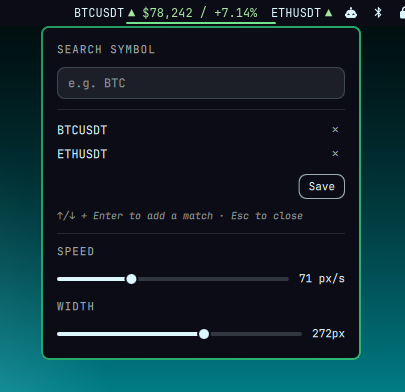
A bar widget that scrolls multiple crypto prices and their daily % change, marquee-style, with a triangle that's green on the way up and red on the way down per symbol, and opens a configuration popup on click.

Dependency
Live prices come over a Binance WebSocket stream, bridged into Quickshell
via websocat, since Quickshell's QML
has no native WebSocket client. Install it with:
omarchy pkg add websocat
If websocat isn't on PATH, the widget stays empty and its tooltip says
so instead of hanging on "Fetching…" forever. websocat is only checked
once, when the plugin loads. See "Applying changes" below if you install
it after the widget already came up without it.
Install
omarchy plugin add https://github.com/devbrsa/omarchy-crypto-marquee.git --enable
omarchy pkg add websocat
--enable walks you through picking a bar section (left/center/right) and
adds the widget's entry to ~/.config/omarchy/shell.json for you. Install
order with websocat doesn't matter, but see "Applying changes" below if
the widget already loaded once without it.
To install manually instead, clone this repo into
~/.config/omarchy/plugins/io.github.devbrsa.crypto-marquee/, then add an
entry with "id": "io.github.devbrsa.crypto-marquee" under bar.layout in
~/.config/omarchy/shell.json yourself (see Configuration below).
Uninstall
omarchy plugin remove io.github.devbrsa.crypto-marquee
This removes the widget from the bar (if enabled) and deletes the plugin
folder, backed up alongside the other plugins first unless it's a
git-managed clone (e.g. via omarchy plugin add).
How it works
- A single persistent
websocatprocess, started once at load and auto-restarted with exponential backoff if it exits (dropped connections, network blips, and so on), subscribes to Binance's combined@tradeWebSocket stream for every configured symbol at once (wss://stream.binance.com:9443/stream?streams=<symbol>@trade/...). Each incoming line is the latest traded price for one symbol, applied totickersinstantly. That's the live part. - Separately, every
refreshIntervalSec(default 5 minutes), a sequentialcurlloop hitsGET /api/v3/klines?symbol=<symbol>&interval=1d&limit=1once per configured symbol to (re)fetch each symbol's current UTC daily-open baseline.% change = (lastTradePrice - dayOpen) / dayOpenis recomputed locally whenever either input updates. - This matches what Binance's own UI shows: change since the 00:00 UTC
daily open, not the rolling 24h figure from
/api/v3/ticker/24hr. Those two numbers disagree by design (rolling window vs. fixed daily window). Binance's kline WebSocket stream would give the daily-open baseline directly and skip the REST poll entirely, but it proved unreliable and throttled in practice, unlike@trade, which pushes instantly, so the REST poll handles that half instead. - The bar renders a continuous marquee: all configured symbols'
<symbol> <triangle> <price> / <percent>segments (e.g.BTCUSDT ▲ $63,103 / +0.09%) scroll right-to-left in an endless loop, clipped to a fixed-width viewport, at the bar's own text size (Style.font.body, not independently configurable). Prices are dollar-prefixed, and decimals scale with magnitude (0 for ≥100, down to 8 for sub-$0.0001 prices), so a low-priced altcoin (e.g.JASMYUSDT ▲ $0.004560 / +1.20%) shows its actual value instead of rounding to$0.00.▲(up) and▼(down) render at full glyph width in every font, unlike the diagonal↗/↘arrows originally used, which render narrow and half-width in most fonts. Each segment is two independently coloredTextitems: the symbol name always usesbar.barForeground, the same theme text token every other bar widget's label uses, regardless of direction. Only the price/percent segment carries the up/down color. Those colors are their own settings rather than the theme's accent/urgent tokens (some themes' "urgent" color reads closer to olive than red, and a pastel green tuned for dark surfaces loses contrast on light ones), with one pair of colors per theme brightness:colorPositiveDarkandcolorNegativeDarkon dark themes,colorPositiveLightandcolorNegativeLighton light themes, chosen via aColor.backgroundluminance check (see Configuration below). The scroll is the standard seamless-marquee trick: the segment row is duplicated back-to-back and animated by exactly one copy-width, so the loop reset is invisible. - Hovering shows a tooltip listing every symbol's price/percent, plus a single "last updated" time (the most recent fetch, rendered in the configured timezone).
- Left-clicking opens a popup (
Panel.qml, the same Loader/panel pattern every other Omarchy bar widget uses) to edit the tracked symbol list. A search field filters Binance's own tradeable symbol list, fetched once fromGET /api/v3/ticker/price(about 2500 symbols, no auth, cached in memory for the panel's lifetime), as you type. Only real Binance symbol names ever get added, picked with the arrow keys and Enter or a click, never whatever you happened to type, so a typo can't silently produce a symbol that never resolves. Each added symbol becomes its own row with an "✕" to remove it. Nothing is saved until you click Save (Escape or clicking outside discards the edit entirely); on save, the new list is written back to this widget'sshell.jsonentry and the marquee updates immediately (seesymbolsin Configuration below). The same popup also has speed and width sliders (PanelSlider, the same component Omarchy's own brightness/volume sliders use), separate from the symbol list: each applies and writes back toshell.jsonthe moment you release it, independent of the Save button, which only ever commits the symbol list.
Configuration
Set in this widget's entry under bar.layout.right in
~/.config/omarchy/shell.json:
{
  "id": "io.github.devbrsa.crypto-marquee",
  "symbols": ["BTCUSDT", "ETHUSDT"],
  "timezone": "GMT",
  "viewportWidth": 170,
  "scrollSpeedPxPerSec": 30,
  "refreshIntervalSec": 300,
  "reconnectBaseMs": 2000,
  "reconnectMaxMs": 60000,
  "colorPositiveDark": "#a6e3a1",
  "colorNegativeDark": "#e74c3c",
  "colorPositiveLight": "#1b5e20",
  "colorNegativeLight": "#c0392b"
}
symbolsis the whole point of the widget: which coins you're tracking. It's a list rather than a single value because the widget scrolls through any number of them in one marquee. Any array of Binance spot symbol pairs works. It's easiest to edit by left-clicking the widget and using the search popup (see "How it works" above) rather than hand-editing this array, though both work identically; the popup just writes here for you. Any number of symbols works; more symbols just make one lap of the marquee longer. A newly added symbol shows…for a few seconds after saving, since it needs both its first WebSocket trade and its daily-open REST fetch to land before a price/percent can be computed. Defaults to["BTCUSDT", "ETHUSDT"].timezonelabels the tooltip's "last updated" time, since a bare time like14:32is ambiguous without a zone attached. Only"GMT"/"UTC"is currently supported, since that's all that was needed (Binance's daily-open boundary is itself UTC-based; see "How it works" above). Anything else falls back to the same UTC rendering rather than guessing an offset. Defaults to"GMT".viewportWidthsets the fixed pixel width of the visible scrolling area (the popup's WIDTH slider, 80-400px, writes here on release). The bar has limited horizontal space shared with every other widget, so the marquee needs a fixed, predictable width rather than expanding to fit its variable, scrolling content. Defaults to150; widened here to170to fit the symbol name prefix.scrollSpeedPxPerSecsets the marquee scroll speed in pixels per second (the popup's SPEED slider, 10-200px/s, writes here on release). Readability is a personal tradeoff between glancing quickly and reading every digit, so this is tunable rather than hardcoded. Defaults to90(fast) when unset; slowed here to30for easier reading.refreshIntervalSecsets how often, in seconds, the daily-open baseline is re-fetched via REST. That baseline only changes once every 24 hours at UTC midnight, so polling it as often as prices update would waste REST calls for no benefit; this setting trades off noticing the new day's open promptly against making fewer calls. Defaults to300(5 minutes). It only affects how quickly the widget notices a new UTC day's open; live price updates are unaffected, since those come from the WebSocket stream continuously, not this poll.reconnectBaseMsandreconnectMaxMsbound the exponential backoff, in milliseconds, used when reconnecting the WebSocket after a drop. The connection will occasionally drop from network blips or Binance-side disconnects; without backoff, a broken connection would either hammer Binance with instant reconnect attempts or leave the widget stuck.Baseis the first retry delay;Maxcaps how long any single retry ever waits, no matter how many consecutive failures there've been. Default to2000and60000; rarely worth changing.colorPositiveDark/colorNegativeDarkandcolorPositiveLight/colorNegativeLightare the up/down color pairs, one per theme brightness. A single hardcoded pair doesn't work well across themes: a pastel green tuned for dark surfaces loses contrast on light ones, and some themes' own "urgent" (red) accent reads closer to olive than red. So the widget picks one of the two pairs itself, via aColor.backgroundluminance check, rather than relying on theme tokens, and exposes both as settings so you can retune them without editing code.Darkcolors apply when the active theme is dark,Lightcolors when it's light;Positive/Negativemap to price up/down. Default to#a6e3a1(green) and#e74c3c(red) for dark themes,#1b5e20(dark green) and#c0392b(red) for light themes; the light pair uses darker shades specifically for contrast against light surfaces.
Applying changes
Any setting above, edited in shell.json (including symbols), applies
live on save with no restart needed. Changing symbols specifically
clears cached prices and reconnects the WebSocket stream with the new
subscription list within a second or two; this was verified by editing
the list and watching the websocat process command change without
touching anything else.
Editing this plugin's own .qml files (Widget.qml, Panel.qml) also
hot-reloads automatically. Omarchy's shell watches everything under
~/.config/omarchy/plugins/ and reloads on save; you'll see "Local
plugin changed, reloading" in the shell's log.
Installing websocat after the widget already loaded without it needs a
plugin reload to be noticed, since the check only runs once, at plugin
load: touch or save any file in the plugin folder, run
omarchy-shell shell rescanPlugins, or run omarchy restart shell.
Editing manifest.json (id, version, entry points, and so on) isn't
guaranteed to be picked up by the same file-watch hot-reload as .qml
changes; run omarchy-shell shell rescanPlugins or omarchy restart shell
after changing it.