
Omarchy SteelSeries Mice
Omarchy shell plugin for SteelSeries mice: edit the DPI preset table and polling rate from the bar, and follow the physical DPI button live.
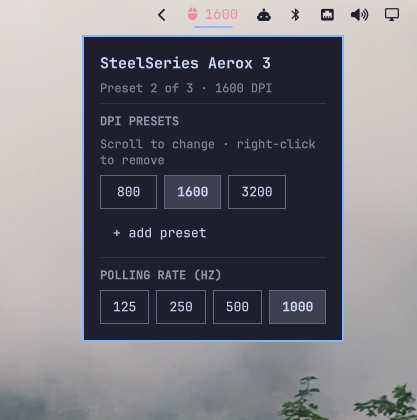
What it does
Modern SteelSeries mice hold up to five DPI presets and cycle between them when you press the button behind the scroll wheel. The panel shows that table as a row of chips, highlights the active one, and lets you edit it:
| Gesture on a chip | Effect |
|---|---|
| Click | Make this preset the active one |
| Scroll | Change its DPI, one step of the device's own resolution per notch |
| Right-click | Remove it (the last remaining preset stays put) |
Scrolling is collected and sent once the wheel stops, so a flick through a hundred steps is one write, not a hundred.
Press the physical button and the panel follows — the mouse pushes an unsolicited HID report on every press carrying both the active index and the whole preset table, so what you see is what the device reported, not a cached guess.
Nothing about a particular mouse is written into this plugin. The DPI range,
how many presets the device holds, which polling rates it accepts, whether the
active preset can be chosen at all — all of it comes out of
rivalcfg's per-device profile at runtime,
and the panel draws itself from that.
Requirements
rivalcfg(AUR), used as a Python library rather than through its CLI — see "Why not the CLI" below.jq- The udev rules
rivalcfginstalls, so the mouse is writable without root. After installing, either replug the mouse or run:sudo udevadm control --reload-rules && sudo udevadm trigger
Install
omarchy plugin add https://github.com/dfrost90/omarchy-steelseries-mice.git --enable
Bind a key to open the panel:
omarchy-shell io.github.dfrost90.steelseries-mice toggle
Uninstall
omarchy plugin remove io.github.dfrost90.steelseries-mice
That takes the widget out of the bar and deletes the plugin directory. Two things are deliberately left behind, because neither belongs to the plugin:
~/.local/state/omarchy/steelseries-mouse.json, the remembered preset table. Delete it by hand if you want it gone.- The DPI presets and polling rate already written to the mouse. They live in
the device's own flash and survive uninstalling, rebooting, and moving the
mouse to another machine. Use
rivalcfg --resetto put the device back to its factory defaults.
Device support
Every mouse rivalcfg knows — 76 USB ids — falls into one of three tiers.
Tested on hardware. The wired Aerox 3 (1038:1836), and only that. It is
the mouse this was developed against, and the one place the wire protocol has
actually been watched rather than inferred.
Preset table, tracked (22 ids). Aerox 3 / 3 Wireless, Aerox 5 / 5 Wireless, Aerox 9 Wireless, Prime Wireless, Prime Mini Wireless, Rival 5, and their special editions. These share the Aerox 3's report layout exactly — one command byte, one byte per DPI code — so the panel both writes the table and follows the physical button. The tracking half is unverified on everything but the Aerox 3.
Preset table, not tracked (12 ids). Prime, Prime Mini, Prime+, Rival 3, Rival 3 Gen 2, Rival 3 Wireless, Sensei TEN. Editing works. Following the button does not, and is deliberately not attempted: these encode DPI as a plain number, or use a two-byte command whose echo is unknown, so any stray report would decode as a plausible DPI change rather than being rejected. The panel says so instead of guessing.
Two fixed slots (42 ids). Rival 100 / 110 / 300 / 310 / 500 / 600 / 650 / 700 / 95, Sensei 310, Sensei [RAW], Kana v2, Kinzu v2, and editions. These predate the preset table: they hold exactly two DPI slots, each written by its own command, and nothing on the wire names which one the button has selected. The panel shows both slots and edits either, without pretending to know or choose the active one. Where the device takes a fixed list of DPI values rather than a range — the Kinzu v2 accepts 400, 800, 1600 or 3200 and nothing between — scrolling steps along that list instead of along a step size.
Anything outside the tested tier is driven from rivalcfg's profile alone. That
is enough to be confident about what gets sent, and the test suite checks the
payload for all 34 preset-table devices, but it is not the same as having seen
one land. The first_preset bug below is exactly the kind of thing no amount of
offline testing would have caught.
How it works
BarWidget.qml ──> scripts/steelseries ──> scripts/steelseries-device ──> rivalcfg ──> mouse
     ^                |                          |
     |                v                          | watch
     |       ~/.local/state/omarchy/             |
     └────── steelseries-mouse.json <────────────┘
scripts/steelseries owns validation and the state file and speaks JSON.
scripts/steelseries-device owns the hardware: it reports the device's
capabilities, writes through rivalcfg's library, and decodes DPI-button reports
into JSON lines.
The panel never runs the helper itself, the watch stream included. Everything
the helper produces has a ceiling on it, and those ceilings live in the wrapper
— a stream read straight from the helper would arrive under none of them.
The split matters for speed. Deciding whether a supported mouse is plugged in
costs a Python process and a rivalcfg import; deciding whether any SteelSeries
USB id is present at all costs a sed over sysfs. The wrapper does the cheap
check on every call and caches the expensive answer against it, so the panel's
routine get never starts an interpreter.
Why not the rivalcfg CLI
rivalcfg --sensitivity 800,1200,1600 always activates the first preset.
The underlying command carries a selected-preset byte that the CLI never
exposes, so switching the active preset requires the library.
Reading the device
There is no "what are your settings?" command. The mouse only speaks when the DPI button is pressed, sending:
ad 03 01 12 1b 24 ...
│  │  │  └──┴──┴── one encoded DPI per preset (800, 1200, 1600)
│  │  └─────────── 0-based active preset
│  └────────────── preset count
└───────────────── sensitivity command (0x2d) with the high bit set
DPI codes are decoded by inverting rivalcfg's own output_choices table, so
the decode cannot drift from the encode. Every field is then checked against
the profile — the count against the device's preset limit, the selection
against the count, every DPI byte against the code table — because this is the
one place an unrelated report from a shared interface could be mistaken for a
DPI change.
Consequently, before the first write or button press the state is unknown, and the panel says "Assumed" rather than presenting a default as fact.
The selected-preset byte is 0-based
rivalcfg's Aerox 3 profile declares first_preset: 1, so process_value adds
one to the selection. The device counts presets from 0, which means every
selection made through set_sensitivity() lands one preset too high — and
selecting the last preset produces a byte one past the end that the device
silently discards, so the DPI never changes at all.
Verified against hardware by writing raw payloads: byte 0x00 makes the mouse
report index 0, 0x02 reports index 2, and rivalcfg's 0x03 for the last of
three presets produces no response whatsoever.
sensitivity_payload() therefore takes the DPI codes from rivalcfg and
overwrites only that one byte — and only for a device listed in VERIFIED,
whose real numbering has been checked. Every other device gets exactly the bytes
rivalcfg would have sent, because a second guess about somebody else's hardware
is worth less than upstream's first one. This looks like an upstream bug; the
sibling Aerox 5 and Aerox 9 profiles declare first_preset: 0 for the same
protocol.
Flash wear
set --presets persists to the device's internal memory. select does not:
switching presets is a frequent action, and the selection is re-asserted at
startup anyway.
Development
tests/run
Quickshell resolves the qs import to the shell at runtime; qmllint has to be
told, so linting takes a scratch root:
mkdir -p /tmp/qmlroot && ln -sfn ~/.local/share/omarchy/shell /tmp/qmlroot/qs
qmllint -I /tmp/qmlroot -I /usr/lib/qt6/qml BarWidget.qml
What remains are Style/Color singleton lookups and one Quickshell Process
signal type that qmllint cannot introspect statically — the same warnings the
first-party Omarchy plugins produce, in larger numbers.
75 tests for the wrapper script, 34 for the device helper, and 16 for the panel. The wrapper's device helper is stubbed and sysfs is faked, so the suite can never reach real hardware and can pretend any mouse is plugged in. The helper's tests use report fixtures captured from a real Aerox 3, then sweep all 76 profiles: capability derivation and payload building are pure functions of the profile, so a device nobody owns can still be checked for a missing field, a range that reads backwards, or a table the panel would render as an empty row.
The panel's tests lift applyState and observed straight out of
BarWidget.qml and feed them what a broken or replaced helper could say, so
they cannot drift from the code they cover. They need node and are skipped
without it — nothing else here wants a JS engine, and the plugin itself needs
only the one already inside Quickshell.
Hot-reload is not reliable for structural QML changes. The shell can keep
serving a cached copy of BarWidget.qml, which looks like your edits silently
having no effect. When in doubt:
omarchy restart shell
License
MIT