
SimpleOpenVPN
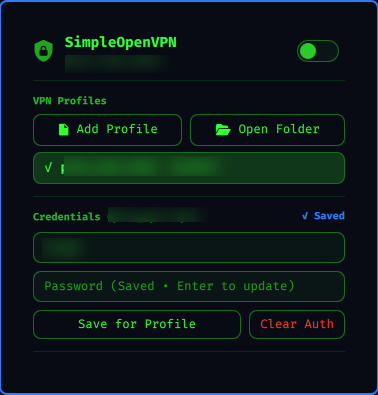
SimpleOpenVPN is an Omarchy bar widget for running a single OpenVPN tunnel from the Omarchy shell. It provides a compact status icon, a profile picker, profile-specific credentials, connect/disconnect controls, live tunnel details, and recent OpenVPN log output.
The plugin is intentionally small: it does not manage NetworkManager VPN profiles, systemd services, or multiple concurrent tunnels. It is built for users who already have .ovpn or .conf files and want a direct bar control for them.
Features
- Add
.ovpnor.confprofiles with a graphical file picker - Remember profiles across restarts
- Save login credentials per profile file
- Connect or disconnect from the bar
- Right-click the bar icon for quick connect/disconnect
- Show active tunnel interface, IPv4 address, and traffic counters
- Show recent OpenVPN log lines inside the panel
- Keep profile state under
~/.local/state
Requirements
SimpleOpenVPN is designed for Omarchy and its Quickshell-based shell.
Install these packages before enabling the plugin:
omarchy pkg add openvpn jq zenity python
It also uses tools that are normally present on Omarchy or Arch Linux:
pkexecippsfindawkgrepsedpython3- GNU coreutils
Install
Install dependencies:
omarchy pkg add openvpn jq zenity python
Add and enable the plugin:
omarchy plugin add https://github.com/diogogc/simple-openvpn.git --enable
Move it to the right side of the bar if needed:
omarchy bar move io.github.diogogc.simple-openvpn --section right
You can also use the included installer from a checked-out copy:
./install.sh
omarchy plugin add does not run plugin install hooks or privileged setup. The installer script is only a convenience wrapper that installs packages first and then calls omarchy plugin add.
Usage
Click the SimpleOpenVPN bar icon to open the panel.
Use Add Profile to select an OpenVPN .ovpn or .conf file. The selected file is remembered as a profile and becomes the active profile.
Enter your VPN username and password, then click Save for Profile. Credentials are linked to the selected profile path, so switching profiles also switches the saved credentials.
Use the switch in the panel to connect or disconnect. You can also right-click the bar icon to toggle the VPN without opening the panel.
Security
SimpleOpenVPN runs inside the unsandboxed Omarchy shell as the desktop user, then uses pkexec only for the OpenVPN launch/stop operations that need elevated privileges.
Security hardening in the current implementation was shaped by review from HANCORE-linux. Their feedback identified command-line credential exposure, predictable shared temporary paths, descriptor/path race conditions, and root OpenVPN execution of user-owned profiles.
The plugin now keeps credentials off process argv, stores profile auth files with private permissions, keeps privileged runtime files under a root-owned /run directory, performs descriptor-relative file publication, opens user-supplied files with O_NOFOLLOW and fstat() validation, and rejects OpenVPN profile directives that would add privileged code execution or control surfaces such as plugin, nested config, iproute, management sockets, script hooks, and runtime output overrides.
References:
- OpenVPN 2.6 manual: https://openvpn.net/community-docs/community-articles/openvpn-2-6-manual.html
- OpenVPN management interface notes: https://openvpn.net/community-docs/management-interface.html
- Omarchy plugin development guide: https://omarchyplugins.com/develop.html
- Omarchy plugin publishing guide: https://omarchyplugins.com/publish.html
Remove
omarchy plugin remove io.github.diogogc.simple-openvpn
License
MIT