
Layout Switcher
An Omarchy Quattro bar widget for switching Hyprland's tiling layout from the bar, with every layout option Hyprland exposes in a popup panel — like a lightweight HyprMod living in your bar.
-
Bar chip shows the tiling layout of the active workspace (▦ Dwindle · ▥ Master · ☰ Scrolling) and follows you across workspaces.
-
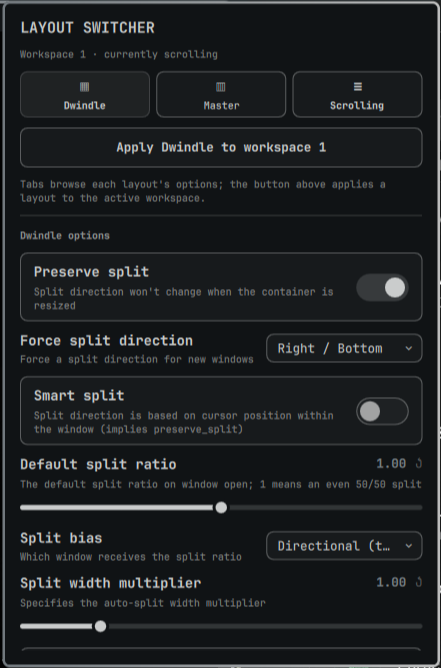
Click the chip to open the panel: pick a layout, and it is applied to the active workspace (per-workspace, exactly like Omarchy's built-in
Super + Ltoggle — the choice sticks across restarts). -
Tabs for Dwindle, Master, and Scrolling expose all of Hyprland's layout options with live values read from
hyprctl getoption:Dwindle Master Scrolling preserve_split orientation column_width force_split mfact explicit_column_widths smart_split new_status direction split_width_multiplier new_on_top fullscreen_on_one_column permanent_direction_override new_on_active focus_fit_method use_active_for_splits smart_resizing follow_focus smart_resizing special_scale_factor follow_min_visible special_scale_factor allow_small_split wrap_focus drop_at_cursor wrap_swapcol always_keep_position focus_master_on_close -
Changes apply to Hyprland instantly and persist across reloads.
Requirements
- Omarchy Quattro (Hyprland configured in Lua, Quickshell bar with the plugin host)
- Hyprland with
hyprctlonPATH;jqfor reading live option values (optional — the panel falls back to defaults if it is missing)
No extra packages, no root.
Install
omarchy plugin add https://github.com/djrcx/omarchy-layout-switcher.git --enable
For a local checkout:
omarchy plugin add ~/Work/omarchy-layout-switcher --enable
Then add Layout Switcher to the bar from Omarchy's bar settings, or:
omarchy bar put io.github.djrcx.layout-switcher --section right
Optional keybinding to summon the panel from the keyboard — add to
~/.config/hypr/bindings.lua:
o.bind("SUPER + ALT + L", "Open layout switcher",
  "qs -p /usr/share/omarchy/shell/shell.qml ipc call io.github.djrcx.layout-switcher toggle")
How it applies things
Omarchy Quattro configures Hyprland in Lua, where hyprctl keyword is
refused. The plugin therefore speaks Lua:
- Workspace layout —
hyprctl eval 'hl.workspace_rule({ workspace = "N", layout = "..." })'(with ahyprctl keyword workspace ...fallback for legacy.confsetups), and the same rule written to~/.local/state/omarchy/workspace-layouts/N.lua, which is the exact mechanism Omarchy's own layout toggle uses, so per-workspace choices survive restarts. - Layout options —
hyprctl eval 'hl.config({ dwindle = { ... } })'for immediate effect, and the full option set written to~/.local/state/omarchy/toggles/hypr/layout-switcher.lua, which Omarchy's toggle directory loads on every Hyprland (re)load.
Note on hyprland-gui.lua (HyprMod)
Omarchy's hyprland.lua loads HyprMod's generated hyprland-gui.lua after
the toggles directory. If you have used HyprMod to configure layout options
(e.g. scrolling.focus_fit_method = 0), those hardcoded values will override
the plugin's toggles on every hyprctl reload or restart.
Fix (explicit opt-in): Open the panel → click "Take ownership of layout settings" (or run the cleanup action). This atomically removes only the dwindle, master, and scrolling sections from the main hl.config({...}) block in ~/.config/hypr/hyprland-gui.lua, preserving all other settings (decoration, general, misc, environment, comments, etc.). The operation is:
- Bounded — touches only the three layout keys inside the first
hl.config({...})call - Atomic — uses
FileViewwithatomicWrites: true - Idempotent — running multiple times produces identical output
- Fail-closed — returns
null(no write) if the file lacks the expected structure
After cleanup, the plugin's toggles file becomes the sole source of truth for layout options and survives reloads.
Files written
| Path | Why |
|---|---|
~/.config/omarchy/layout-switcher.json |
Your saved option values |
~/.local/state/omarchy/toggles/hypr/layout-switcher.lua |
Generated hl.config calls, loaded by Omarchy's toggles directory |
~/.local/state/omarchy/workspace-layouts/<id>.lua |
Per-workspace layout rules (shared with Omarchy's built-in toggle) |
Optional (explicit opt-in): ~/.config/hypr/hyprland-gui.lua — layout sections (dwindle, master, scrolling) removed from the main hl.config({...}) block so toggles take precedence on reload. The widget only edits this file when you explicitly trigger the cleanup action; it never writes there automatically.
Settings
Inline shell.json settings for the widget:
| Key | Default | Meaning |
|---|---|---|
showLabel |
true |
Show the layout name next to the icon on the bar |
omarchy bar set io.github.djrcx.layout-switcher showLabel false --json
Remove
omarchy plugin remove io.github.djrcx.layout-switcher
Optional cleanup (also reverts all option tweaks and per-workspace layouts the plugin wrote — note the workspace-layouts directory is shared with Omarchy's built-in toggle):
rm -f ~/.config/omarchy/layout-switcher.json \
      ~/.local/state/omarchy/toggles/hypr/layout-switcher.lua
If you ran the "Take ownership of layout settings" cleanup, you may also want
to restore hyprland-gui.lua from a backup or re-run HyprMod to regenerate it.
License
MIT