
omarchy-wallpaper-engine
Live Wallpaper Engine wallpapers on Omarchy.
Use your Steam Wallpaper Engine wallpapers — the animated scene and video ones — as live wallpapers on Omarchy, picked from Omatrix, an Omnitrix-style dial.
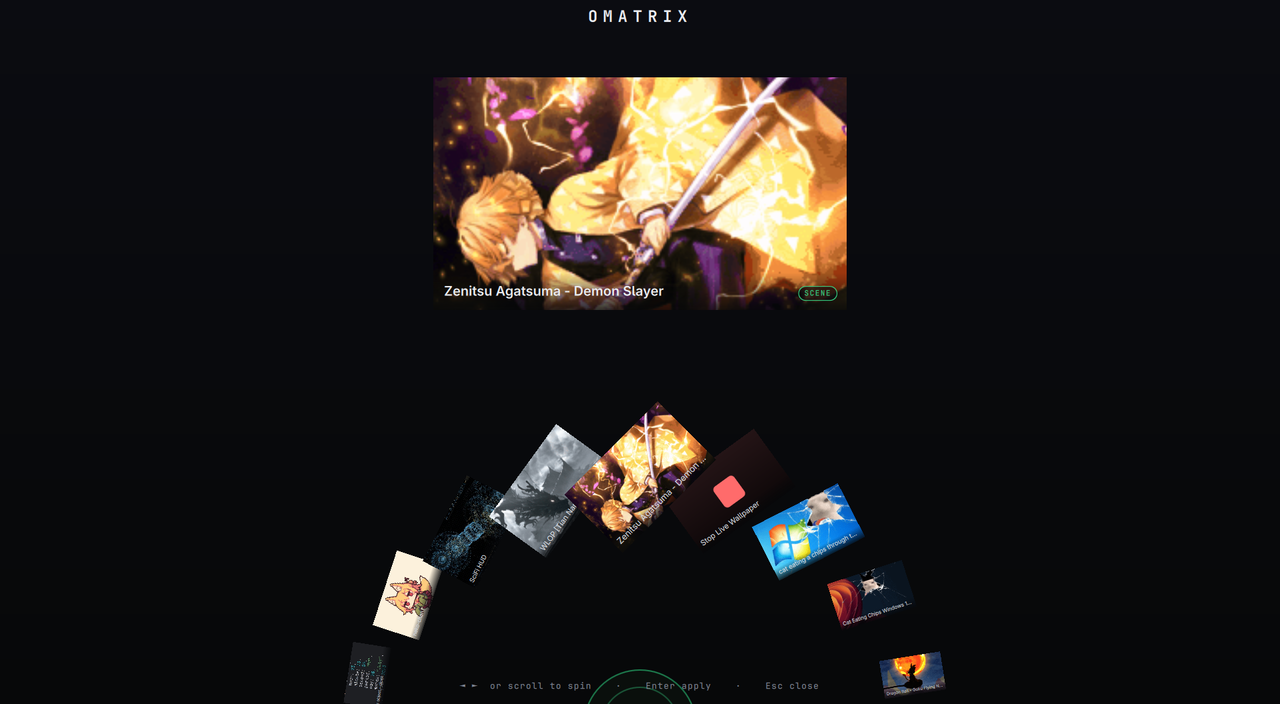
Omarchy draws its wallpaper through the Quickshell shell as a static image. This project renders your Wallpaper Engine content on the Hyprland background layer with linux-wallpaperengine and moves Omarchy's own background out of the way, so the animation shows through — and it survives theme switches and reboots. Nothing under /usr/share/omarchy is ever touched.
Features
- 🎡 Omatrix — a semicircular dial picker (spin, click to apply) that lands under menu → Style.
- 🖼️ Live scene and video wallpapers on the desktop, all monitors.
- 🔁 Survives theme changes and reboots (auto-restored on login).
- 🧰 A scriptable
omarchy-weCLI, plus a stable IPC surface for other bars/shells. - 🧩 Installs as a first-class Omarchy plugin, or from a plain clone.
Requirements
- An Omarchy system (Hyprland + the Quickshell shell).
- Wallpaper Engine on Steam, with some wallpapers subscribed (they live under
~/.local/share/Steam/steamapps/workshop/content/431960/). linux-wallpaperengine-gitfrom the AUR (an AUR helper likeyay/paru).
Install
As an Omarchy plugin (recommended):
yay -S linux-wallpaperengine-git       # the renderer — a plugin can't install AUR packages
omarchy plugin add https://github.com/dkgamer02ai/omarchy-wallpaper-engine.git --enable
Or from a clone:
git clone https://github.com/dkgamer02ai/omarchy-wallpaper-engine.git
cd omarchy-wallpaper-engine
./install.sh          # add --no-deps to skip the AUR install
Either path sets up the same thing: links the omarchy-we CLI into ~/.local/bin, drops a transparent placeholder so Omarchy's background stops covering the live one, adds a Hyprland autostart entry, installs a theme-set hook (re-applies the wallpaper after a theme change), and adds the menu → Style → Wallpaper Engine entry that opens Omatrix.
Note: Omarchy has no post-install/-remove hooks, so the plugin's service runs
install.shitself the first time the shell loads it. When removing the plugin, rununinstall.shfirst (see Uninstall).
Usage
Open menu → Style → Wallpaper Engine (or run omarchy-we omatrix) to launch Omatrix:
| Action | Control |
|---|---|
| Spin the dial | scroll · ← → · drag |
| Apply the selected wallpaper | left-click · Enter |
| Cancel | right-click · Esc |
| Stop the live wallpaper | the ⏹ Stop card (last on the dial) |
Omatrix needs the plugin install to open. On a plain
./install.sh(or a non-Omarchy shell)omarchy-we omatrixfalls back to the native grid picker.
Everything is also available from the CLI:
omarchy-we list           # list your wallpapers:  #  type  title  id
omarchy-we set 3          # set by list number…
omarchy-we set 2555206224 # …by Steam Workshop id…
omarchy-we set "goku"     # …or by title substring
omarchy-we omatrix        # open the Omatrix dial (falls back to the grid picker)
omarchy-we menu           # native Omarchy grid picker (falls back to walker/fuzzel/wofi/rofi)
omarchy-we next / prev / random
omarchy-we current        # what's set, and whether it's running
omarchy-we stop           # stop the live wallpaper, restore a normal background
Your choice is saved to ~/.local/state/omarchy-we/current and re-applied on every login.
Keybinding (optional)
Add one of these to ~/.config/hypr/bindings.lua:
o.bind("SUPER + SHIFT + W", "Wallpaper Engine picker", "omarchy-we omatrix")  -- dial
o.bind("SUPER + SHIFT + W", "Wallpaper Engine picker", "omarchy-we menu")     -- grid
Tuning
Set these before omarchy-we (e.g. in the autostart line):
| Variable | Default | Meaning |
|---|---|---|
OMARCHY_WE_SCALING |
fill |
stretch | fit | fill | default |
OMARCHY_WE_FPS |
(unset) | cap the frame rate (e.g. 30) to save battery |
How it works
linux-wallpaperengine --silent --screen-root <output> --bg <workshop-folder>renders the wallpaper on the Hyprland background layer (one group per active monitor).- Omarchy's Quickshell background is an opaque surface on that same layer, so it would hide the live one. We point Omarchy's current background at a transparent PNG (
~/.config/omarchy/backgrounds/transparent.png) and relaunch the wallpaper on top — never editing/usr/share/omarchy. - The
theme-sethook re-applies this after a theme change (which otherwise resets the background and restarts the shell). - Omatrix (
DialPicker.qml) is a Quickshelloverlayplugin: a dial of cards fed byomarchy-we ipc entries, applying viaomarchy-we set. omarchy-we menureuses Omarchy's own image selector (omarchy-menu-images), caching thumbnails under~/.cache/omarchy-we/; without it, it falls back to awalker/fuzzel/wofi/rofimenu.
Integration (IPC) for bars & shell plugins
omarchy-we exposes a small, stable interface so a bar or shell can build its own animated-wallpaper picker on top of it, mirroring the familiar ipc <verb> shape:
omarchy-we ipc version     # JSON capability contract: {"ipc":1,...} — probe this first
omarchy-we ipc entries     # JSON: every wallpaper (build your own grid/dial from this)
omarchy-we ipc current     # JSON: the active wallpaper
omarchy-we ipc set <id>    # apply by Steam Workshop id (or index/title)
omarchy-we ipc picker      # open the built-in grid picker
omarchy-we ipc stop        # stop the live wallpaper, restore a static background
Probe before use: run omarchy-we ipc version and only enable the feature when it exits 0 with a compatible ipc contract (currently 1). entries/current/set exit non-zero (message on stderr) on failure — treat that as an error, not an empty result. The ipc number bumps only on a breaking change to these JSON shapes.
ipc entries (same as omarchy-we list --json):
[
  {
    "id": "3239853514",
    "title": "Dragon Ball - Goku Flying Nimbus 4k",
    "type": "scene",
    "preview": "/home/you/.local/share/Steam/steamapps/workshop/content/431960/3239853514/preview.gif",
    "current": false
  }
]
ipc current (same as omarchy-we current --json):
{ "id": "3239853514", "title": "…", "type": "scene", "preview": "/…/preview.gif", "running": true }
Fields: id = Steam Workshop id · type = scene | video | web · preview = absolute path to the wallpaper's own preview image (or null) · current/running = booleans. Render entries, and on select call omarchy-we ipc set <id>. Output is UTF-8 JSON; the contract is stable.
Notes & limits
- Scene and video wallpapers work. Web (HTML/JS) wallpapers may not render —
linux-wallpaperengine's web support is limited. - Live wallpapers use the GPU continuously. On a laptop/iGPU, cap the frame rate (
OMARCHY_WE_FPS=30) oromarchy-we stopon battery. - Audio is muted (
--silent). - Multi-monitor: the same wallpaper renders on every active monitor.
Coexisting with a custom bar / shell
This project never edits third-party shell or bar configs (e.g. a Quickshell bar under ~/.config/quickshell/) — those are usually auto-updating deploys, and editing them just causes merge conflicts. Everything here stays in your own files: ~/.local/bin, ~/.config/hypr, ~/.config/omarchy, ~/.cache/omarchy-we.
If your bar ships its own static wallpaper picker, the two coexist — they write the same Omarchy background, so last write wins:
- Pick a live wallpaper here → the background goes transparent and the animation shows through.
- Pick a static image in the other picker → it sets an opaque background that covers the live one. The renderer keeps running underneath until you stop it.
To go back to plain static wallpapers, run omarchy-we stop once; to go live again, use Omatrix.
Uninstall
Clone install:
./uninstall.sh # removes CLI, hook, autostart, state; restores a normal background
Plugin install — run the uninstaller from the plugin folder before removing the plugin (there's no remove hook), so the autostart line, theme hook, and menu row are cleaned up:
~/.config/omarchy/plugins/io.github.dkgamer02ai.wallpaper-engine/uninstall.sh
omarchy plugin remove io.github.dkgamer02ai.wallpaper-engine
Either way, linux-wallpaperengine is left installed — remove it with yay -R linux-wallpaperengine-git if you want. (If you forget the uninstaller, the menu row hides itself once the CLI is gone, and the theme-set hook self-cleans on the next theme change.)
Credits
- Almamu/linux-wallpaperengine — the renderer doing the heavy lifting.
- Omarchy by DHH.