
ImageGen Studio for Omarchy
Create. Edit. Refine. Compare. Your complete Codex ImageGen workflow, one click from the Omarchy bar.
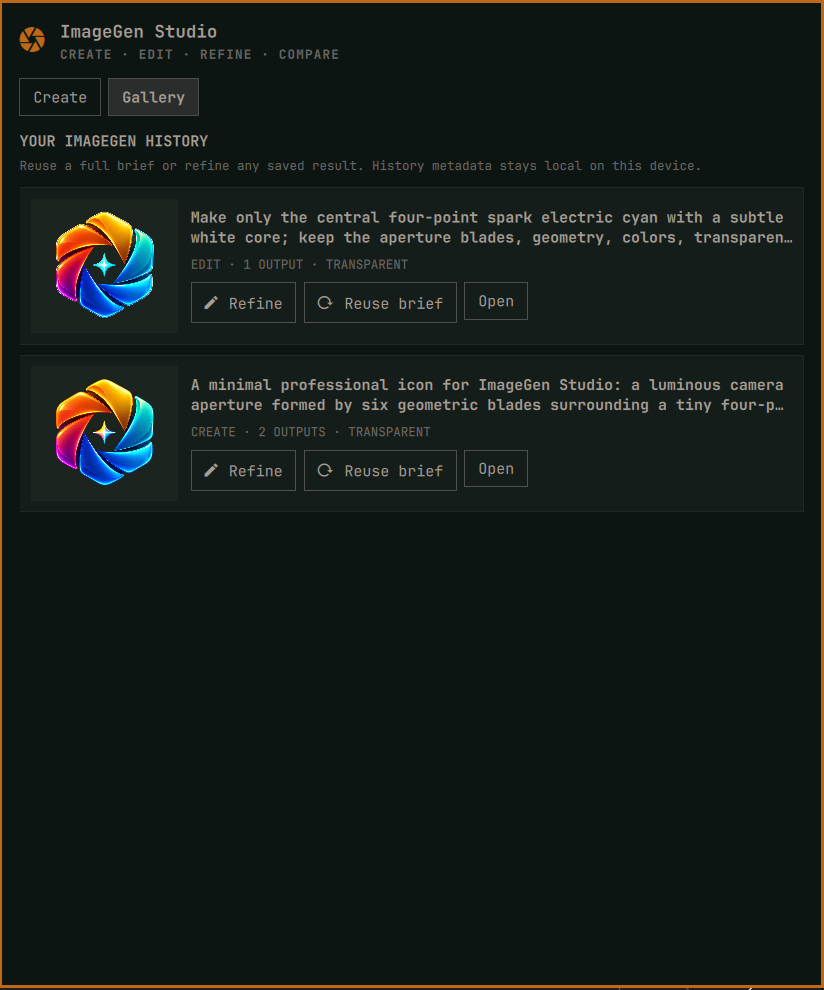
ImageGen Studio turns Codex's built-in ImageGen skill into a polished desktop workflow. Build a structured creative brief, bring edit targets and role-aware references, generate independent variants, refine any result, and keep a reusable local gallery. Every finished PNG lands in ~/Downloads/imagegen/.
No OpenAI API key is required. The plugin uses your normal Codex sign-in and opens the official interactive login flow for first-time users.
Highlights
- Create new images or make non-destructive edits to existing ones
- Add up to eight reference images as style, subject, framing, compositing, or general guidance
- Express the full creative brief: use case, asset type, style, composition, lighting, palette, exact text, invariants, and avoid list
- Generate 1, 2, or 4 genuinely independent variants through separate ImageGen calls
- Request transparent PNG output and verify that the result contains real transparent pixels
- Review the result once and permit one targeted correction when a requirement is materially missed
- Refine any result or restore an entire brief from the local gallery
- Run in the background with honest phases, elapsed time, cancellation, partial-result preservation, and desktop notifications
- Validate PNG structure, dimensions, alpha, and decompressed pixel data before reporting success
- Save with readable, collision-safe names without overwriting source images or existing results
Install
omarchy plugin add https://github.com/dlpwaters/omarchy-imagegen.git --enable --yes
The widget defaults to the left side of the bar. Move it whenever you like:
omarchy bar move io.github.dlpwaters.imagegen --section left
Requirements
- Omarchy Quattro with the shell plugin system
- Codex CLI available as
codex - Python 3
zenityfor graphical image selectionnotify-sendis optional for completion notifications
ImageGen Studio does not install packages, request administrator authentication, run install hooks, or modify Omarchy-managed files.
First-run sign in
Open ImageGen Studio from the bar. It checks codex login status without reading credential files.
- Already signed in: the studio is immediately ready.
- Not signed in: press Sign in. A terminal opens the official
codex loginflow, which uses your ChatGPT account and browser. The panel detects completion automatically. - Codex missing: install the Codex CLI, then press Check or reopen the panel.
Credentials remain owned and managed by Codex. This plugin never asks for, reads, logs, stores, or publishes account tokens or API keys.
Use the studio
Create
- Choose Create and describe the image.
- Open Creative brief when you want precise control over style, framing, lighting, palette, exact rendered text, constraints, or unwanted elements.
- Optionally add reference images and label the role each one should play.
- Choose 1, 2, or 4 variants and press Create image.
Edit and refine
- Choose Edit and select the edit target.
- Describe only the changes you want. The skill is instructed to preserve everything else.
- Add supporting references if needed, then press Edit image.
- Use Refine on a result for another targeted, non-destructive edit.
The source image is never overwritten. Every edit receives a new versioned filename.
References
Reference roles make multi-image prompts less ambiguous:
- Style — visual language, rendering, texture, or medium
- Subject — appearance or identity to preserve
- Framing — composition, camera angle, or spatial layout
- Composite — material that should be integrated into the result
- General — supporting visual context
Variants and review
Variants are sequential, separate ImageGen invocations, as recommended by the skill. This produces meaningfully independent results, but 2 or 4 variants take longer and can use more of your Codex allowance than one image.
Review and correct once if needed tells Codex to inspect the result against the brief and make at most one targeted correction. It is intentionally bounded to avoid open-ended iteration.
Output and local data
| Data | Location |
|---|---|
| Finished PNG files | ~/Downloads/imagegen/ |
| Job state, private log, and gallery metadata | ${XDG_STATE_HOME:-~/.local/state}/omarchy-imagegen/ |
State, logs, and history are stored in user-only directories. Gallery metadata contains the creative brief and local image paths so a job can be reused. Temporary request manifests are removed when a worker exits.
Removing the plugin does not delete generated images or gallery metadata.
Privacy and security
Plugins run with your user permissions, so review source before installing any Omarchy plugin.
ImageGen Studio sends the creative brief and attached images through your signed-in Codex session to perform generation. It scopes user text as visual requirements, explicitly rejects unrelated command/file/config instructions inside the brief, runs Codex with a writable sandbox rooted at the output folder, and never invokes the OpenAI Image API fallback.
The built-in path intentionally does not advertise API-only controls such as model selection, quality levels, input-fidelity settings, or pixel masks. It exposes the capabilities the Codex ImageGen skill can reliably drive without an API key.
IPC and automation
# Open or toggle the panel
omarchy-shell io.github.dlpwaters.imagegen open
omarchy-shell io.github.dlpwaters.imagegen toggle
omarchy-shell io.github.dlpwaters.imagegen gallery

# Pre-fill a creation or edit
omarchy-shell io.github.dlpwaters.imagegen create "A paper-cut forest at dawn"
omarchy-shell io.github.dlpwaters.imagegen edit "/absolute/path/image.png" "Change only the sky to blue hour"

# Read the live panel state
omarchy-shell io.github.dlpwaters.imagegen state
Troubleshooting
Check the account and output directory:
./imagegen-tool check
Inspect the current job or recent local history:
./imagegen-tool status
./imagegen-tool history --limit 5
If a job fails, use Open log in the panel. The log is stored at ~/.local/state/omarchy-imagegen/job.log and may contain the generated brief and local paths; review it before sharing.
Validate a checkout:
omarchy plugin validate .
qmllint -I /usr/share/omarchy/shell BarWidget.qml Panel.qml
python3 -m unittest -v tests.test_imagegen_tool
Update
omarchy plugin update io.github.dlpwaters.imagegen
Remove
omarchy plugin remove io.github.dlpwaters.imagegen
Generated images and history remain available after removal and can be deleted manually if you no longer want them.
License
MIT © 2026 Dean Waters
ImageGen Studio is an independent community plugin. Omarchy and OpenAI product names identify compatibility and do not imply endorsement.