
Retro Library
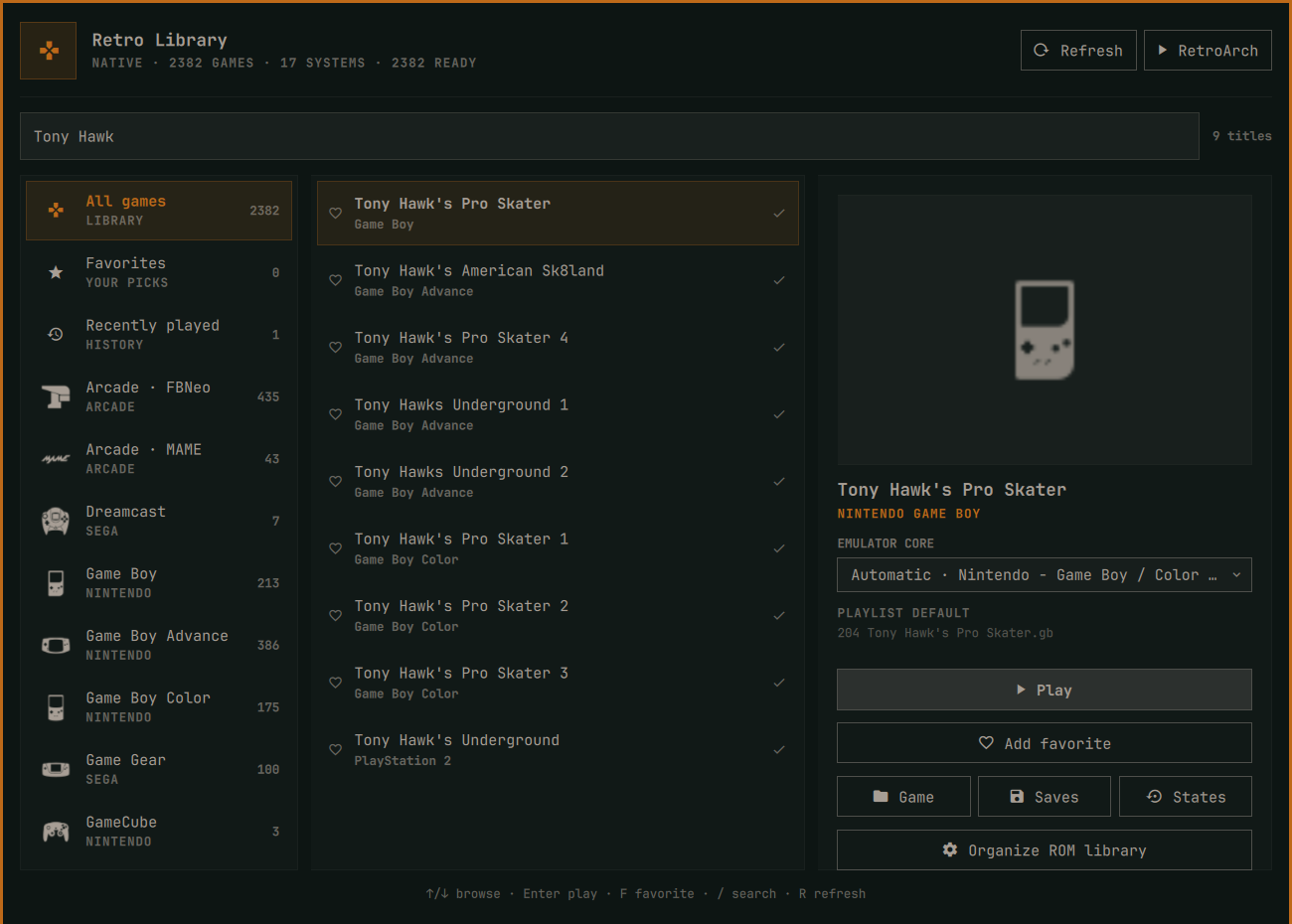
Retro Library is a local-first Omarchy Quattro bar plugin for browsing and launching an existing RetroArch collection. It reads RetroArch's playlists directly, groups titles by console, uses installed Ozone system icons and local box art, and launches each title with its configured core.
Features
- Console-sorted library with system-specific RetroArch icons
- Fast search across titles, systems, and cores
- Local box-art preview when RetroArch thumbnails are available
- Direct launch using the playlist's default core
- Per-game overrides limited to compatible installed cores
- Favorites and recently played views
- Shortcuts to the selected game's folder, saves, and save states
- Optional integration with
organizeromswhen that command is installed - Native-package, Flatpak, Snap-style, and custom/AppImage discovery
- No network requests, telemetry, ROM scanning, or playlist modification
RetroArch remains the source of truth. The plugin never moves ROMs, downloads cores, edits playlists, or changes RetroArch settings.
Requirements
- Omarchy Quattro
- RetroArch with at least one JSON
.lplplaylist - Python 3
xdg-openfor folder shortcuts
RetroArch itself, emulator cores, firmware/BIOS files, and game content are external dependencies and are not distributed with this plugin. Core and game compatibility remains the responsibility of the installed RetroArch/core setup.
Install
omarchy plugin add https://github.com/dlpwaters/omarchy-retro-library.git --enable
The widget defaults to the left bar section. Move it with the normal Omarchy bar command if desired:
omarchy bar move io.github.dlpwaters.retro-library --section left
Automatic discovery
Retro Library selects the configuration containing the most playlists from these standard locations:
$XDG_CONFIG_HOME/retroarch~/.var/app/org.libretro.RetroArch/config/retroarch(Flatpak)~/snap/retroarch/current/.config/retroarch
It then reads retroarch.cfg rather than assuming fixed locations for playlists, cores, core metadata, assets, thumbnails, saves, and save states.
Native RetroArch is launched from PATH. A detected Flatpak configuration uses flatpak run org.libretro.RetroArch. Playlist entries using DETECT, archive-member paths such as game.zip#rom.nes, and custom absolute content paths are supported.
For Flatpak installations, game folders must already be visible to RetroArch through its normal sandbox permissions. Retro Library never broadens Flatpak filesystem access on the user's behalf.
Custom installations
For an AppImage, portable build, or unusual configuration location, save an explicit override:
PLUGIN="$HOME/.config/omarchy/plugins/io.github.dlpwaters.retro-library/retro-library"

"$PLUGIN" configure \
  --config-dir "$HOME/Games/RetroArch/config" \
  --retroarch-command "$HOME/Applications/RetroArch.AppImage"
Clear overrides and return to automatic discovery:
"$PLUGIN" configure --clear
Inspect exactly what was detected:
"$PLUGIN" doctor | python3 -m json.tool
Environment variables are also available for non-persistent testing or advanced launchers:
RETRO_LIBRARY_CONFIG_DIRRETRO_LIBRARY_COMMANDRETRO_LIBRARY_CORE_DIRSRETRO_LIBRARY_INFO_DIRSRETRO_LIBRARY_ASSET_DIRS
Directory-list variables use the normal colon separator.
Controls
Left/Right: move between Systems and ROMsUp/Down: browse the active sectionEnter: move from Systems into ROMs, or launch the selected titleF: toggle favorite/: focus searchR: refresh playlistsEscape: clear search, then close
Local data and privacy
Favorites, recent history, core overrides, and optional discovery overrides are stored at:
${XDG_STATE_HOME:-~/.local/state}/retro-library/state.json
This file stays local. ROM filenames, playlists, thumbnails, save data, and usage history are never uploaded.
Remove
omarchy plugin remove io.github.dlpwaters.retro-library
Removal leaves RetroArch, ROMs, playlists, saves, and the plugin's small state file untouched. To remove that optional state later:
gio trash "${XDG_STATE_HOME:-$HOME/.local/state}/retro-library"
Validation
python3 -m unittest -v tests.test_retro_library
python3 -m py_compile retro_library.py
python3 -m json.tool manifest.json >/dev/null
qmllint -I "$OMARCHY_PATH/shell" BarWidget.qml Panel.qml
omarchy plugin validate .
Licensing
Retro Library's source is MIT licensed. At runtime it can display locally installed Ozone icons from the RetroArch assets project, which is licensed under CC BY 4.0. The plugin does not redistribute emulator cores, firmware, ROMs, box art, or RetroArch assets.