
Omarchy Stem Splitter
Remove selected parts from a song or split it into four high-quality stems directly from the Omarchy bar. Processing stays on your computer, and finished FLAC, WAV, or MP4 files are organized under ~/Desktop/stems/<track>/.
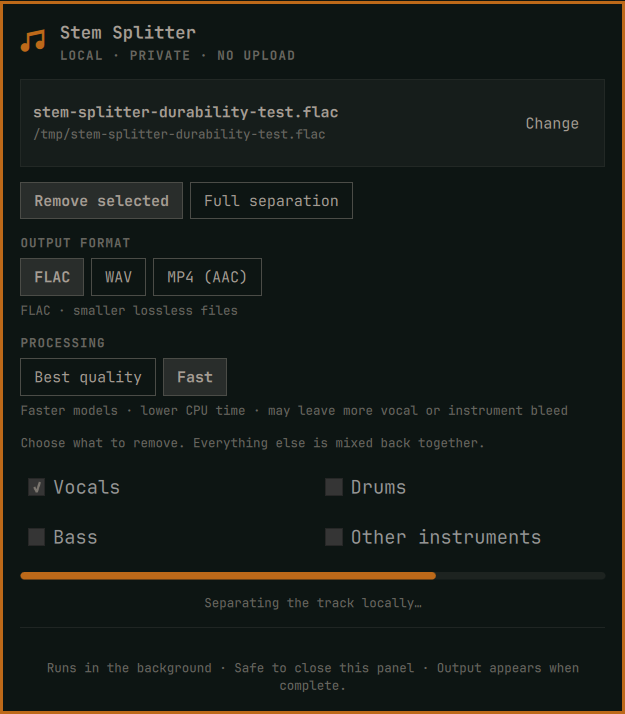
Stem Splitter uses Audio Separator with two processing profiles:
- Best quality uses BS-RoFormer for vocal-only removal and fine-tuned HTDemucs for four-stem work.
- Fast uses MDX-Net for vocal-only removal and standard HTDemucs for four-stem work. It cuts CPU time substantially at the cost of potentially more bleed.
Features
- Pick WAV, FLAC, MP3, M4A, OGG, AAC, WMA, or AIFF files from a native file dialog
- Remove vocals, drums, bass, other instruments, or any valid combination
- Preserve everything not selected by mixing the remaining stems back together
- Export each mix or stem as FLAC, 16-bit PCM WAV, or AAC audio in an MP4 container
- Save each result in its own non-overwriting Desktop subfolder
- Keep models and the pinned Python environment isolated from the system Python installation
- Continue in a transient user service when the panel closes or Omarchy Shell restarts
- Reconnect the panel to persisted, model-derived progress
- Cancel without publishing partial results
- No account, API key, upload, telemetry, permanent background service, or elevated permission
Requirements
Install these standard Arch packages before setup:
uv— creates the isolated, reviewed Python 3.12.13 environmentffmpeg— reads, validates, and combines audiozenity— native audio-file picker
The plugin never invokes a system package manager or asks for elevated permission. Its explicit Set up engine action creates an exact CPython 3.12.13 x86_64 environment and uses uv pip sync --require-hashes with the committed requirements.lock. That lock fixes every direct and transitive package version and accepted distribution SHA-256, including Audio Separator 0.44.5 and the matching CPU PyTorch stack. Wheels are mandatory except for diffq, whose upstream release has no Linux wheel; its hash-verified source distribution is built with the separately pinned and hashed build-requirements.lock. Setup fails closed if the Python build or complete installed package set differs from the reviewed locks.
Install
Review the source, install the required packages, then add and enable the plugin:
omarchy pkg add uv ffmpeg zenity
omarchy plugin add https://github.com/dlpwaters/omarchy-stem-splitter.git --enable
Click the music-stem icon and choose Set up engine. The setup is user-local and requires network access once to download hash-locked Python wheels. The first run of each separation model downloads its reviewed bundle into ~/.local/share/omarchy-stem-splitter/models. models.lock.json fixes the URL, byte size, and SHA-256 of every model, configuration, metadata file, and Demucs weight; no component is handed to Audio Separator until all checks pass.
Use
- Open Stem Splitter from the bar and choose an audio track.
- Select Remove selected and mark the parts to remove, or select Full separation.
- Choose FLAC, WAV, or MP4 (AAC) as the output format.
- Choose Best quality or Fast, then start processing. The panel can be closed while the job continues.
- Open the finished folder from the panel or browse
~/Desktop/stems.
The four standard stems are vocals, drums, bass, and other, where other contains the remaining instruments. Only one separation runs at a time, preventing duplicate jobs from competing for CPU and memory.
On the maintainer's 8-core/16-thread Ryzen AI 7 350, a warm Fast vocal-removal run processed a 40-second test track in 26 seconds. A typical 3–4 minute song should therefore take roughly 2–3 minutes in Fast mode on that machine, while Best quality generally takes about 15–18 minutes. Source format, model download, cooling, and mix complexity can change those times.
If a track folder already exists, Stem Splitter creates a numbered sibling such as Track-2 instead of overwriting files.
IPC
omarchy-shell io.github.dlpwaters.stem-splitter open
omarchy-shell io.github.dlpwaters.stem-splitter toggle
omarchy-shell io.github.dlpwaters.stem-splitter choose
omarchy-shell io.github.dlpwaters.stem-splitter process "/path/to/song.flac" remove "vocals,drums"
omarchy-shell io.github.dlpwaters.stem-splitter processAs "/path/to/song.flac" full "vocals" wav
omarchy-shell io.github.dlpwaters.stem-splitter processConfigured "/path/to/song.flac" remove "vocals" flac fast
The original process method exports FLAC with Best quality for backward compatibility. processAs adds the output format. processConfigured accepts flac, wav, or mp4, followed by best or fast.
Output
Removal mode produces one lossless file named for the removed parts, for example:
~/Desktop/stems/Track/mix-without-vocals.flac
~/Desktop/stems/Track-2/mix-without-vocals-drums.wav
~/Desktop/stems/Track-3/mix-without-drums.mp4
Full separation produces:
~/Desktop/stems/Track/
├── bass.wav
├── drums.wav
├── other.wav
├── vocals.wav
└── separation.json
separation.json records the engine, model, mode, output format, source filename, and creation time used for that result.
Format compatibility
- FLAC is lossless and compact. It is the default and is ideal for archiving or further processing in modern audio software.
- WAV uses uncompressed 16-bit PCM at 44.1 kHz for maximum compatibility with editors, samplers, DAWs, and older software.
- MP4 (AAC) uses 256 kbps AAC-LC at 44.1 kHz in a standard
.mp4container with fast-start metadata. It is compact and widely playable, but it is lossy.
Privacy, network, and permissions
Audio processing is entirely local. The plugin never uploads track contents or reads credentials. Network access occurs only when uv installs the reviewed hash-locked engine and when the plugin downloads a selected model bundle for the first time. The plugin performs model downloads itself, writes through a temporary file, enforces the reviewed byte size while streaming, verifies SHA-256, and atomically publishes the result before Audio Separator starts. A changed or corrupted upstream artifact is rejected.
Each separation runs in a collectable transient systemd --user unit named omarchy-stem-splitter-job.service. It exists only for the duration of a job, owns the complete worker process group, and allows safe cancellation even after the panel or shell closes.
Omarchy plugins run unsandboxed with the current user's permissions. This plugin limits its persistent writes to:
~/.local/share/omarchy-stem-splitter— isolated engine and models~/.cache/omarchy-stem-splitter— temporary job staging, removed after each job~/.local/state/omarchy-stem-splitter— job status, lock, and last engine error~/Desktop/stems— finished user output
The source models may have licenses or usage conditions separate from this plugin. Their reviewed upstream locations and hashes are recorded in models.lock.json; this repository does not redistribute model weights.
Update
omarchy plugin update io.github.dlpwaters.stem-splitter --yes
Remove
Remove the plugin checkout safely:
omarchy plugin remove io.github.dlpwaters.stem-splitter --yes
Cancel any active separation from the panel before removal. This stops the transient worker and discards its unpublished staging directory.
Removal intentionally preserves generated stems, downloaded models, and the isolated engine. If you also want to discard the engine and models, review the path and move it to Trash explicitly:
gio trash "$HOME/.local/share/omarchy-stem-splitter"
Generated files under ~/Desktop/stems are never deleted automatically.
Validate
./scripts/validate.sh
The validation script checks the manifest, compiles the Python helpers, runs unit tests, validates the Omarchy plugin when Omarchy is present, and runs qmllint against the installed shell when available.
Quality notes
Source separation is an estimate, not access to the original studio multitracks. Dense mixes, heavy limiting, reverb, and lossy source files can produce bleed or artifacts. Start with a lossless source whenever possible. Choose FLAC or WAV when the result will be edited again; MP4 adds AAC compression and is intended for convenient playback or sharing.
License
MIT. See LICENSE. Audio Separator is separately distributed under the MIT license.