
YT Downloader for Omarchy
A compact Omarchy Quattro bar plugin for downloading video, MP3 audio, or SRT transcripts with yt-dlp. Transcript language can be selected from a common-language dropdown or detected from the linked video.
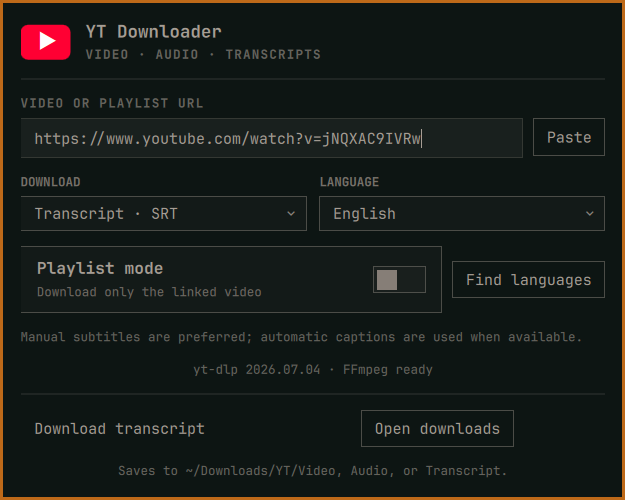
Everything runs locally with your installed yt-dlp and FFmpeg. There is no account, API key, background service, installer, or elevation step. Downloads are saved under ~/Downloads/YT using separate Video, Audio, and Transcript folders; playlist mode adds a playlist-title folder.
Features
- Video downloads target H.264/AVC video plus AAC audio in an MP4 container for broad compatibility across browsers, phones, TVs, editors, and media players.
- Audio downloads extract the best available audio and convert it to MP3.
- Transcript downloads save manual subtitles or automatic captions as SRT.
- A built-in language dropdown covers common languages.
- Find languages inspects the linked video and fills the dropdown with the exact manual and automatic transcript tracks it provides.
- Optional playlist mode preserves playlist order and title.
- Live progress, cancellation, clipboard paste, and one-click access to the download folder.
- Automatic one-time fallback to YouTube's embedded client when its default media URL returns HTTP 403.
- Safe argument-array process calls: URLs and titles are never evaluated by a shell.
Requirements
- Omarchy Quattro / Omarchy Shell 4 or newer
yt-dlp- FFmpeg
- Optional:
wl-clipboardfor the Paste button - Optional:
xdg-utilsfor Open downloads
On Omarchy/Arch Linux:
yay -S --needed yt-dlp ffmpeg wl-clipboard xdg-utils
No root access is requested by the plugin. Package installation is a separate user-controlled step.
Install
Review the repository, then install and enable it:
omarchy plugin add https://github.com/dlpwaters/omarchy-yt-downloader.git --enable --yes
The widget starts in the left section. Move it if desired:
omarchy bar move io.github.dlpwaters.yt-downloader --section center
Use
- Click the download arrow in the bar.
- Paste a video or playlist URL.
- Choose Video, Audio, or Transcript.
- For transcripts, select a common language or click Find languages to load the tracks available for that video.
- Enable playlist mode only when you want every item.
- Start the download.
Press Escape to close the panel. Stopping an active download leaves any .part file in place so yt-dlp can resume it later.
Update
omarchy plugin update io.github.dlpwaters.yt-downloader --yes
Remove
omarchy plugin remove io.github.dlpwaters.yt-downloader --yes
Removing the plugin does not delete anything under ~/Downloads/YT.
Validate
From the repository root:
omarchy plugin validate .
qmllint -I /usr/share/omarchy/shell BarWidget.qml Panel.qml
tests/test-yt-tool.sh
Privacy, network access, and responsibility
The plugin sends the URL only to the site selected by yt-dlp and downloads media directly to your computer. It stores no history or credentials. As with any yt-dlp interface, you are responsible for following the source site's terms and downloading only content you have permission to use.
Omarchy plugins run unsandboxed with the current user's permissions. Review the source before installation.
License
MIT. See LICENSE.