
Omarchy Market (io.github.dpr.omarchy-market) v1.2.1
A production-quality, native financial market data ticker and compact terminal plugin for Omarchy Quattro.
Features
- Dynamic Watchlist & Market Catalog:
- Add, remove, and reorder up to 20 crypto & stock markets.
- Curated US equity coverage (e.g.
AAPL,MSFT,NVDA,AMZN,GOOGL,META,TSLA,AVGO,AMD, etc.). - Dynamic Stock Search: Search and add arbitrary stocks and ETFs beyond the static catalog via unauthenticated Yahoo Finance search with clean, isolated persistence.
- Integrated search engine with alias resolution (e.g.
apple→AAPL,nvidia→NVDA,dogecoin→DOGE,bitcoin→BTC,ether→ETH). - Locally persisted via Qt
Settingswith automatic migration and schema versioning. - Horizontally scrollable asset tab bar with reactive gradient edge-fade scroll affordances that indicate available scrollable content.
- Native Quattro Watchlist Manager:
- Dedicated
⚙settings control adjacent to asset tabs. - Live search dropdown with instant
+ Addaction for catalog and remote stock search results with asset class tags (STOCK/CRYPTO). - Active watchlist list with
↑/↓reordering and✕deletion.
- Dedicated
- Live Streaming Multi-Provider Feeds:
- Yahoo Finance: Direct HTTP Chart API integration with strict rate-limiting serialization and session handling (Regular, Pre-Market, Post-Market, Closed).
- Binance: Public spot ticker WebSocket streams & REST klines with dynamic subscriptions.
- Coinbase: Advanced Trade public ticker WebSocket feeds with dynamic IPC channel subscriptions. Unsupported historical candle granularities (4H, 1W) are cleanly blocked at provider entry.
- Hyperliquid: Real-time mid prices & market contexts (native DEX home of
HYPE).
- Distinct Instrument & Pricing Engine:
- Distinguishes spot markets (
BTC/USDT,BTC/USD), equities (AAPL,NVDA), and perpetuals (HYPE,BTC-PERP). - Calculates Reference Spot Price across active spot feeds without cross-market distortion.
- Routes equities to Yahoo and DEX-native tokens directly to their native feeds.
- Deterministic Historical Candle Routing: Centralized historical provider resolution (Spot Crypto -> Binance with Hyperliquid fallback; Perps -> Hyperliquid; Equities -> Yahoo) avoiding multi-provider data races and payload collisions.
- Distinguishes spot markets (
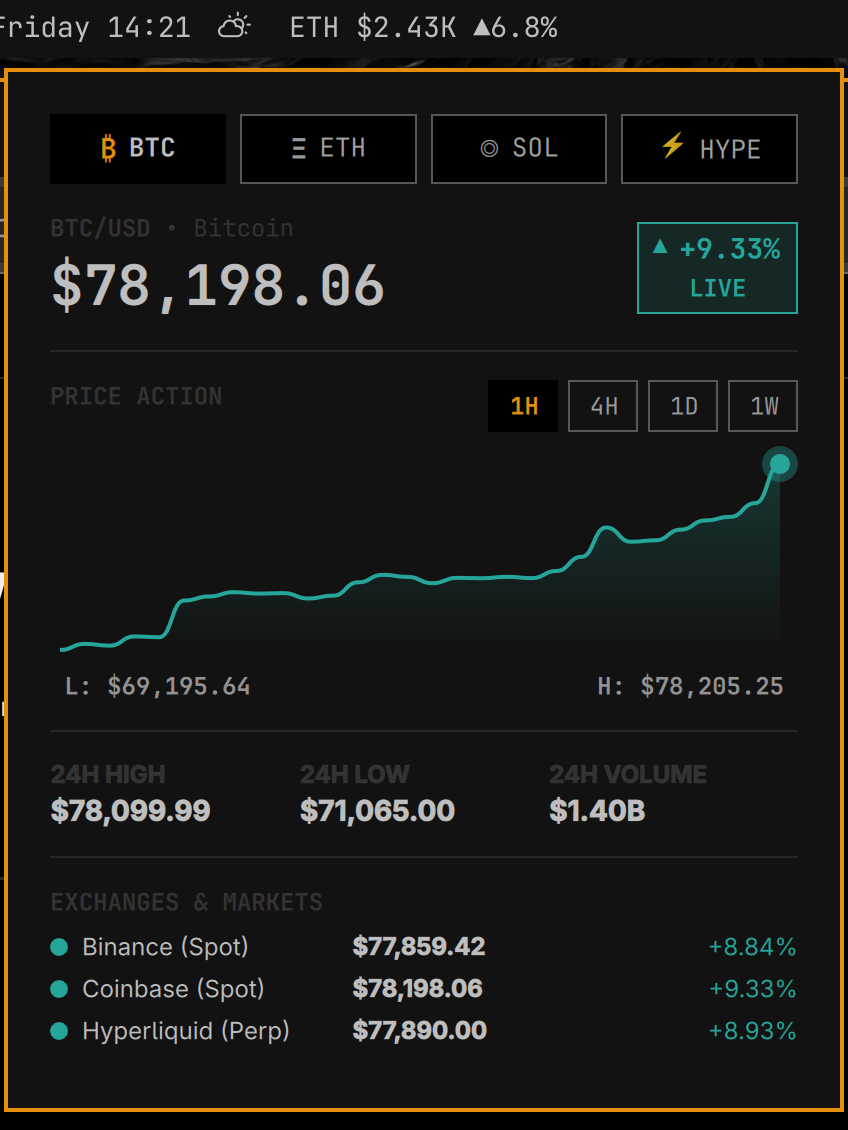
- Compact Market Terminal Panel:
- Large price display with color-coded 24h change & freshness indicator (
LIVE,STALE,OFFLINE). - 24h High, Low, and USD Volume statistics.
- Multi-exchange comparison table showing live prices across Yahoo Finance (for stocks) or Binance, Coinbase, and Hyperliquid (for crypto).
- Native QML Canvas sparkline chart with timeframe selectors (
1H,4H,1D,1W). - Native Chart Hover Inspection: Crosshair hairline, highlighted data point glow, and formatted date/time and price badge without external charting libraries.
- Subdued baseline loading state eliminating artificial 3-point synthetic lines on asset or timeframe switches.
- Single-click
+ Add to Watchlistaction on the asset header.
- Large price display with color-coded 24h change & freshness indicator (
- Zero Cost & Zero Daemon:
- $0 operating cost, zero API keys required, zero paid backends.
- No background daemons, no extra Quickshell processes, no systemd units, no sudo needed.
- Resilient & Isolated:
- Single active HTTP request invariant for Yahoo with minimum 1200ms spacing and exponential backoff with jitter on HTTP 429/5xx.
- Dynamic subscription updates over
stdinwithout restarting unaffected feeds. - Automatic reconnection with exponential backoff and jitter.
- Independent provider failure isolation (one exchange going down does not disrupt the others or block watchlist editing).
- Clean process teardown on disable or shell reload with zero orphaned child processes.
Stock Market Data Notice: Stock market data is provided through Yahoo Finance's unofficial Chart API. Availability, rate limits, symbol coverage, delays, and endpoint behavior are controlled by Yahoo Finance and may change without notice.
Prerequisites & Dependencies
- Desktop Shell: Omarchy Quattro (
omarchy-shell/ Quickshell0.3.0+, Qt6.8+). - Runtime Transport:
node(Node.js v20+, v22+, or v26+ with native WHATWGWebSocketsupport, 0 npm packages required).
Installation
Method 1: Automatic via Omarchy CLI
omarchy plugin add https://github.com/DPRC137/omarchy-market.git --enable --yes
Method 2: Manual Installation
- Clone or symlink into your Omarchy plugins directory:
git clone https://github.com/DPRC137/omarchy-market.git ~/.config/omarchy/plugins/io.github.dpr.omarchy-market - Rescan and enable:
omarchy-shell shell rescanPlugins
omarchy plugin enable io.github.dpr.omarchy-market
Removal
Automatic via Omarchy CLI
omarchy plugin remove io.github.dpr.omarchy-market
Manual Removal
rm -rf ~/.config/omarchy/plugins/io.github.dpr.omarchy-market
omarchy-shell shell rescanPlugins
Usage & Controls
- Left-Click on the bar ticker: Opens / closes the compact Market Terminal popup.
- Middle-Click: Forces an immediate market data refresh across all providers.
- Right-Click: Cycles the active single-asset display in compact mode.
- Watchlist Settings (
⚙): Opens the native Watchlist Manager to search, add, reorder, and remove assets. - Keyboard in Terminal:
Tab/Shift+Tab: Switch between watchlist asset tabs.R: Refresh market data.Escape: Close Watchlist Manager / close terminal popup.
Configuration (shell.json)
Settings can be customized directly in ~/.config/omarchy/shell.json:
{
  "id": "io.github.dpr.omarchy-market",
  "multiAsset": false,
  "speed": 4000
}
multiAsset(boolean): Toggle between full multi-asset scrolling ticker and single-asset compact cycling mode.speed(number): Multi-asset cycling interval in milliseconds (default:4000).
Development & Testing
- Run the automated test suite:
./tests/run_tests.sh - Run fault-injection tests:
./tests/test_fault_injection.sh - Run live integration connectivity tests:
./scripts/live-test.sh - Monitor live resource usage:
./tests/measure_resources.sh