
Herdr Collie
An Omarchy bar widget for Collie, the mobile web UI for Herdr.
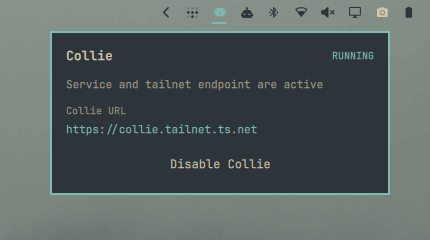
The widget shows whether both the Collie user service and its Tailscale Serve endpoint are active. Its panel displays the tailnet URL and can enable or disable both components together.
Read this before enabling
Collie is remote shell access to this machine. It drives your Herdr panes, which means typing into your terminals. Enabling it from this widget publishes that surface to every device on your tailnet.
- This plugin only ever uses
tailscale serve, which is tailnet-only. It never enablestailscale funnel, so Collie is never exposed to the public internet. - How well that surface is protected is Collie's configuration, not this plugin's.
Collie only enforces a Tailscale identity check when
COLLIE_TRUSTED_USERis set, and nothing sets it for you. With it unset, any tailnet peer that can reach the host gets full read and write access to your terminals.
Set it before you enable the widget, in ~/.config/herdr/plugins/config/herdr.collie/.env:
COLLIE_TRUSTED_USER=you@example.com
Omarchy plugins run unsandboxed with your full user permissions. There is no plugin permission model, so installing this plugin is a decision to trust its code.
How enable and disable work
Both actions delegate to Collie's own collie-ctl.sh, which this plugin locates under
~/.config/herdr/plugins/github/herdr.collie-*/scripts/collie-ctl.sh.
That script is the only safe way to manage the tailnet front door:
- It refuses to publish over a
tailscale serveroot mount it does not own, so enabling Collie cannot silently unpublish another service. - On teardown it removes only the mapping it recorded as its own, rather than clearing the whole HTTPS listener.
- When upgrading from an older widget that created the Collie mapping directly, it first adopts a
matching Collie proxy through
collie-ctl.sh, then removes it through the same ownership check. - It refreshes
COLLIE_TAILSCALE_HOSTSon every start, so Collie's fail-closed Host allowlist stays correct after a tailnet address change.
If collie-ctl.sh is not present, enable and disable fail with an error instead of falling back to raw tailscale serve calls.
Note that enable and disable also control autostart at login, because collie-ctl.sh uses
systemctl --user enable --now and disable --now.
Requirements
- Omarchy with the Quattro shell plugin system
- Collie installed as the
herdr.collieHerdr plugin, including itscollie-ctl.sh - The
collie.servicesystemd user unit created by Collie - Tailscale with Serve enabled
- Bash, systemd, and
jq
Install
From GitHub:
omarchy plugin add https://github.com/dpulpeiro/omarchy-herdr-collie.git --enable
For local development:
git clone https://github.com/dpulpeiro/omarchy-herdr-collie.git
cd omarchy-herdr-collie
omarchy plugin validate .
omarchy plugin add "$PWD" --enable
Place it near the Tailscale widget:
omarchy bar move io.github.dpulpeiro.collie --after omarchy.tailscale
Usage
Click the Collie icon to open its panel. The icon is green when both the service and tailnet endpoint are active, urgent-colored when only one of the two is active, and dim otherwise. If the Tailscale daemon cannot be queried the panel reports an unknown state rather than claiming the endpoint is off.
Click the displayed tailnet URL to open Collie. Use the panel button to enable or disable the service and endpoint together.
The first enable after an update may take a while, because collie-ctl.sh builds Collie's web bundle before starting.
Configuration
The widget reads Collie's port from COLLIE_PORT in
~/.config/herdr/plugins/config/herdr.collie/.env, falling back to 8787.
To override it for the widget alone, export COLLIE_PORT in the Omarchy shell environment before loading the plugin.
Validate
omarchy plugin validate .
qmllint -I /usr/share/omarchy/shell BarWidget.qml Panel.qml
bash -n scripts/collie-control
Remove
omarchy plugin remove io.github.dpulpeiro.collie
Removing this widget does not stop or uninstall Collie.
License
MIT