
Omastatus
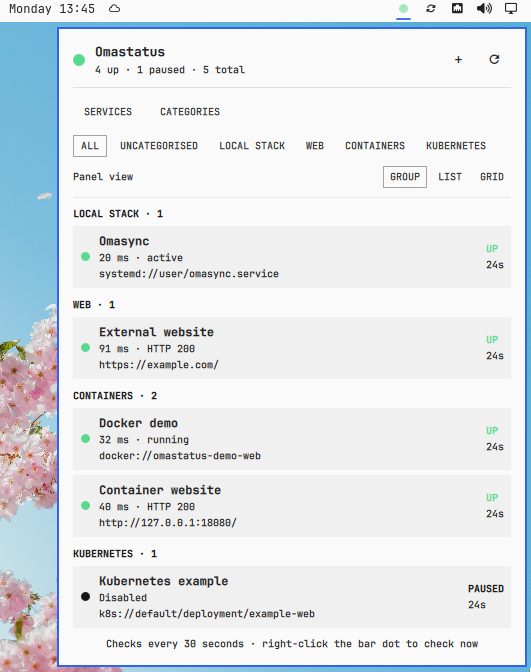
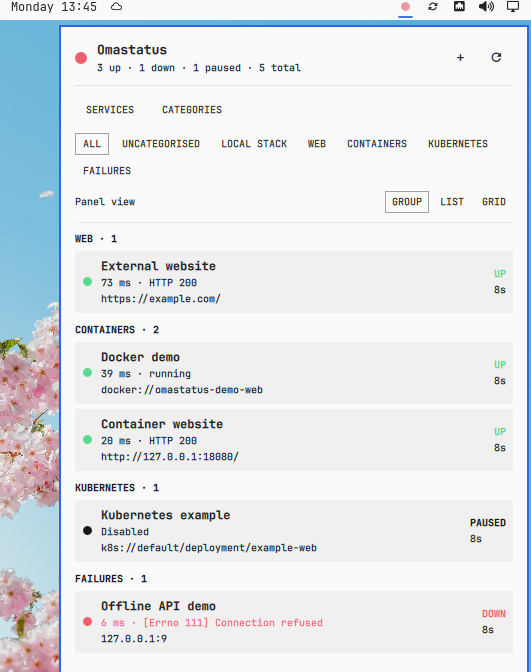
Omastatus is an independent Omarchy Quattro plugin for watching local and remote services from the bar. A small dot shows the aggregate state: green when every enabled service is up, red as soon as one is down, amber while a check is running or unstable, and grey before anything is configured.
Click the dot to open a native panel with a status dot beside every service.
Features
- Add, pause, categorise, recategorise, and remove services entirely from the panel.
- Automatic target detection, plus explicit HTTP, TCP, ping, systemd, Docker, and Kubernetes modes.
- Concurrent checks, so ten timeouts do not block one after another.
- Categories with an All/Uncategorised filter.
- Three persistent panel layouts: grouped detail, compact list, and two-column grid.
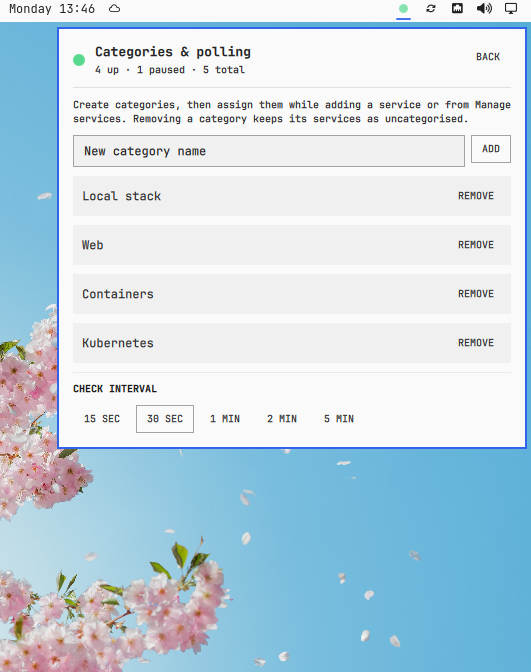
- Configurable 15-second to 5-minute polling from the panel; the CLI accepts 5 seconds to 1 hour.
- Desktop notifications on a transition to down and on recovery.
- Private, atomic configuration and state files; no cloud account or monitoring server.
Supported targets
| What | Examples | Check performed |
|---|---|---|
| Website or API | https://example.com/health |
HTTP 2xx/3xx response |
| Local service | localhost:3000, tcp://127.0.0.1:6379 |
TCP connection |
| Database | postgres://db.local, mysql://localhost:3306, redis://localhost, mongodb://db.local |
TCP connection, with the standard port when omitted |
| Machine | server.local, ping://192.168.1.20 |
One ICMP ping |
| System service | nginx.service, systemd://docker.service |
System systemctl is-active |
| User service | systemd://user/my-worker.service |
User systemctl --user is-active |
| Docker container | docker://api, or api with Docker mode selected |
Container is running and not unhealthy |
| Kubernetes pod | k8s://default/pod/api-7c9f |
Pod phase and container readiness |
| Kubernetes workload | k8s://production/deployment/api, k8s://default/statefulset/postgres, k8s://monitoring/daemonset/node-exporter |
Ready replicas/nodes versus desired count |
| Kubernetes job | k8s://default/job/database-migration |
Completed executions versus desired completions |
| Other Kubernetes resource | k8s://default/service/api |
Resource existence or its Ready/Available condition when exposed |
Database probes intentionally check reachability rather than authenticate. Omastatus rejects usernames and passwords in targets so credentials never land in its JSON configuration.
Docker checks use the local Docker CLI. Kubernetes checks use the current kubectl context and store only the namespace/kind/name reference; kubeconfig credentials remain managed by Kubernetes tooling.
Example monitors
The add screen includes Website, Docker, Kubernetes, PostgreSQL, and systemd presets that prefill the form without creating anything until Add service is pressed. A practical setup could contain:
| Category | Name | Target |
|---|---|---|
| Production | Public website | https://example.com/ |
| Production | API readiness | https://api.example.com/ready |
| Local dev | Frontend | http://localhost:3000 |
| Local dev | PostgreSQL | postgres://localhost |
| Containers | API container | docker://my-api |
| Kubernetes | API deployment | k8s://production/deployment/api |
| Kubernetes | Migration job | k8s://production/job/migrate-2026-08 |
| Machine | Omasync | systemd://user/omasync.service |
The equivalent CLI commands are:
OMASTATUS="$HOME/.config/omarchy/plugins/io.github.dupontbertrand.omastatus/bin/omastatus"

"$OMASTATUS" add --name "Public website" --target "https://example.com/"
"$OMASTATUS" add --name "API container" --target "docker://my-api"
"$OMASTATUS" add --name "API deployment" --target "k8s://production/deployment/api"
"$OMASTATUS" add --name PostgreSQL --target "postgres://localhost"
"$OMASTATUS" add --name Omasync --target "systemd://user/omasync.service"
Install
omarchy plugin add https://github.com/dupontbertrand/omastatus --enable --yes
For local development, link this checkout and rescan plugins:
ln -s "$PWD" "$HOME/.config/omarchy/plugins/io.github.dupontbertrand.omastatus"
omarchy-shell shell rescanPlugins
omarchy plugin enable io.github.dupontbertrand.omastatus --section right
The plugin creates these files on first load:
~/.config/omastatus/config.json
~/.local/state/omastatus/status.json
Both files and their parent directories are user-only. Checks run directly from the Omarchy machine. No target or result is sent anywhere else.
Panel
Use + to add a service. Auto is suitable for most targets; choosing a type explicitly gives stricter validation.
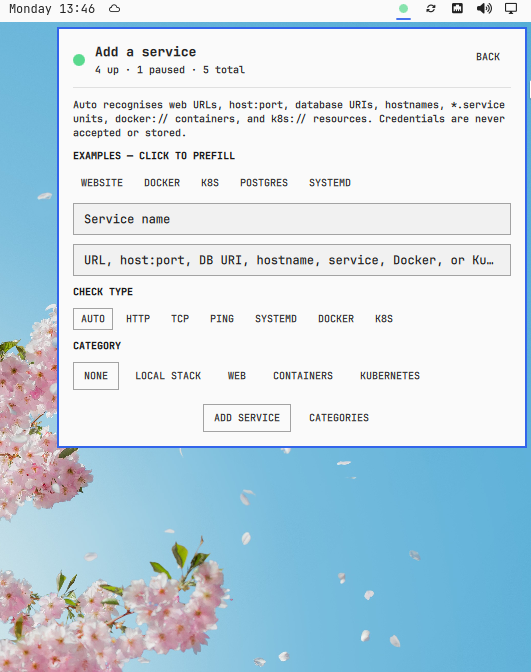
The dashboard offers:
- category filters;
- grouped, list, and grid views;
- immediate refresh;
- a service manager for pause, category cycling, and two-step removal;
- category creation/removal and polling presets.
Services can be created entirely from the panel. Presets fill in common Website, Docker, Kubernetes, PostgreSQL, and systemd targets, while the Auto mode recognises supported target formats.
Categories and the polling interval are managed in the same panel.
Right-click or middle-click the bar dot to check every service without opening the panel.
CLI
The UI invokes the plugin-local CLI; it is also useful for diagnostics:
OMASTATUS="$HOME/.config/omarchy/plugins/io.github.dupontbertrand.omastatus/bin/omastatus"

"$OMASTATUS" config
"$OMASTATUS" status
"$OMASTATUS" check
"$OMASTATUS" add --name PostgreSQL --target localhost:5432 --type tcp
"$OMASTATUS" add-category "Local dev"
"$OMASTATUS" --help
Set OMASTATUS_CONFIG_DIR and OMASTATUS_STATE_DIR to override the storage paths, notably in tests.
Dependencies and security
Omastatus uses Python 3 and standard Omarchy/Arch tools: ping, systemctl, and omarchy-notification-send. HTTP and TCP checks use Python's standard library. Docker and Kubernetes checks are optional and activate when their respective docker and kubectl CLIs are installed.
The checker never invokes a shell with a target. Ping hosts, systemd units, Docker container names, and Kubernetes resource references are validated and passed as separate process arguments. HTTP URLs cannot contain credentials.
Resource use is bounded before untrusted local data is decoded: JSON configuration/state files must be regular files owned by the current user and are opened without following symlinks or waiting on special files. They are limited to 1 MiB, with at most 128 categories and 256 services. Output captured from ping, systemctl, docker, or kubectl is limited to 256 KiB in total per check; a command is stopped on overflow or timeout before its output is parsed.
Like every Omarchy plugin, its QML and local executable run unsandboxed, so inspect the source before enabling it.
Uninstall safely
Remove the plugin through Omarchy:
omarchy plugin remove io.github.dupontbertrand.omastatus
Omastatus installs no system service and makes no privileged system change. Removing the plugin stops its checks but deliberately keeps the service list and last known state, making a later reinstall non-destructive.
To also erase that local data, remove the two files Omastatus creates, then remove their empty directories:
rm -f "$HOME/.config/omastatus/config.json"
rm -f "$HOME/.local/state/omastatus/status.json"
rmdir --ignore-fail-on-non-empty "$HOME/.config/omastatus"
rmdir --ignore-fail-on-non-empty "$HOME/.local/state/omastatus"
Development
python3 -m unittest discover -s tests -v
python3 -m py_compile bin/omastatus
omarchy plugin validate .
The tests use temporary configuration/state directories and a local ephemeral HTTP server. They do not modify the user's Omastatus data.
MIT licensed.