
GitLab CI — Omarchy bar widget
Lists the merge requests that are yours with the state of the CI running on each, and fires a desktop notification the moment a pipeline finishes.
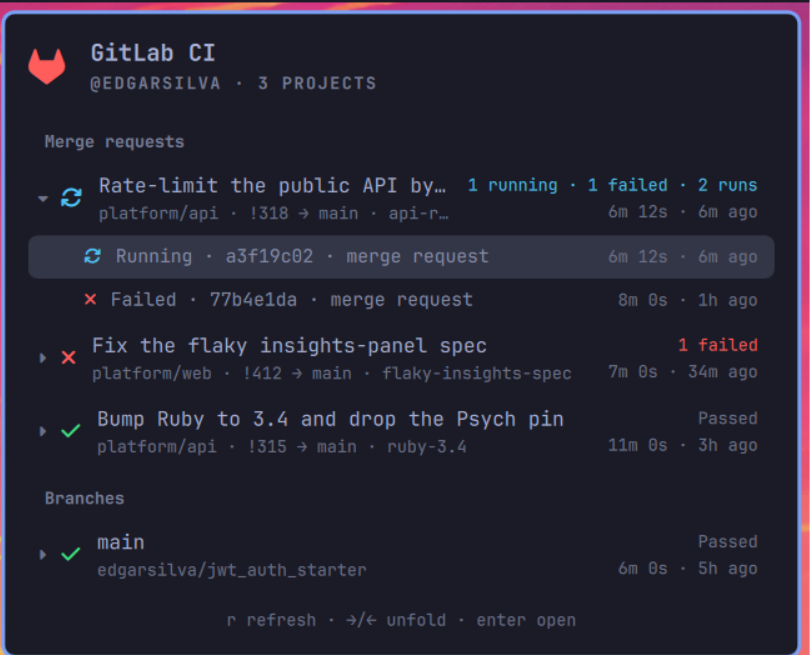
The bar mark takes the colour of the loudest pipeline — red failed beats blue running beats amber queued beats green passed — and glows while anything is running or broken. Nothing to report renders dim and stays out of the way.
Install
omarchy plugin add https://github.com/edgarsilva/omarchy-gitlab-ci.git --enable
Then give it a token (below) and omarchy restart shell.
Token
The widget needs a GitLab personal access token with the read_api scope.
Create one at https://<your-gitlab>/-/user_settings/personal_access_tokens.
Copy the token, then take it straight from the clipboard so it never lands in your shell history:
mkdir -p ~/.config/omarchy/gitlab-ci && chmod 700 ~/.config/omarchy/gitlab-ci
wl-paste -n > ~/.config/omarchy/gitlab-ci/token
chmod 600 ~/.config/omarchy/gitlab-ci/token
The token lives outside the plugin directory on purpose: that directory is
a git repo, and a token inside it is one git add . away from being published.
GITLAB_TOKEN in the environment takes precedence if you would rather keep it
elsewhere.
Check it before restarting the shell — the helper is runnable on its own and prints exactly what the widget sees:
python3 ~/.config/omarchy/plugins/io.github.edgarsilva.gitlab-ci/pipelines.py --limit 5
Usage
- Left click — open the panel. Right click — force a refresh.
- Each row is a merge request: its title, where it lives, and what its CI is
doing right now —
2 running,1 failed,Passed. Left click opens it; right or middle click copies its link instead. - The caret on the left unfolds the runs underneath it, newest first. Those rows work the same way, on the pipeline. A run that belongs to no merge request lands under Branches, where the row carries the pipeline link directly.
- In the panel:
j/kor arrows move,→unfolds a merge request and steps into its runs,←backs out and folds it again,enteropens whatever is selected andcorycopies its link,rrefreshes,esccloses. - The footer alternates between the key legend and the mouse legend, and stands in as the confirmation when a link is copied.
- A badge appears on the bar mark when more than one pipeline is in flight.
- Polling relaxes to
refreshIntervalSeconce everything settles and tightens toactiveRefreshIntervalSecwhile something is running.
Why copy and not open
With two browser profiles signed into different accounts — work and personal — a link is regularly wanted in the profile that is not about to receive it. The clipboard has no opinion about which window you meant, so right or middle click copies and you paste where you actually are.
Opening, on left click or enter, goes through xdg-open — the same path
every other link on the system takes, so it lands wherever your links normally
land: the browser puts the tab in the window it was last active in and raises
that one.
Not omarchy-launch-browser, which is what this widget used at first. It ends
by force-focusing the first Hyprland window whose class matches the browser —
first in window creation order, not the one you were last in. With several
Chrome windows open that pulls an arbitrary one to the front, and on a machine
with a work profile and a personal profile it is arbitrary in a way you notice
every time.
Copies go through wl-copy, which ships with Omarchy.
Why merge requests and not pipelines
A pipeline row can only tell you !19069 · Passed, which says nothing about
what was being built. The merge request title does, so the merge request is the
row and its pipelines hang underneath it.
Getting there takes two links. A pipeline started by GitLab's merge request
event runs on refs/merge-requests/<iid>/head and names its MR outright. A
pipeline started by a plain push names only the branch — so a branch with an
open merge request is matched to it by source branch, because that is how you
think of it anyway. Anything left over is grouped by branch instead.
Titles come free from the My merge requests source, which already fetched them. Under Triggered by me alone, the merge requests a pipeline points at but nothing else accounted for are fetched once each, in parallel.
Which pipelines count as yours
GitLab has no "all my pipelines" endpoint, so the list is built from two sources. Both are scoped to you, on different axes:
- Triggered by me — pipelines you started (
?username=<you>). Misses a pipeline a colleague started by pushing to your MR branch. - My merge requests — pipelines on merge requests you opened, whoever pushed. One global call finds those across every project, so this source needs no project discovery at all.
The scope setting picks between them. Both is the default and takes the union; pipeline ids are global, so the overlap dedupes cleanly.
Project discovery
Only the triggered source needs to know which projects to look at.
Leave projects empty to auto-discover. Recency comes from your activity
feed (/events) rather than from the project list, because
/projects?order_by=last_activity_at — the obvious query — answers with a
500 after ~15s on an account with many memberships, as does
order_by=updated_at. The feed is also the truer signal: a project you pushed
to today is where your pipelines are. The membership list, ordered by id
because that ordering is cheap and reliable, tops up the remainder to
maxProjects.
Set projects to a comma-separated list of paths (group/project, group/other) to skip discovery and watch exactly those.
Settings
Set per bar entry in ~/.config/omarchy/shell.json, or through the shell's
widget settings UI.
| Key | Default | Meaning |
|---|---|---|
host |
gitlab.com |
Hostname only, e.g. gitlab.example.com |
tokenFile |
~/.config/omarchy/gitlab-ci/token |
Where the token is read from |
projects |
(empty) | Comma-separated paths; empty auto-discovers |
scope |
Both |
Triggered by me, My merge requests, or Both |
notify |
true |
Toast when a pipeline finishes |
refreshIntervalSec |
60 |
Poll interval when idle |
activeRefreshIntervalSec |
20 |
Poll interval while something runs |
lookbackHours |
168 |
How far back a pipeline still counts |
maxProjects |
15 |
Projects scanned when auto-discovering |
limit |
15 |
Merge requests and branches shown in the panel |
Multi-monitor
One widget instance runs per monitor and they all poll. pipelines.py
serialises them through a locked state file at
~/.local/state/omarchy/gitlab-ci/state.json: the first caller through the
lock does the real refresh and records what just finished, and callers arriving
inside the cache window get that same answer with an empty finished list. So
GitLab is queried once per interval and each finished pipeline is announced
once, however many screens are attached.
That cache names projects, branches and commits from private projects, so it is
written 0600 inside a 0700 directory — created with those modes rather than
chmod'ed after the fact, and tightened on startup if an older install left them
looser. Nothing here is readable by another login on the machine.
Delete that file to reset what the widget considers already announced.
Durations
The pipeline list API returns no duration, so created_at → updated_at stands
in for one. That only holds for a pipeline that ran straight through — one that
sat queued, waited on a manual job, or was retried a day later produces a span
that is not runtime. Past four hours it is dropped rather than shown as a
duration it isn't.
Requirements
python3(standard library only — no pip packages)notify-sendfor the finish toastomarchy-launch-browserto open a pipeline
Development
The repo is the source of truth; the shell loads a plain copy from
~/.config/omarchy/plugins/<id>/. Sync and reload after an edit:
rsync -a --delete --exclude .git --exclude __pycache__ \
  ./ ~/.config/omarchy/plugins/io.github.edgarsilva.gitlab-ci/
omarchy restart shell
omarchy restart shell rather than a hot reload: edited plugin QML is often
still served from the old instance until the shell process restarts, and
omarchy-shell shell rescanPlugins will report a reload that did not visibly
happen.
Symlinking the plugin directory at the workspace does not work —
omarchy plugin validate refuses a plugin folder that is itself a symlink.
pipelines.py runs standalone, which is the fastest way to iterate on the
GitLab side without touching the shell at all:
python3 pipelines.py --scope both --limit 10 --lookback-hours 168
It prints pipelines — the flat list the bar colour is read off — alongside
groups, the merge-request rows the panel draws. The QML side does no grouping
of its own; the helper builds it because the helper is the side that knows the
titles.
Removal
omarchy plugin remove io.github.edgarsilva.gitlab-ci
rm -rf ~/.config/omarchy/gitlab-ci ~/.local/state/omarchy/gitlab-ci
The first command drops it from the bar and deletes the plugin; the second removes your token and the poll state. Revoke the token in GitLab too.
License
MIT — see LICENSE.