
Power Button — Omarchy bar widget
A power button for the bar. One click opens a session menu; every action is one keystroke away, and the three that lose unsaved work ask first.
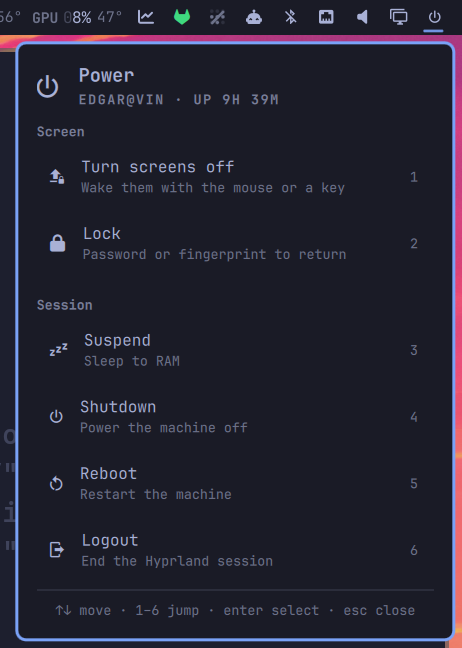
Every action runs Omarchy's own session script — omarchy-system-lock,
omarchy-system-shutdown, omarchy-system-reboot, omarchy-system-logout,
systemctl suspend — rather than reimplementing what they do. Whatever those
grow later, this widget inherits. Only Turn screens off has no Omarchy
equivalent, so it dispatches to Hyprland directly.
Install
omarchy plugin add https://github.com/edgarsilva/omarchy-power-button.git --enable
Then place it where you want it and restart the shell:
omarchy bar move io.github.edgarsilva.power-button --section right
omarchy restart shell
Nothing to configure — it finds the sleep states this machine actually supports on its own.
Usage
- Left click — opens the menu.
- Right click — runs one action straight away without opening the menu, and
without the confirmation prompt. Lock by default;
Nonedisables it. - Hover — names the right-click action, so a stray right click is never a surprise.
In the menu:
| Key | Does |
|---|---|
↑ ↓, j k |
Move the cursor |
1–9 |
Jump straight to that row and run it |
enter, space |
Run the highlighted action |
esc |
Close — or, with a prompt up, back out of the prompt to the menu |
tab |
Move to the next bar popup |
Numbering follows the rows actually on screen, so it stays dense whatever you
enable, and the footer names the range that exists rather than a fixed 1–9.
Why numbers and not letters
The shell's shared PanelKeyCatcher already claims h j k l for cursor
movement and x for delete before a panel sees them, which takes the natural
first letters of Lock and Shutdown off the table. Half-letter,
half-number accelerators would be worse than either, so the menu is numbered
throughout.
The actions
| Runs | Notes | |
|---|---|---|
| Turn screens off | hl.dsp.dpms |
See below — the only one with no omarchy-* script |
| Lock | omarchy-system-lock |
Locks the session, resets the keyboard layout, locks 1Password, stops the screensaver. It does not turn the displays off |
| Suspend | systemctl suspend |
Hidden while the suspend-off toggle is set |
| Hibernate | systemctl hibernate |
Only where omarchy-hibernation-available succeeds |
| Shutdown | omarchy-system-shutdown |
Confirms first |
| Reboot | omarchy-system-reboot |
Confirms first |
| Logout | omarchy-system-logout |
Confirms first |
Actions run detached, on purpose: Logout and Shutdown tear down the session the shell itself lives in, and a tracked subprocess would be killed mid-flight by the very thing it started.
Turning the screens off
Hyprland 0.56 moved its dispatchers to Lua. The hyprctl dispatch dpms off that
every Waybar and wlogout config still carries now exits 7 and does nothing at
all — silently, if you redirect stderr. The widget uses the current form and
falls back to the legacy one, the same chain omarchy-launch-screensaver uses:
hyprctl dispatch 'hl.dsp.dpms({ action = "disable" })' || hyprctl dispatch dpms off
The delay matters as much as the command. Omarchy's input.lua ships with
key_press_enables_dpms and mouse_move_enables_dpms set, so the mouse-button
release that follows your click — or any nudge of the mouse — wakes the displays
straight back up. Dispatching 400 ms late lets the release land first. Raise
screenOffDelayMs if your screens still wake instantly; set it to 0 to
dispatch immediately.
Check what actually happened with hyprctl monitors -j | jq '.[].dpmsStatus' —
false is off.
Suspend and Hibernate
Both rows are conditional, so the menu never offers a sleep state the machine cannot enter. Availability is re-probed on every open, so neither needs a shell restart after you change it.
- Suspend disappears while Omarchy's
suspend-offtoggle is set (omarchy toggle suspend), matching whatomarchy-menudoes. - Hibernate appears only where
omarchy-hibernation-availablesucceeds. It needs swap at least the size of RAM, whichomarchy-hibernation-setupconfigures — so it is there on a laptop set up for it and absent on a desktop that never was.
Suspend sleeps to RAM: instant resume, but it keeps drawing power and loses the session if the battery goes flat. Hibernate writes RAM out to swap and powers off completely: nothing is lost, resume is slower. Both are in the Actions setting too, so either can be hidden on a machine that does support it.
Confirmation
Shutdown, Reboot, and Logout ask before running. ← → or tab swap buttons,
enter commits, esc backs out to the menu rather than closing the panel — a
half-made decision should not need reopening.
confirm controls the rule: Never, Destructive actions (the default —
those three), or Every action. The right-click quick action never prompts,
whatever this is set to; that is the point of it.
Destructive rows only warm to the theme's urgent colour once the cursor is on them. A menu that is red at rest reads as an error state rather than as a consequence.
Settings
Set per bar entry in ~/.config/omarchy/shell.json, or through the shell's
widget settings UI. They apply on save.
{
  "id": "io.github.edgarsilva.power-button",
  "confirm": "Every action",
  "rightClickAction": "None",
  "showDescriptions": false
}
| Key | Default | Meaning |
|---|---|---|
items |
(all) | Which actions the menu offers, by label. Empty means all the ones this machine supports |
confirm |
Destructive actions |
Never, Destructive actions, or Every action |
rightClickAction |
Lock |
Runs on right click without the menu or a prompt. None disables it |
icon |
|
Nerd Font glyph shown in the bar |
showGroupHeaders |
true |
The Screen and Session headers |
showDescriptions |
true |
The second line under each action. Off gives a compact menu |
showNumbers |
true |
The number hint at the right of each row |
screenOffCommand |
(empty) | Override the DPMS command. Empty uses the built-in chain |
screenOffDelayMs |
400 |
Delay before dispatching it, 0–5000 |
Colours are not configurable on purpose. Rows draw in the theme's foreground and destructive ones mix toward its urgent colour, so the menu stays coherent across every Omarchy theme.
IPC
The command table the panel renders is scriptable, so a Hyprland bind can reuse
it instead of duplicating the commands in bindings.conf:
omarchy-shell io.github.edgarsilva.power-button toggle      # open/close the menu
omarchy-shell io.github.edgarsilva.power-button list        # ids of the enabled actions
omarchy-shell io.github.edgarsilva.power-button run lock    # run one, no menu, no prompt
run takes any id list prints: screens-off, lock, suspend,
hibernate, shutdown, reboot, logout. It refuses an action this machine
does not support rather than failing silently, and it answers ok when it
starts one.
o.bind("SUPER + CTRL + ALT + P", "Power menu",
  "omarchy-shell io.github.edgarsilva.power-button toggle")
Requirements
- A Nerd Font for the glyphs, which Omarchy already ships
- Omarchy's
omarchy-system-*scripts, which it also already ships hyprctl, for Turn screens off only
No pip packages, no daemon, no elevated privileges. The widget writes nothing:
it reads /proc/uptime, asks two omarchy-* helpers what this machine
supports, and shells out only when you pick something.
Development
The repo is the source of truth; the shell loads a plain copy from
~/.config/omarchy/plugins/<id>/. Sync and reload after an edit:
rsync -a --delete --exclude .git ./ ~/.config/omarchy/plugins/io.github.edgarsilva.power-button/
omarchy restart shell
omarchy restart shell rather than a hot reload: edited plugin QML is often
still served from the old instance until the shell process restarts, and
omarchy-shell shell rescanPlugins will report a reload that did not visibly
happen.
Symlinking the plugin directory at the workspace does not work —
omarchy plugin validate refuses a plugin folder that is itself a symlink.
Validate before publishing:
omarchy plugin validate .
mkdir -p /tmp/qsimports/qs
ln -s /usr/share/omarchy/shell/Ui /tmp/qsimports/qs/Ui
ln -s /usr/share/omarchy/shell/Commons /tmp/qsimports/qs/Commons
qmllint -I /tmp/qsimports -I /usr/lib/qt6/qml Panel.qml Service.qml
That reports no errors. The remaining warnings are unqualified for root.
read inside a Component delegate, missing-property for Style.* and bar.*
through their QtObjects, and one signal-handler-parameters for
Process.onExited — all artifacts of how qmllint resolves component scopes and
Quickshell's types, and the shell's own widgets produce the same class.
The capability probe runs standalone, which is the fastest way to see what the widget will offer on a given machine:
omarchy-hibernation-available && echo "hibernate available"
omarchy-toggle-enabled suspend-off && echo "suspend hidden"
Testing the keyboard path needs the open, the key, and the screenshot in one command — the panel dismisses itself between separate invocations, which makes a split test read as a failure that never happened:
omarchy-shell io.github.edgarsilva.power-button open; sleep 1; wtype "1"
Removal
omarchy plugin remove io.github.edgarsilva.power-button
That drops it from the bar and deletes the plugin. It keeps no state and writes no files of its own, so there is nothing else to clean up.
License
MIT — see LICENSE.