
Web App Manager
An Omarchy bar plugin for discovering, launching, installing, and removing user-owned web-app launchers.
Preview
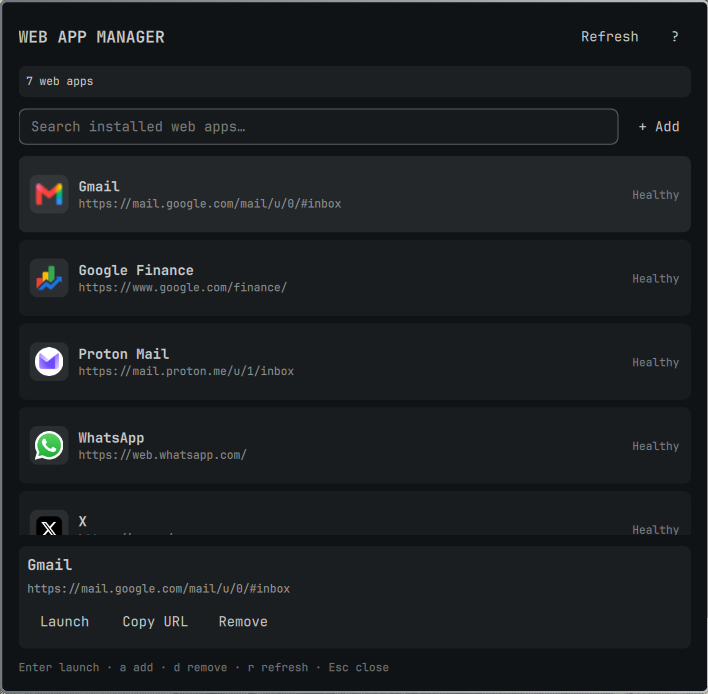
Status
This is the first implementation pass. It supports the core workflow:
- Scan Omarchy web-app desktop entries in the user application directory.
- Search and launch an installed web app.
- Install a new web app through
omarchy webapp install. - Move a selected launcher to the user trash for reversible removal.
- Report invalid URLs, missing icons, and protocol handlers.
- Show each installed app's local icon from Omarchy's user icon store, with a system-theme fallback and a letter fallback when no icon can be resolved.
The plugin accepts only exact omarchy-launch-webapp <http(s)-url> and omarchy-webapp-handler-<name> %u command templates. It never executes an arbitrary desktop-file Exec= command and does not expose MIME-type editing.
Security boundaries
Desktop-entry scanning uses Omarchy's Perl dependency with core modules to open each candidate once using O_NOFOLLOW|O_NONBLOCK, verify a user-owned regular-file descriptor, and enforce bounded file, field, and JSON-output sizes. Launching consumes the same strict parser result and invokes only trusted Omarchy executables, avoiding a second desktop-file open. Oversized, replaced, non-regular, or nonconforming entries are skipped safely.
Install for local development
Clone or copy this repository into the Omarchy user plugin directory:
mkdir -p ~/.config/omarchy/plugins
ln -sfn "$PWD" ~/.config/omarchy/plugins/io.github.ef-code.webapp-manager
Add the widget to the bar using the normal Omarchy plugin workflow, then reload the shell if needed:
omarchy-shell shell rescanPlugins
Icon handling
Omarchy's web-app installer stores downloaded or user-provided icons in the user hicolor application icon directory and records the icon basename in the desktop entry. The scanner reports a matching local PNG, SVG, or WebP path to the panel; the panel loads that path without downloading anything. If the installer was given a package-owned icon name instead, the active Omarchy icon theme is queried locally. Missing or unavailable icons fall back to a compact letter, so the list remains usable.
Native commands used
The plugin uses Omarchy's existing command surface for installation:
omarchy webapp install [name url icon-url-or-name]
omarchy-launch-webapp <url>
The helper scans only ${XDG_DATA_HOME:-$HOME/.local/share}/applications, refuses to mutate system desktop entries, and uses the freedesktop trash service for reversible removal.
Validation
omarchy plugin validate .
qmllint -I "${OMARCHY_PATH:-/usr/share/omarchy}/shell" \
  BarWidget.qml Panel.qml WebAppController.qml WebAppModel.js
bash -n scripts/webapp-managerctl
perl -c scripts/webapp-manager-scan.pl
shellcheck -S style scripts/webapp-managerctl tests/test-webapp-managerctl.sh
tests/test-webapp-managerctl.sh
scripts/webapp-managerctl scan | jq .
Roadmap
- Browser/profile selection using an allowlisted command template.
- Desktop-entry repair and backup history.
- MIME association management with an explicit warning.
- Import/export of web-app definitions.