
Fan Monitor
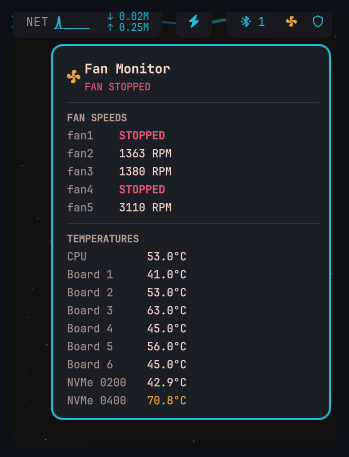
An Omarchy bar-widget plugin that shows a live fan-speed and temperature badge in your bar. Polls lm_sensors every 30 seconds; click opens a popup with per-fan RPM and per-chip temperatures (CPU package, board sensors, NVMe).
 (Fan icon, far right)
Features
- Live badge: normal color when cool, amber above 65°C, red above 80°C
- Badge color adapts to whichever bar it is installed on
- Popup with per-fan RPM — highlights stopped fans in red
- Popup with per-sensor temperatures (CPU, board, NVMe)
- Refreshes on popup open for instant feedback
- 30-second background polling
Supported chips
| Chip | Data shown |
|---|---|
it8689 / it87 |
Fan speeds (RPM) + board temperatures |
coretemp |
CPU package temperature |
nvme |
NVMe composite temperature |
Other chips reported by sensors -j are silently ignored. Open an issue if your chip isn't listed.
Requirements
- Omarchy with Quickshell
lm_sensors— install withpacman -S lm_sensors, then runsudo sensors-detect
Installation
omarchy plugin add https://github.com/elynch303/fan-monitor.git
Then add it to your bar layout in ~/.config/omarchy/shell.json:
{ "id": "io.github.elynch303.fan-monitor" }
License
MIT