
Omahub
← All plugins
E

Security Scan

by elynch303

Security badge for Omarchy bars. Runs AUR-Malware and bumblebee system scans on a 6-hour timer; each scanner is optional and only shown when installed. Click for live results and per-project one-shot scans.

Security review

Review recommended · 3 findings

Deterministic scan — not a security guarantee

Medium
Risk level
Medium
Analyzed commit
a378e22
Scanned
1 month ago
  • medium external_hosts SecurityWidget.qml:282

    Downloads or connects to an external HTTP(S) host.

    git clone https://github.com/Atomic-Arch/AUR-Malware.git \"$0\"",
  • Docs persistence README.md:49

    Bundles a systemd unit file.

    [Unit]
  • Docs persistence README.md:62

    Bundles a systemd unit file.

    [Unit]

Automated analysis only — not a security guarantee.

AI advisory review

No obvious issues detected

Language-model assessment · ~deepseek/deepseek-v4-flash-latest — advisory only

Low
AI risk level
Low
Recommendation
install
Model
~deepseek/deepseek-v4-flash-latest
Analyzed commit
a378e22
Reviewed
1 month ago

The plugin is a bar widget that displays security scan results and optionally runs user-installed scanners. The deterministic scan flagged a git clone in the QML and systemd units in the README, but these are documentation examples or user-initiated actions, not automatic execution. The install.sh script only copies a bundled script with user confirmation, and the widget only runs the scan script if the user has set it up.

  • The widget can execute a user-defined scan script (qs-security-scan.sh) and the bun-check one-shot script, but these are user-installed and user-triggered; no malicious behavior observed.
  • The README documents cloning AUR-Malware and setting up systemd timers, but these are optional and require explicit user action; not part of the plugin's automatic execution.
  • The install.sh script copies a bundled script to ~/.local/bin with user confirmation; it does not run any destructive commands.
How this check works

This review combines the deterministic scan (the rule-based results above) with an independent look at the plugin's code by a language model. The model reads a trimmed sample of the repository's files, the manifest, and the README, then gives a plain-language risk level and a recommendation: install (no notable danger), review (look closer first), or avoid (clearly dangerous).

It runs on the same analyzed commit as the deterministic scan and is strictly advisory — it is not a security guarantee and never blocks a plugin by itself. A human moderator still reviews plugins before they are listed.

AI advisory only — automated analysis, not a security guarantee.

Install
$ omarchy plugin add https://github.com/elynch303/security-scan --enable
Widgets #bar #system #security

Security Scan

An Omarchy bar-widget plugin that shows a live security badge in your bar. Runs system-wide scans on a 6-hour timer and lets you trigger manual re-scans or per-project one-shot scans from a click-through popup.
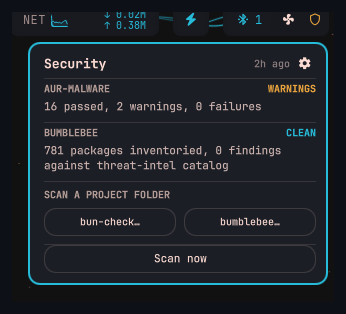
Security scan popup showing AUR-MALWARE and BUMBLEBEE results

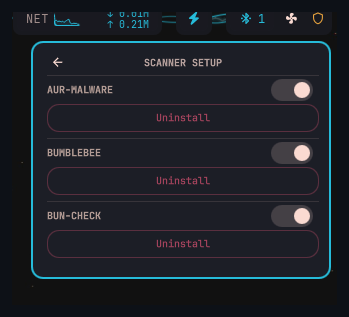
Scanner setup panel with install, uninstall, and toggle controls

Features

  • Live badge: green when clean, amber on warnings, red when compromised
  • Popup breakdown per scanner with last-scan timestamp
  • Manual "Scan now" button in popup
  • Per-project one-shot scan buttons (bun-check, bumblebee)
  • All three scanners are optional — sections only appear when the tool is installed

Scanners

Scanner What it checks How to install
AUR-Malware Atomic Arch IOC scan — pacman/AUR packages, npm/bun caches, eBPF rootkit artifacts, hidden processes Clone AUR-Malware to /local/applications/AUR-Malware/
bumblebee Endpoint package inventory across npm, pypi, go, rubygems, homebrew, etc. GOBIN=$HOME/.local/bin go install github.com/perplexityai/bumblebee@latest
bun-check Per-project dev-env one-shot scan (opens a terminal picker) Bundled — run install.sh after adding the plugin

The bun-check one-shot script (qs-bun-check-oneshot.sh) is included in this repo. After omarchy plugin add, run the optional install step:

bash ~/.config/omarchy/plugins/io.github.elynch303.security-scan/install.sh

This copies the script to ~/.local/bin/ (prompts to confirm). Pass --bun-check or --no-bun-check to skip the prompt.

Scanner paths can be overridden with environment variables:

QS_SEC_AUR_MALWARE=/path/to/check-atomic-arch_new.sh
QS_SEC_BUMBLEBEE=bumblebee
QS_SEC_BUMBLEBEE_CATALOG=~/.local/share/qs-security/threat-intel
QS_BUN_CHECK=/path/to/bun-checkV2.sh
QS_SEC_STATUS_FILE=~/.cache/qs-security-status.json

How it works

The widget reads ~/.cache/qs-security-status.json, written by ~/.local/bin/qs-security-scan.sh. Wire that script into a systemd timer to run every 6 hours:

# ~/.config/systemd/user/qs-security-scan.timer
[Unit]
Description=Periodic security scan for omarchy bar

[Timer]
OnBootSec=2min
OnUnitActiveSec=6h

[Install]
WantedBy=timers.target
# ~/.config/systemd/user/qs-security-scan.service
[Unit]
Description=Security scan for omarchy bar

[Service]
Type=oneshot
ExecStart=%h/.local/bin/qs-security-scan.sh
systemctl --user enable --now qs-security-scan.timer

Installation

omarchy plugin add https://github.com/elynch303/security-scan.git

Then add it to your bar layout in ~/.config/omarchy/shell.json:

{ "id": "io.github.elynch303.security-scan" }

Requirements

  • Omarchy with Quickshell
  • At least one of the three supported scanners (widget gracefully shows a setup notice if none are installed)

License

MIT