
T2 Fan Control for Omarchy
An Omarchy Shell bar widget for monitoring Apple T2 Mac thermals and editing
the existing t2fanrd fan curve.
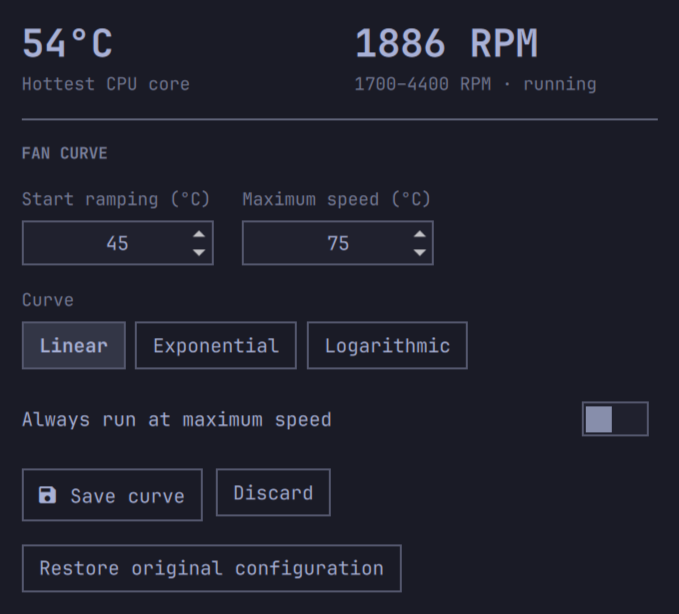
It displays the hottest CPU core and every fan exposed by applesmc. One-fan
Macs keep the compact hero view; two-fan models gain a small per-fan RPM list.
Requirements
- An Apple T2 Mac with the
applesmckernel driver t2fanrdinstalled and enabledpkexec/PolicyKit for authenticated configuration changes
The widget reads fan speed and temperatures without privilege. Saving a curve
uses a separately installed, root-owned helper and opens a graphical
administrator prompt. The helper validates all values, preserves the original
/etc/t2fand.conf, and restarts t2fanrd. If the restart fails, it restores
the previous configuration automatically.
Install
omarchy plugin add https://github.com/Endijs/omarchy-t2-fan-control.git
cd ~/.config/omarchy/plugins/io.github.endijs.t2-fan-control
sudo ./contrib/install-helper.sh
omarchy plugin enable io.github.endijs.t2-fan-control --section right
The second step installs the configuration helper at
/usr/local/libexec/omarchy-t2-fan-control and its PolicyKit action. Monitoring
works without this step, but saving and restoring fan curves remain disabled.
Plugin updates intentionally cannot replace this root-owned copy. After
updating the plugin, review the changes and rerun
sudo ./contrib/install-helper.sh to install the matching helper version.
For local development, place the repository at
~/.config/omarchy/plugins/io.github.endijs.t2-fan-control, then run:
omarchy plugin validate ~/.config/omarchy/plugins/io.github.endijs.t2-fan-control
omarchy-shell shell rescanPlugins
omarchy plugin enable io.github.endijs.t2-fan-control --section right
Fan curves
linear: even ramp between the low and high temperatureexponential: quieter initially, steeper near the high temperaturelogarithmic: stronger cooling earlier in the range
always_full_speed can be used continuously for maximum cooling, at the cost
of additional noise, power use, dust accumulation, and fan wear.
Remove
Before removing the plugin, open the widget and select Restore original
twice to confirm. After administrator authentication, the helper restores the
configuration captured before the plugin's first save and restarts t2fanrd.
Then remove the plugin:
cd ~/.config/omarchy/plugins/io.github.endijs.t2-fan-control
sudo ./contrib/install-helper.sh --uninstall
omarchy plugin remove io.github.endijs.t2-fan-control
Omarchy does not run plugin uninstall hooks, so removing the plugin without
restoring first leaves the current fan curve in place. If the plugin was
already removed, reinstall it and use Restore original before removing it
again. Remove the installed helper before deleting the plugin because Omarchy
does not run uninstall hooks. Removing the plugin never removes t2fanrd.
Security
The status path is unprivileged and reads only sysfs, /etc/t2fand.conf, and
the t2fanrd service state. Routine widget actions never execute the
user-writable plugin checkout as root. Saving invokes pkexec with the fixed,
root-owned helper at
/usr/local/libexec/omarchy-t2-fan-control, and its PolicyKit action pins that
exact path. Every configuration change therefore requires the desktop's normal
administrator prompt, while a plugin update cannot replace the privileged
executable.
The helper accepts only bounded integer temperatures, three known curve names,
and a boolean full-speed value. On the first save it stores an immutable
snapshot at /var/lib/omarchy-t2-fan-control/original-t2fand.conf; later saves
never replace that snapshot. A successful restore deletes the snapshot so it
cannot be reused after a later reinstall. Each save and restore also uses a
temporary rollback copy if t2fanrd fails to restart.
License
MIT