
Little Stereo
Little Stereo adds stereo reversal and balance controls to Omarchy's audio panel. Each output device keeps its own settings, so switching between speakers, headphones, and Bluetooth devices does not require setting them up again.
The name comes from the song Little Stereo by the Swedish band Teddybears.
Renaming outputs snuck in as well. It has nothing to do with stereo, but nobody
has ever looked at a list of speakers and thought ah yes, U32R59x, so that
itch got scratched too.
Main functionality
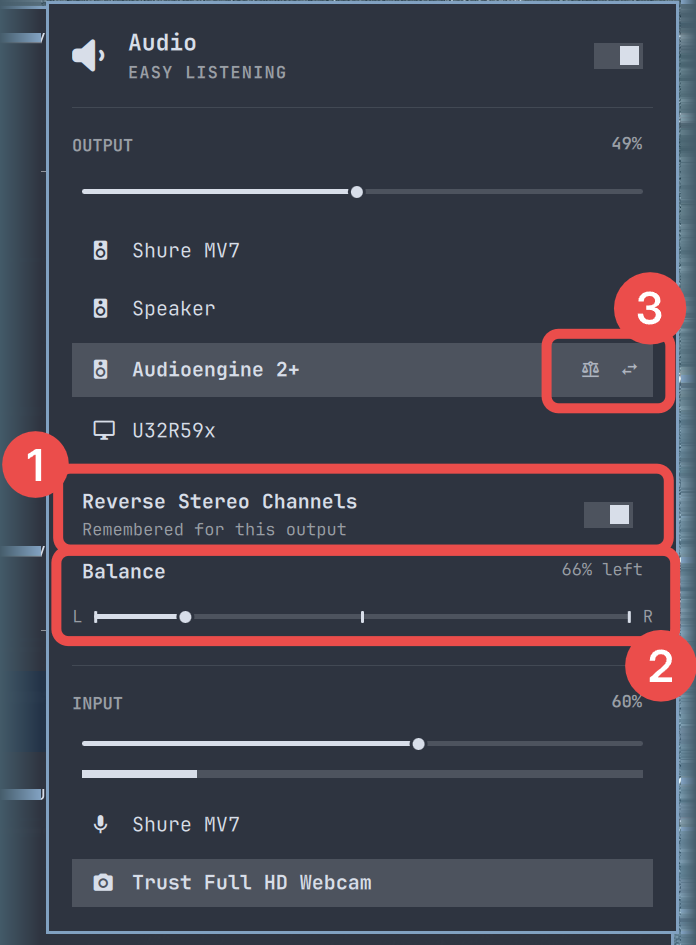
- Reverse stereo — Turn on Reverse Stereo Channels when your left and right speakers are physically arranged the other way around. It also works with Bluetooth outputs. Expect audio to cut out and the bar to disappear for a second or two while the change is applied; see How it works.
- Balance — Move the balance slider toward the audible left or right side. The selected master volume stays stable, including when stereo is reversed.
- Memory and status per output — Little Stereo remembers reversal and balance separately for every output device. Icons beside an output show its saved state at a glance: the swap arrows indicate reversed channels and the balance scales indicate an adjusted balance.
Select an output to view or change its settings. When you return to that device, Little Stereo restores them automatically.
Extra feature
Nothing to do with stereo, and no apology offered.
- Rename an output — Hover an output and a pen appears on the row. Click
it, or press
r, and the name becomes editable. Enter saves, Esc cancels, and submitting an empty field goes back to the name the device reports for itself. Names are capped at 24 characters, and an emoji counts as one of them, soU32R59xcan becomeSamsung Screen, orLoft 🎧if the mood takes you.
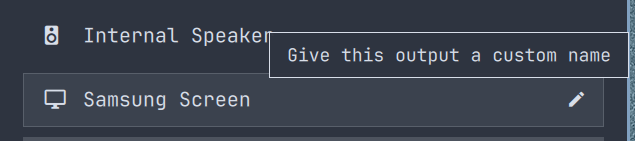
Hovering the name or the icon of a renamed output shows what it was originally called, so a screen full of nicknames can still be traced back to real hardware.
Names are remembered per output like everything else here, and the cleanup command below removes them along with the rest.
Install
omarchy plugin add https://github.com/erikabel/little-stereo --enable --yes
Little Stereo replaces the built-in audio widget rather than sitting beside it.
Enabling it takes over omarchy.audio's exact place in the bar, and disabling
or removing it puts the built-in back where it was, so there is nothing to
switch over by hand.
Remove
Reset Little Stereo's saved settings and generated WirePlumber configuration before removing the plugin:
~/.config/omarchy/plugins/io.github.erikabel.little-stereo/scripts/little-stereo cleanup
omarchy plugin remove io.github.erikabel.little-stereo
Balance is held in the output's own per-channel volumes, so cleanup levels every output it skewed back to centre before forgetting the settings that say it did — otherwise the imbalance would outlive the plugin that caused it. It then removes the generated WirePlumber rule and restarts WirePlumber and the Omarchy shell, so the built-in widget comes back on the normal audio path immediately.
Runtime requirements
Little Stereo runs inside the Omarchy shell with the logged-in user's
permissions. It uses four of Omarchy's own audio helpers
(omarchy-audio-output-sink, omarchy-audio-output-set-default,
omarchy-audio-input-set-default, and omarchy-audio-sink-availability),
PipeWire/PulseAudio's pactl, WirePlumber, and standard user-session tools
(systemctl --user, systemd-run --user, quickshell, and bluetoothctl
for Bluetooth outputs). It does not require sudo, root access, a separate
Quickshell process, or a remote installer. Stereo reversal restarts the user's
WirePlumber service and the Omarchy shell; cleanup removes only Little
Stereo's saved files and its generated WirePlumber rule.
Built and tested against Omarchy 4.0.1. Little Stereo is based on the
built-in audio panel and declares omarchy.clonedFrom in its manifest to take
that widget's place, so a shell release that reworks either one may need a
matching update here.
How it works
Settings are saved under ~/.config/omarchy/audio. Stereo reversal is applied
with a generated WirePlumber filter rule, upstream of the selected physical or
Bluetooth output. Balance uses per-channel PipeWire volume while preserving the
chosen master level.
Reversal is the one setting that cannot be applied in place. WirePlumber only reads that filter rule when it starts, so turning reversal on or off restarts WirePlumber, which tears down and rebuilds every audio node. The bar is stopped first and brought back afterwards, deliberately: a running shell has been seen to crash when the audio graph is replaced underneath it. Balance, volume and output switching all apply immediately and leave the bar alone.
This project is based on Omarchy's built-in Audio plugin and is distributed under the MIT License.